The Creator Settings page allows you to define which LinkedIn creators ConnectSafely should engage with and how automated engagement should be handled.
Accessing Creator Settings
Log in to your ConnectSafely dashboard, open the left sidebar, and click Creators Settings under Presence Booster.
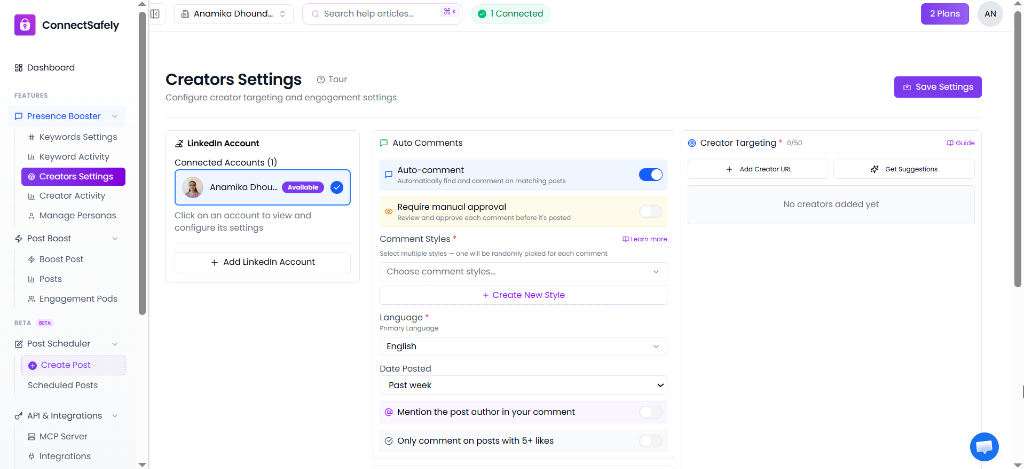
The ConnectSafely Creator Settings page showing LinkedIn account, Auto Comments, and Creator Targeting configuration.
1. LinkedIn Account Selection
Select the connected LinkedIn account you want to configure from the left panel. Each connected account has its own isolated creator list and auto-commenting options.
2. Auto Comments Configuration
The middle panel contains all rules for automated commenting on posts from targeted creators:
- Auto-comment Toggle: Turn auto-commenting on or off for this specific profile.
- Require Manual Approval: When enabled, comments generated for creator posts are held in a queue for your review before publishing.
- Comment Styles: Select one or more commenting styles. If multiple styles are chosen, one is randomly selected for each post.
- Language: Choose the primary language for generated comments (e.g., English).
- Date Posted: Choose how far back to look for new posts (e.g., Past week).
- Mention Post Author: Toggle to automatically tag the creator in the generated comment.
- Engagement Check: Toggle to only comment on posts that already have 5+ likes.
3. Creator Targeting
Add the specific LinkedIn creators you want to target (up to 50 creators):
- Add Creator URL: Paste the exact LinkedIn profile URN or URL of the thought leader or prospect.
- Get Suggestions: Discover relevant creators in your niche using the AI suggestion system.
- Targeting List: Displays all targeted profiles. ConnectSafely monitors these specific profiles and engages with their new posts according to your comment rules.