ConnectSafely + Make
Visually map every step of your go-to-market engine. The Make integration lets operators drag-and-drop ConnectSafely actions into complex, multi-channel flows.
How to Install

Automation
Make (Integromat)
Design visual automation scenarios that keep LinkedIn engagement perfectly choreographed.
Visual orchestration
Plan sophisticated automation paths without writing a single line of code.
Parallel processing
Branch and rejoin workflows to coordinate follow-up across teams and channels.
Operational guardrails
Pause, resume, and monitor outreach with scenario controls your ops team will love.
Make + ConnectSafely Templates
Ready-to-use workflow templates that combine Make with ConnectSafely for automated LinkedIn engagement.
 Make
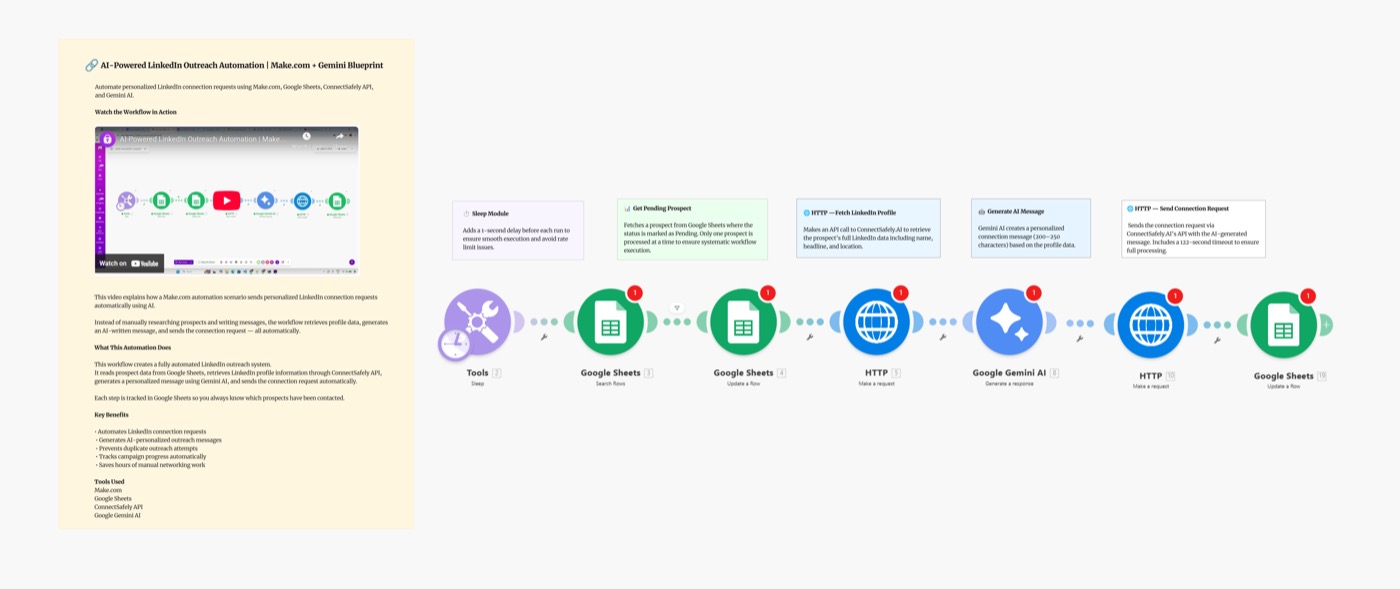
MakeAI-Powered LinkedIn Outreach: Make.com Scenario
Automate personalized LinkedIn outreach at scale with Make.com, Google Sheets, Gemini AI, and ConnectSafely.ai. Build a complete AI-powered lead gen scenario.



 Make
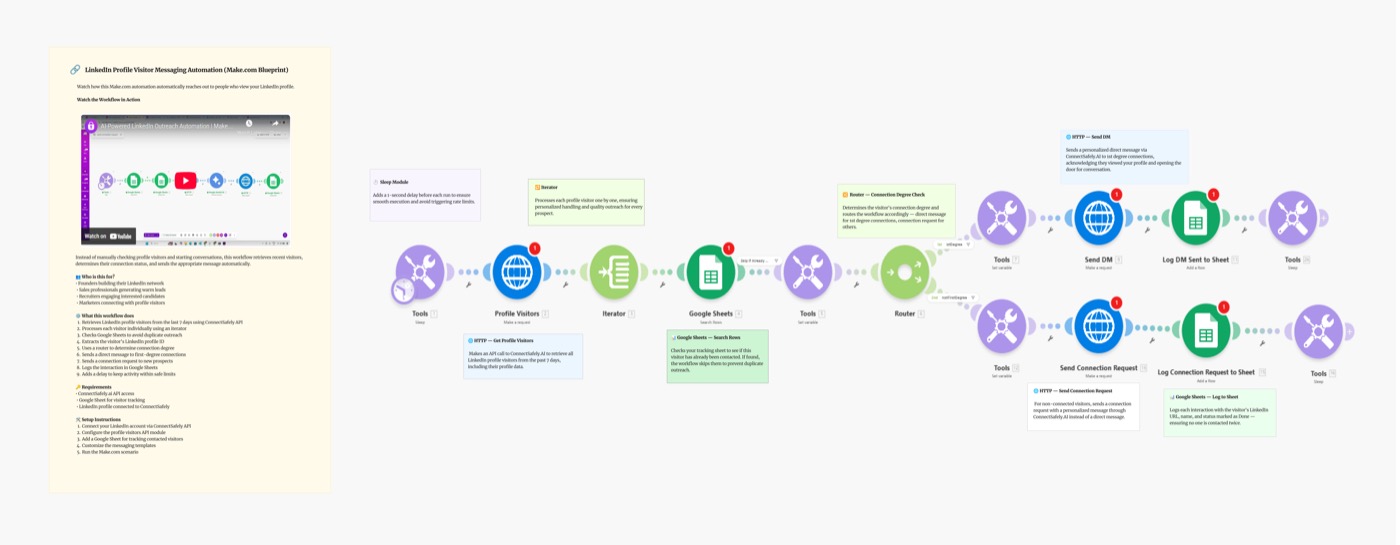
MakeAuto-Message LinkedIn Profile Visitors: Make.com Scenario
Stop letting LinkedIn profile visitors leave without a conversation. This Make.com scenario automatically messages everyone who views your LinkedIn profile.
 Make
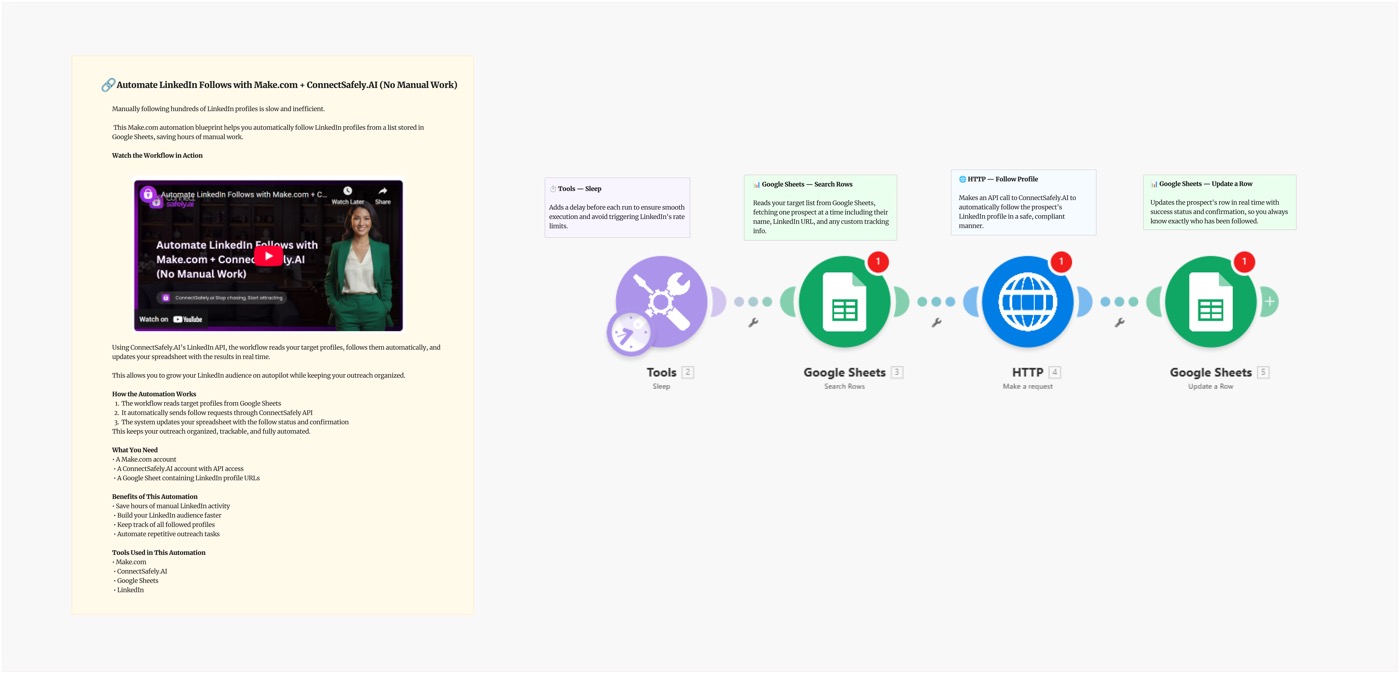
MakeAutomate LinkedIn Follows from Google Sheets: Make.com Scenario
Stop clicking the follow button one by one. This Make.com scenario reads your target list from Google Sheets and automatically follows each LinkedIn profile.
 Make
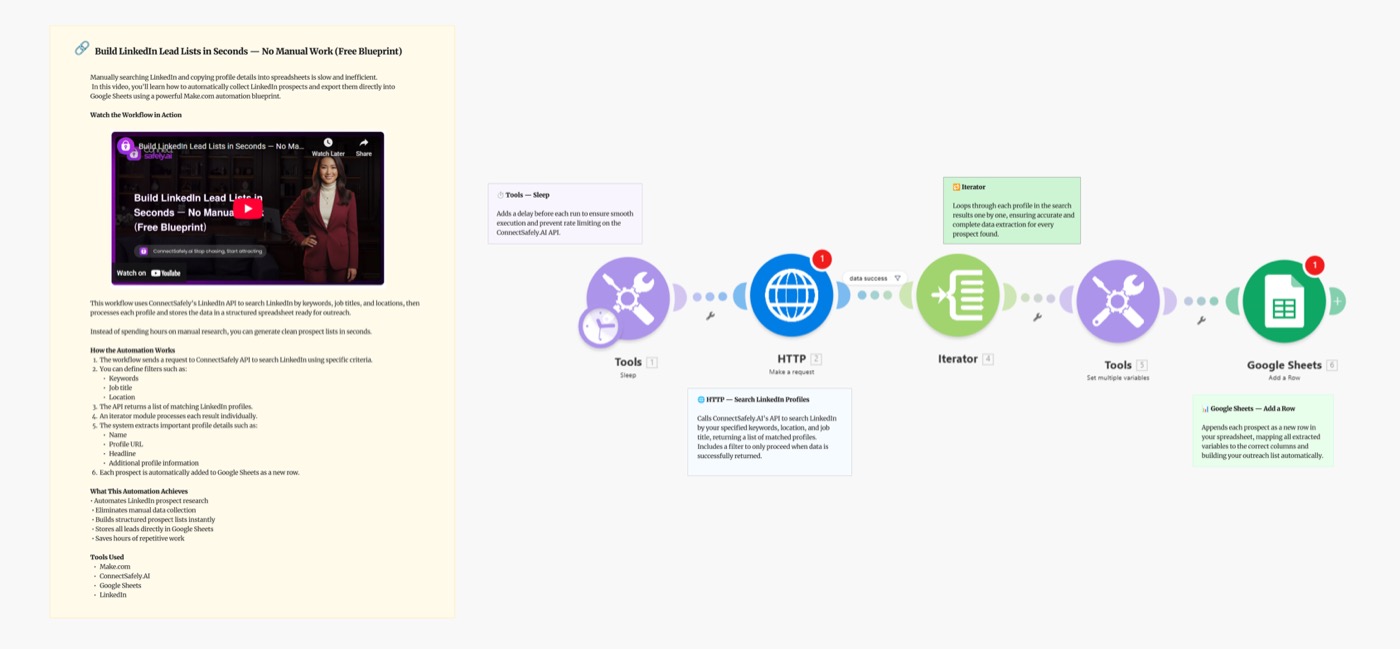
MakeBuild LinkedIn Lead Lists in Seconds with Google Sheets: Make.com Scenario
Stop manually searching LinkedIn and copying profiles into spreadsheets. This Make.com scenario automates it — search LinkedIn and save results to Sheets.
 Make
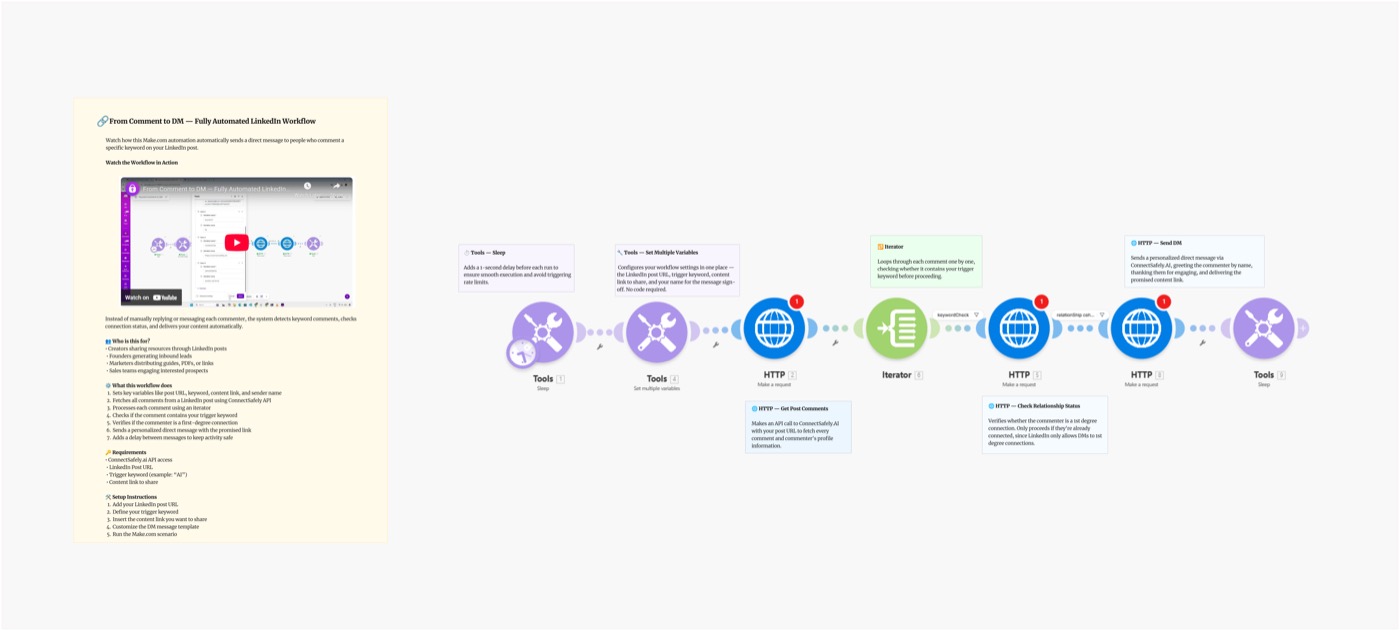
MakeFrom Comment to DM: Make.com Scenario
Post 'Comment AI and I'll send you the link' — then let Make.com handle every DM automatically. This scenario detects keyword comments and sends the resource.
 Make
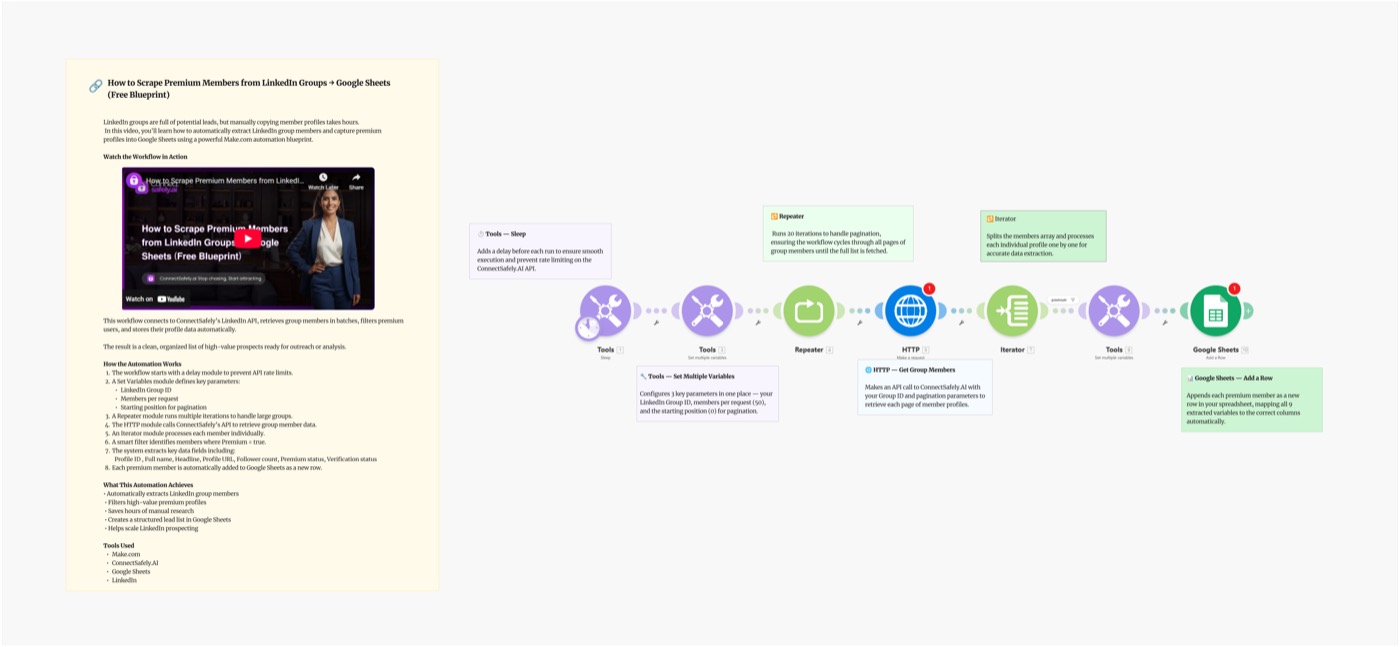
MakeScrape LinkedIn Group Members to Google Sheets: Make.com Scenario
Stop copying LinkedIn group member profiles one by one. This Make.com scenario automatically extracts premium members from Groups and saves them to Sheets.
 Make
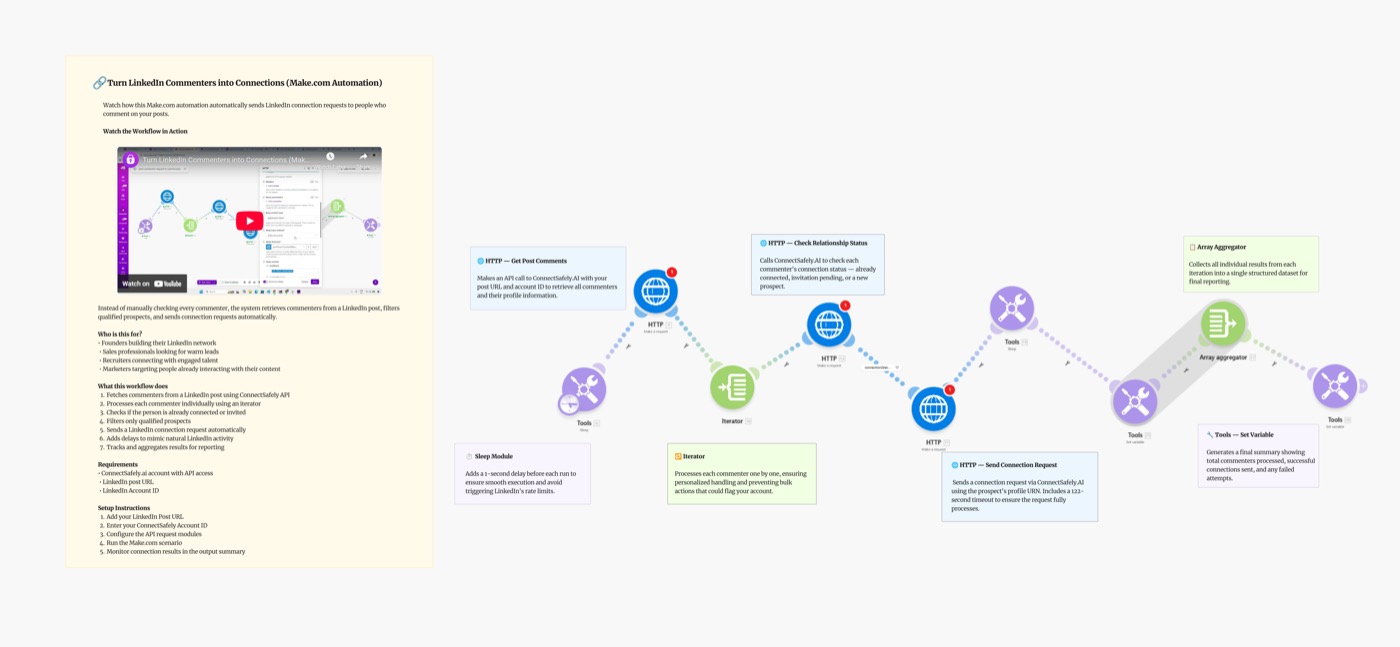
MakeTurn LinkedIn Commenters into Connections: Make.com Scenario
Automatically send LinkedIn connection requests to people who comment on posts. Stop manually following up — let Make.com and ConnectSafely do it for you.
 Make
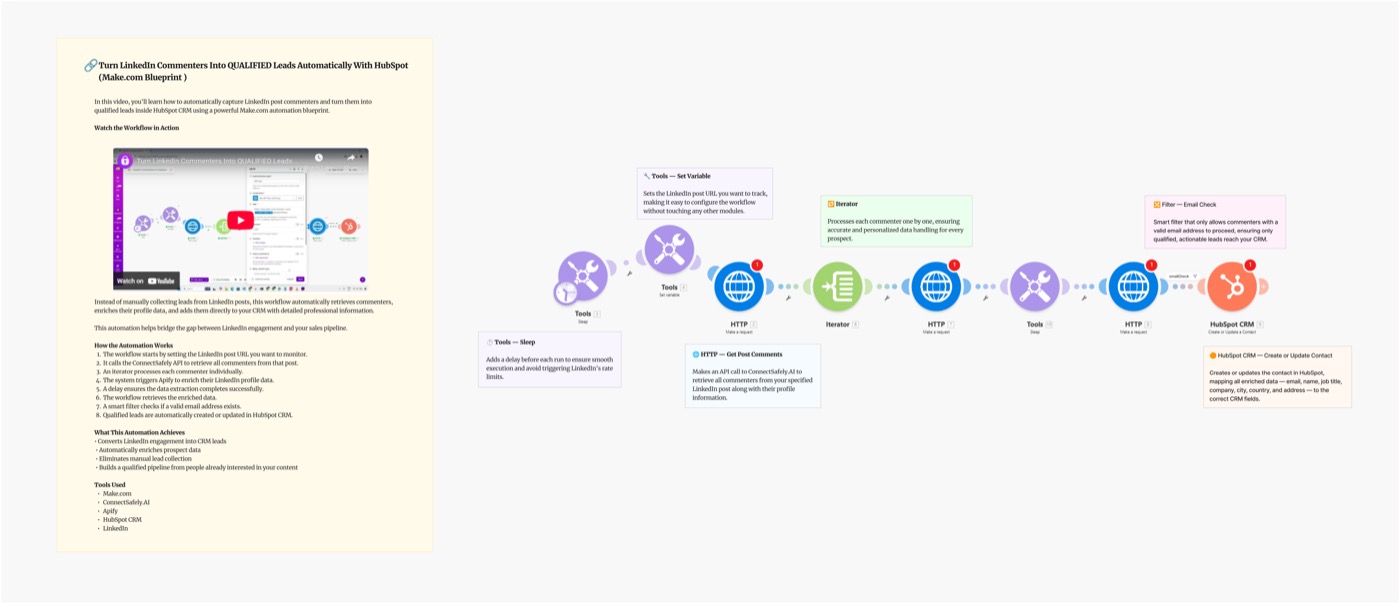
MakeTurn LinkedIn Commenters into HubSpot Leads: Make.com Scenario
Stop letting LinkedIn engagement disappear. This Make.com scenario automatically captures LinkedIn post commenters, enriches data, and pushes them to HubSpot.

 Make
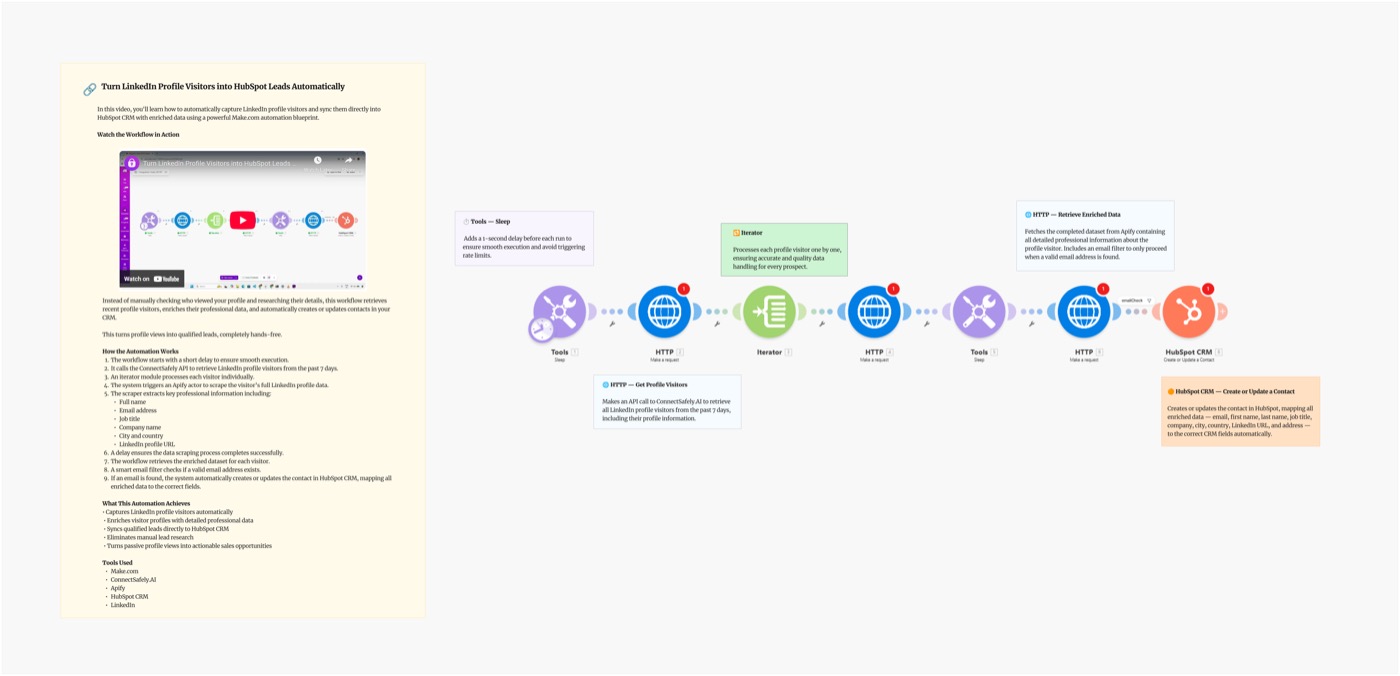
MakeTurn LinkedIn Profile Visitors into HubSpot Leads: Make.com Scenario
Most people let LinkedIn profile visitors disappear. This Make.com scenario automatically captures your LinkedIn profile visitors and pushes them to HubSpot.
Why use ConnectSafely with Make?
Design visual automation scenarios that keep LinkedIn engagement perfectly choreographed.
Visual orchestration
Plan sophisticated automation paths without writing a single line of code.
Parallel processing
Branch and rejoin workflows to coordinate follow-up across teams and channels.
Operational guardrails
Pause, resume, and monitor outreach with scenario controls your ops team will love.
Powerful automation features
Everything you need to automate LinkedIn engagement with Make.
Reusable modules
Drag ConnectSafely actions like campaign launch, audience updates, and reporting into any scenario.
Real-time monitoring
Track throughput, successes, and retry logic from a single dashboard.
Data enrichment loops
Enrich contacts mid-flow and push new intel back into ConnectSafely immediately.
Real-world use cases
See how teams use ConnectSafely + Make to automate their growth stack.
Product-led growth
Trigger LinkedIn outreach based on product usage events captured elsewhere.
Multichannel nurture
Combine email, SMS, ads, and LinkedIn touches based on buyer behaviors.
Partner enablement
Coordinate co-marketing campaigns by sharing scenario templates with partners.
Make Integration FAQs
Common questions about using ConnectSafely with Make automation.
How do I connect ConnectSafely to Make (Integromat)?
To connect ConnectSafely to Make: 1) Open Make and create a new scenario, 2) Search for 'ConnectSafely' in the module library, 3) Add a ConnectSafely module and authenticate with your API key from Settings > API, 4) Configure your triggers and actions. ConnectSafely API & MCP Access plan required ($10/month per LinkedIn account).
What is Make and how does it work with ConnectSafely?
Make (formerly Integromat) is a visual automation platform that connects apps through 'scenarios'. ConnectSafely's Make modules let you trigger LinkedIn automation from any of Make's 1,500+ app integrations. Design visual workflows with branching logic, filters, routers, and error handling.
Is Make better than Zapier for ConnectSafely automation?
Make offers more advanced features like visual scenario design, complex branching, routers, and detailed error handling. It's often more cost-effective for high-volume automation. Zapier is simpler for basic workflows. Both work with ConnectSafely - choose based on your complexity needs and budget.
Can I build complex LinkedIn sequences in Make?
Yes! Make excels at complex automation. Use routers to create branching paths based on LinkedIn responses, aggregators to batch operations, and iterators for processing lists. Combine with delays and scheduling to build sophisticated LinkedIn outreach sequences that adapt to prospect behavior.
How do I connect Make scenarios to Google Sheets with ConnectSafely?
Create a Make scenario that watches your Google Sheet for new rows (your prospect list). Use ConnectSafely modules to send connection requests or messages to each prospect. Add a 'Update Row' module to log the LinkedIn activity status back to your sheet for tracking.
What plan do I need for ConnectSafely Make integration?
The Make integration requires the ConnectSafely API & MCP Access plan — $10/month per LinkedIn account. This includes all Make modules (triggers and actions), unlimited scenario executions on ConnectSafely's side, and priority support. Make has free and paid tiers based on operations per month.
Need help with Make integration?
Contact supportReady to get started with Make?
Install the ConnectSafely app and start building automation scenarios today. Available on the API & MCP Access plan — $10/mo per LinkedIn account.