The Boost Post feature allows you to increase engagement on a specific LinkedIn post by automatically adding comments and interactions through ConnectSafely.ai in a controlled and safe way.
Feature Purpose
This feature is designed to help your posts gain more visibility, reach, and interaction, while staying compliant with LinkedIn's engagement limits. It's perfect for important announcements, high-value content, or campaign support.
How to access Boost Post
To open the Boost Post page:
- Log in to your ConnectSafely.ai dashboard
- From the left sidebar, click Boost Post (under the Engage section)
- You'll be taken to a page where you can submit a LinkedIn post for boosting
Step-by-Step Guide: How to Boost a Post
On the Boost Post page, follow this simple setup flow to configure your targeted engagement:
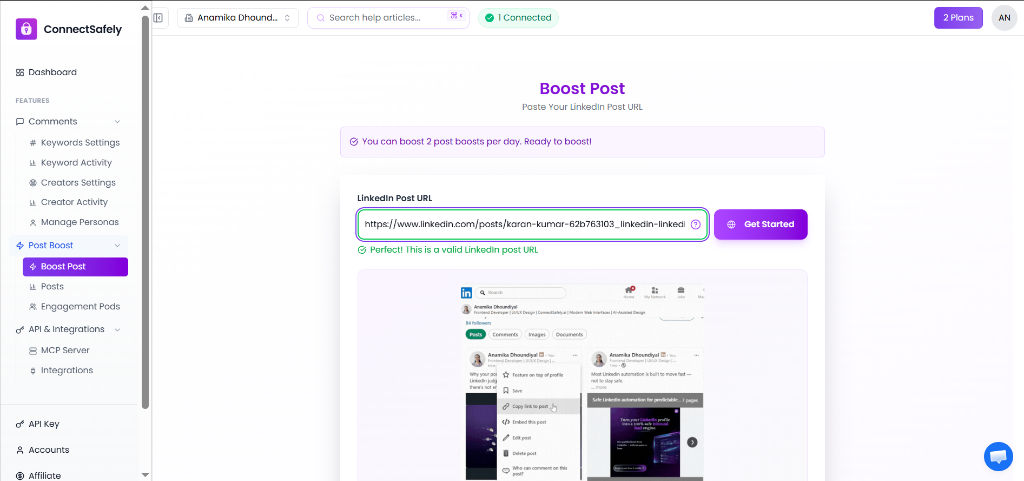
1. Paste your LinkedIn Post URL
Enter the direct URL of the LinkedIn post you want to boost. ConnectSafely will validate the link, and you can click Get Started.
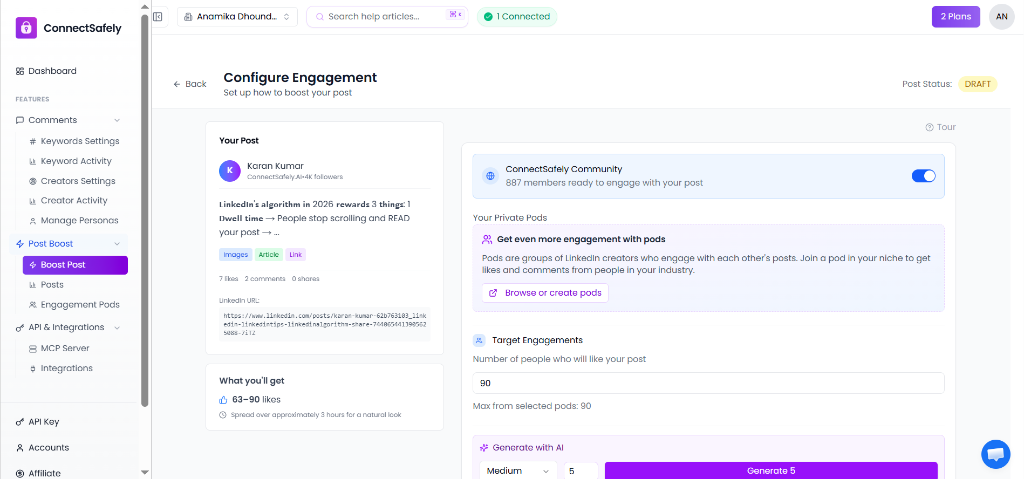
2. Select Your Pods & Target Engagements
- Community Pod: When this is ON, real people in the community will like and comment on your post. Keep it ON so more people see your post.
- Private Pods: Select additional niche pods to get engagement from people in your specific industry. More pods = more targeted engagement.
- Target Engagements: Set how many likes you want on your post. More likes means more visibility in LinkedIn's algorithm.
3. Configure Comments & Delivery Speed
- Smart Comments: Add comments to make your post look more active. Use AI to generate natural-sounding comments, or write your own over multiple lines.
- Delivery Speed: Choose how fast engagements arrive. 'Normal' looks most natural to LinkedIn's algorithm — we recommend it for best results.
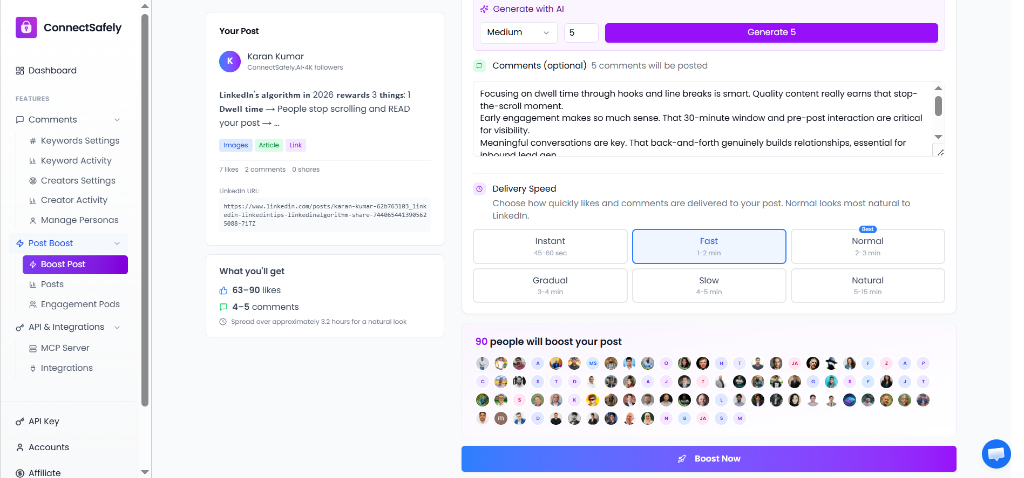
Once correctly configured, review your settings and click Boost Now. ConnectSafely.ai will begin engaging with your post based on your targeted setup.
What happens after you boost a post
After a post is boosted:
- ConnectSafely.ai adds engagement in a gradual and natural way
- Activity follows platform-safe limits
- Engagement respects your account's current warm-up and safety status
This ensures visibility increases without triggering suspicious behavior.
Viewing boosted posts (Posts section)
In the left sidebar, below Boost Post, you'll find the Posts section.
The Posts page shows all posts you have boosted using ConnectSafely.ai, including the status of each boosted post and a history of boosted activity for tracking and review. This section acts as a central place to monitor all boosted posts created through the platform.
When to use Boost Post
Use Boost Post when you want to:
- Increase engagement on an important announcement
- Give more visibility to a high-value LinkedIn post
- Support content launches or campaigns
- Test how boosted engagement performs compared to organic posts
💡 Helpful tip
For best results, boost posts that already have meaningful content and align with your audience. Boosting works best when paired with a well-defined persona and engagement strategy.
Related Articles
External Resources