The Keywords Activity page gives you visibility into all actions performed using your keyword-based targeting. It helps you understand what posts were found, how ConnectSafely engaged, and when each action was completed.
Page Purpose
This page is primarily used for monitoring, reviewing, and exporting activity. You can track all automated engagements, verify their relevance, and maintain records for reporting purposes.
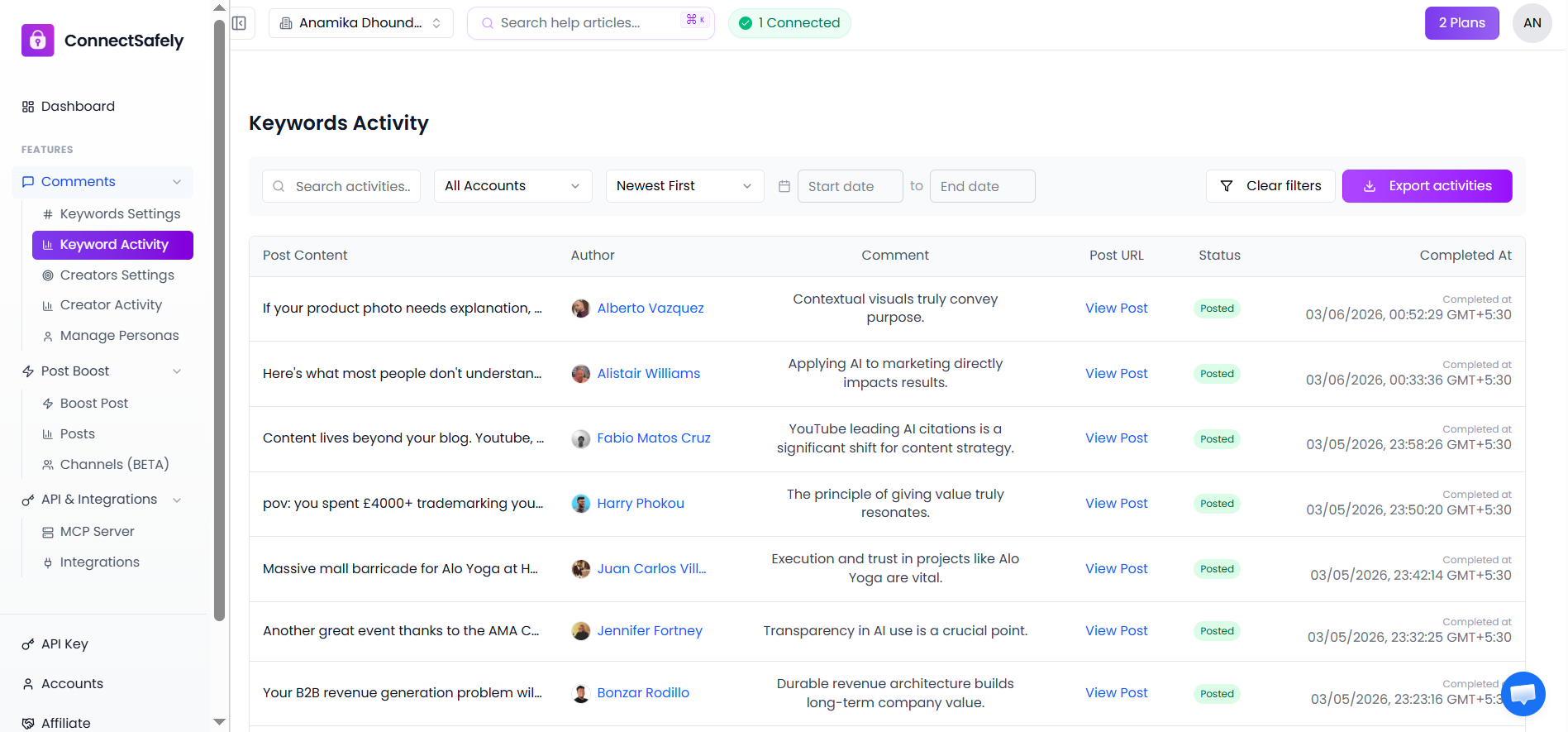
What appears in the activity list
Each row represents a completed engagement and includes:
- A preview of the LinkedIn post - See the content that was engaged with
- The post author - Identify who created the post
- The generated comment - Review what ConnectSafely posted
- A direct link to the post - Click to view the original LinkedIn post
- The status of the action - See if engagement was successful
- The date and time the action was completed - Track when engagement occurred
This allows you to quickly verify that engagement is relevant and accurate.
Filtering and sorting activity
You can narrow down activity using:
- LinkedIn account selection - Filter by specific connected accounts
- Date range filters - View activity from specific time periods
- Sorting order (newest first) - Organize results by recency
Use the search bar to locate specific posts or keywords.
Exporting activity
The Export activities option lets you download keyword activity data for reporting, audits, or performance review. You can export data in various formats for analysis or sharing with team members.
💡 Helpful tip
If no activity appears, ensure keywords are configured and auto commenting is enabled for the selected account.