The Keyword Settings page lets you configure how ConnectSafely finds relevant LinkedIn posts and controls automated commenting for each connected account.
Accessing Keyword Settings
Log in to your ConnectSafely dashboard, open the left sidebar, and click Keywords Settings.
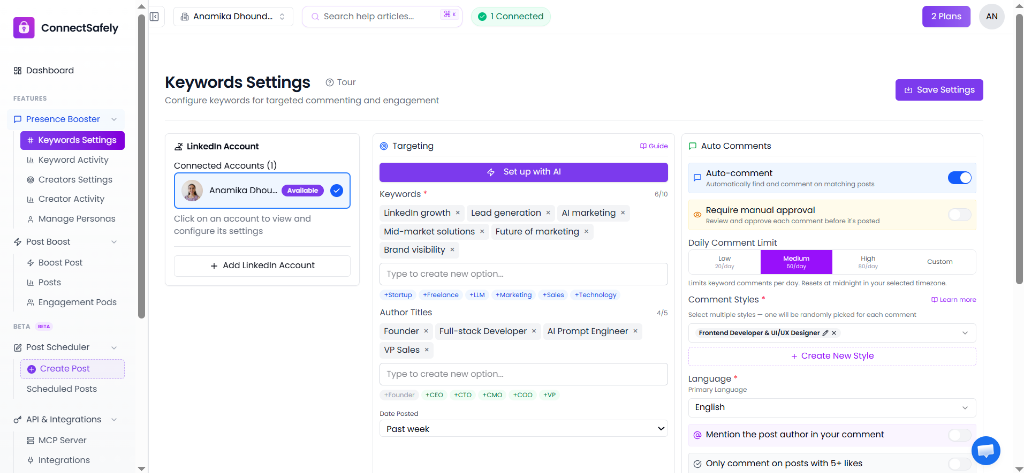
ConnectSafely Keyword Settings dashboard with account selection, targeting configuration, and commenting limits.
1. LinkedIn Account Selection
Select the connected LinkedIn account you want to configure from the left panel. Each connected account can have its own independent targeting, comments, and schedule settings.
2. Targeting Panel
- Keywords: Enter up to 10 keywords to find matching LinkedIn posts. Use the Set up with AI tool or click quick-add tags below to get started.
- Author Titles: Add up to 5 job titles to filter post authors (e.g., Founder, VP Sales).
- Date Posted: Choose how far back to look for posts (e.g., Past 24 hours, Past week).
3. Auto Comments Panel
- Auto-comment Toggle: Enable or disable automated commenting for the account.
- Require Manual Approval: Turn this on to review and approve generated comments before they publish.
- Daily Comment Limit: Select from Low (20/day), Medium (50/day), High (80/day), or set a Custom limit.
- Comment Styles: Select one or more styles (e.g. Frontend Developer & UI/UX Designer) to randomize response tones, or create a new style.
- Mention Post Author: Toggle to automatically tag/mention the author in comments.
- Engagement Check: Only comment on posts with 5+ likes to ensure active discussions.
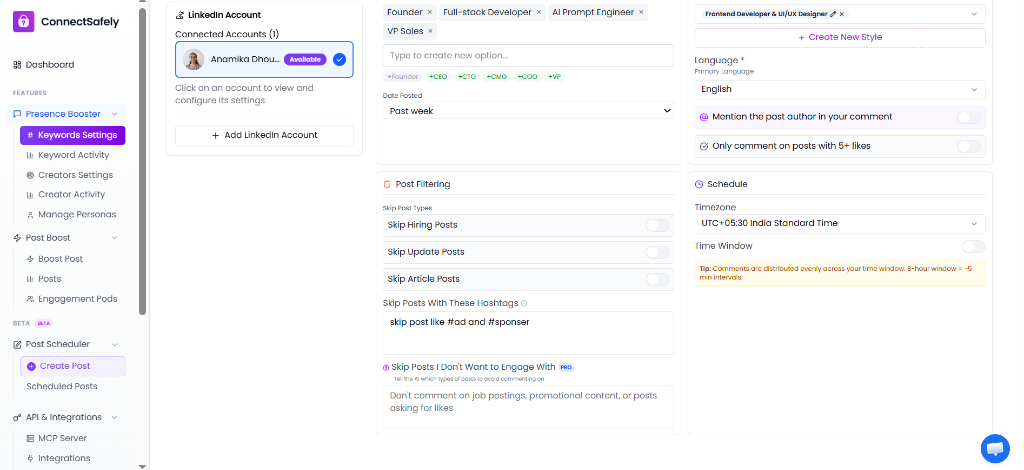
ConnectSafely filtering and schedule configurations.
4. Post Filtering Panel
- Skip Post Types: Automatically skip Hiring Posts, Update Posts, or Article Posts.
- Skip Hashtags: List hashtags to exclude (e.g., skip posts containing #ad and #sponser).
- Skip Posts I Don't Want to Engage With (PRO): Use AI to evaluate post content against custom rules (e.g., "Don't comment on job postings, promotional content, or posts asking for likes").
5. Schedule Panel
- Timezone: Select your preferred timezone (e.g. UTC offset or standard IANA names) to ensure schedules align with local business hours.
- Time Window: Define active hours during which comments are posted. Comments are distributed evenly across this window (e.g. 8-hour window = ~5 min intervals) to avoid spam filters.