
Article Type: Overview | Audience: All users | Goal: Explain available integrations and how to choose the right one
Integrations
The Integrations page allows you to connect ConnectSafely with your existing tools, workflows, and platforms. Integrations help you automate actions, sync data, and extend ConnectSafely beyond the dashboard.
This page is divided into API & Webhooks and Third-Party Integrations, depending on how you want to connect your stack.
What Are Integrations?
Integrations let ConnectSafely communicate with other tools such as CRMs, automation platforms, and AI assistants. This allows you to:
- Trigger ConnectSafely actions from external workflows
- Send data from ConnectSafely to other systems
- Automate outreach at scale
- Build custom workflows using APIs or no-code tools
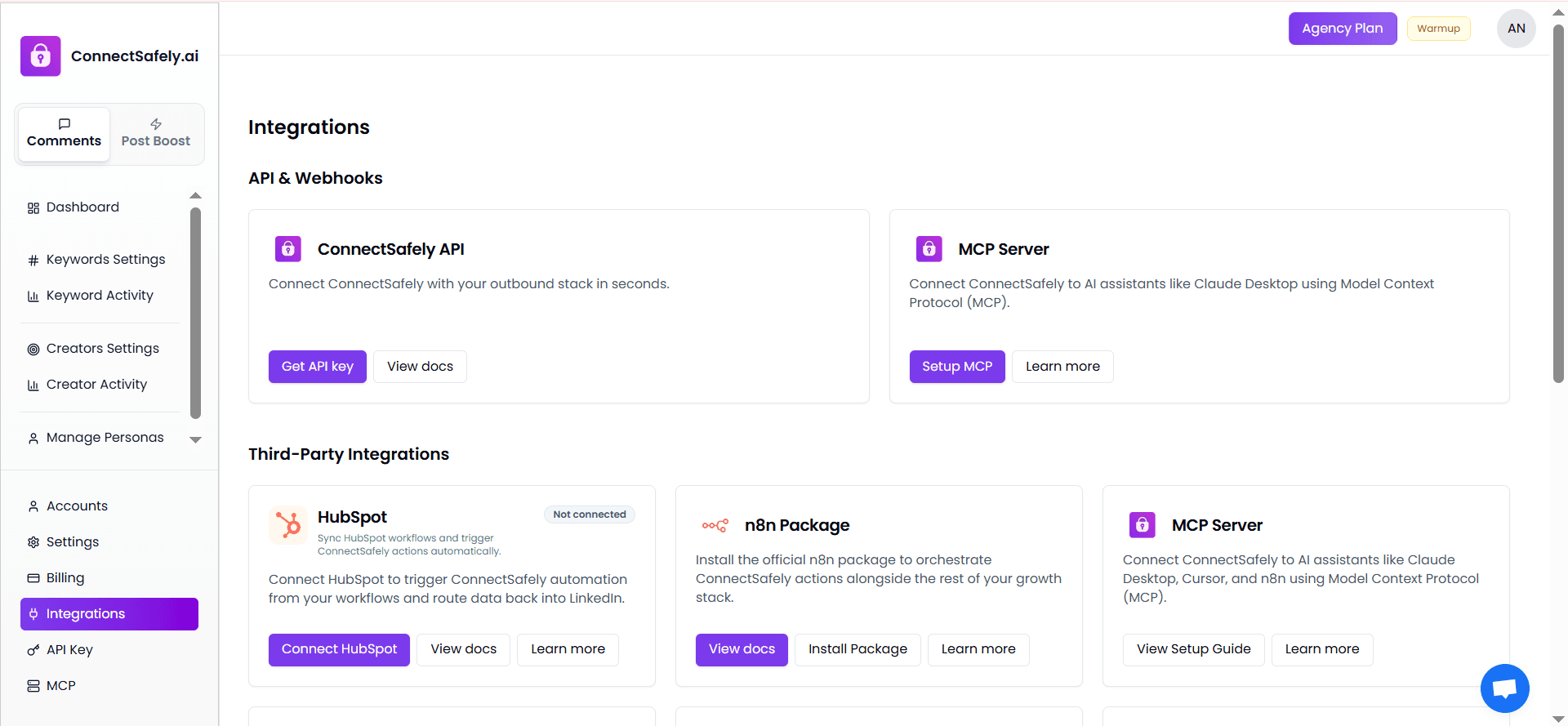
API & Webhooks
ConnectSafely API
The ConnectSafely API allows developers and technical teams to integrate ConnectSafely directly into their outbound or automation stack.
You can use the API to:
- Trigger automation programmatically
- Fetch account or campaign data
- Build custom integrations
- Control ConnectSafely from external systems
To get started:
- Generate an API key
- Review the API documentation
- Authenticate requests securely
This option is ideal for custom setups and engineering-led teams.
MCP Server
The MCP (Model Context Protocol) Server lets you connect ConnectSafely to AI assistants and automation tools that support MCP.
With MCP, you can:
- Control ConnectSafely from AI tools
- Use ConnectSafely inside supported AI environments
- Orchestrate actions using shared context
This integration is suitable for advanced workflows involving AI-driven automation.
Third-Party Integrations
Third-party integrations allow you to connect ConnectSafely with popular platforms without building custom code.
HubSpot
The HubSpot integration enables you to connect ConnectSafely with your CRM workflows.
Using HubSpot, you can:
- Trigger ConnectSafely actions from HubSpot workflows
- Sync engagement data back into HubSpot
- Automate LinkedIn outreach based on CRM events
This is ideal for sales and marketing teams already using HubSpot.
n8n Package
The n8n package allows you to orchestrate ConnectSafely actions using n8n's automation workflows.
With n8n, you can:
- Combine ConnectSafely with other tools in a single workflow
- Automate complex multi-step processes
- Control timing, conditions, and logic visually
This option is perfect for no-code and low-code automation setups.
MCP Server (Third-Party Usage)
In addition to direct API usage, the MCP Server can also be used alongside tools like:
- Cursor
- n8n
- AI desktop assistants
This enables advanced orchestration across multiple platforms using shared context and automation logic.
Choosing the Right Integration
Use this quick guide to decide:
- API → Custom development and engineering teams
- HubSpot → CRM-driven outreach and sales workflows
- n8n → Visual automation and no-code orchestration
- MCP Server → AI-driven and context-aware automation
You can use multiple integrations together based on your workflow needs.
Best Practices
- Start with one integration to understand data flow
- Test workflows in small batches
- Monitor automation activity before scaling
- Keep API keys secure
- Review documentation before connecting production systems
Need Help?
If you need help setting up an integration or choosing the right option, our support team is available to guide you through the process.
Article Type: Technical Guide | Audience: Developers, technical teams | Goal: Provide comprehensive API documentation and usage examples
ConnectSafely API
The ConnectSafely API allows you to integrate ConnectSafely directly into your own applications, automation workflows, or outbound systems. Using the API, you can programmatically trigger actions, retrieve data, and build custom integrations tailored to your workflow.
This article provides an overview of what the API offers and when to use it.
👉 Official API Documentation: https://connectsafely.ai/docs/api
What Is the ConnectSafely API?
The ConnectSafely API is a REST-based interface that enables external systems to communicate securely with ConnectSafely.
It allows you to:
- Trigger automation from external tools
- Control ConnectSafely actions programmatically
- Fetch data related to accounts and activity
- Integrate ConnectSafely into custom outbound stacks
This is ideal for teams that need flexibility beyond built-in integrations.
When Should You Use the API?
Use the ConnectSafely API if you:
- Have custom automation requirements
- Want to integrate with internal tools
- Need fine-grained control over workflows
- Are building developer-led or engineering-driven systems
If you prefer no-code or low-code solutions, third-party integrations like n8n or HubSpot may be a better fit.
Authentication & API Keys
To use the API, you must generate an API key from your ConnectSafely dashboard.
Key points:
- Each API key is unique to your workspace
- API keys authenticate all requests
- Keys should be kept private and secure
Never expose API keys in public repositories or client-side code.
What You Can Do With the API
Using the ConnectSafely API, you can:
- Trigger ConnectSafely automation from external events
- Sync data between systems
- Build custom dashboards or reports
- Orchestrate outreach workflows programmatically
All available endpoints, request formats, and response details are documented in the official API reference.
API Documentation
For full technical details, including:
- Available endpoints
- Request and response examples
- Authentication headers
- Error handling
Refer to the official documentation:
🔗 https://connectsafely.ai/docs/api
This documentation is the source of truth for implementation.
Best Practices
- Test API calls in a development environment first
- Implement proper error handling
- Respect rate limits
- Rotate API keys periodically
- Monitor automation activity closely
Following these practices ensures stable and safe integrations.
Need Help?
If you encounter issues or need guidance on API usage, our support team can assist with implementation.
Article Type: Technical Guide | Audience: AI users, advanced automation | Goal: Explain MCP protocol and AI-driven workflows
MCP Server
The MCP Server allows you to connect ConnectSafely with AI assistants and automation tools using the Model Context Protocol (MCP). This enables AI-driven workflows where your assistant can securely access ConnectSafely data and actions.
This article explains what MCP is, why it matters, and how ConnectSafely uses it.
What Is MCP?
Model Context Protocol (MCP) is an open protocol that standardizes how applications share context with AI models.
In simple terms:
- MCP lets AI assistants understand and interact with external tools
- It provides structured access to data and actions
- It enables safer, more powerful AI-driven workflows
With MCP, ConnectSafely can act as a trusted tool that AI assistants can use in real time.
What You Can Do with MCP in ConnectSafely
Using MCP with ConnectSafely allows you to:
- Manage comments with AI - Let AI assistants help monitor and respond to LinkedIn comments.
- Access ConnectSafely from AI tools - Use ConnectSafely directly inside supported AI environments.
- Build AI-driven workflows - Automate social engagement and outreach with AI context awareness.
- Create custom integrations - Connect ConnectSafely with other MCP-compatible tools and platforms.
MCP-Compatible Tools
You can connect ConnectSafely via MCP to supported tools such as:
- Claude Desktop
- Cursor
- Automation platforms that support MCP
These tools can securely interact with ConnectSafely using your MCP Server URL.
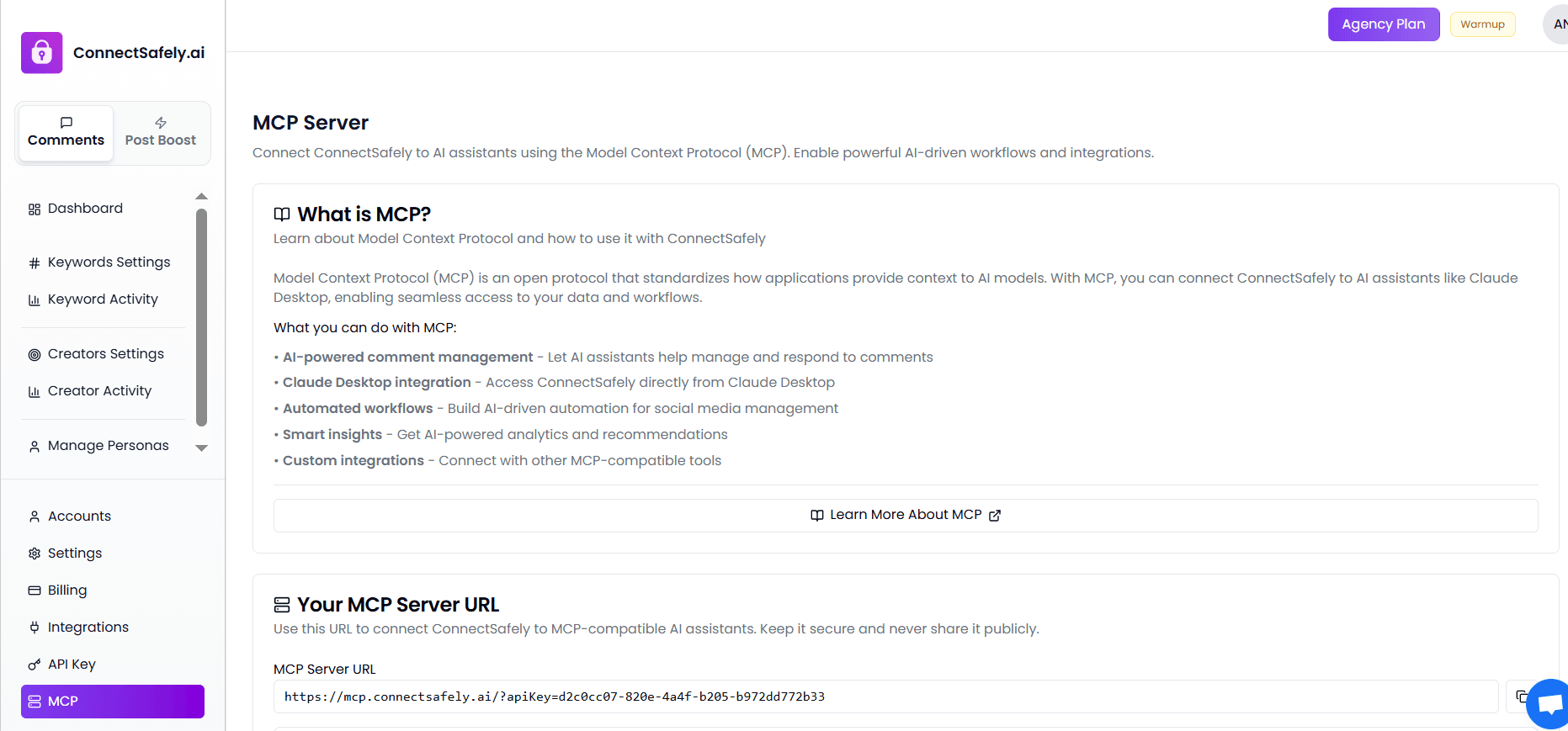
Your MCP Server URL
Your MCP Server URL is a unique endpoint that allows MCP-compatible tools to connect to your ConnectSafely workspace.
Important points:
- The URL is generated automatically
- It uses your API key for authentication
- It should be kept private and secure
If you regenerate your API key, you'll need to update the MCP Server URL wherever it is used.
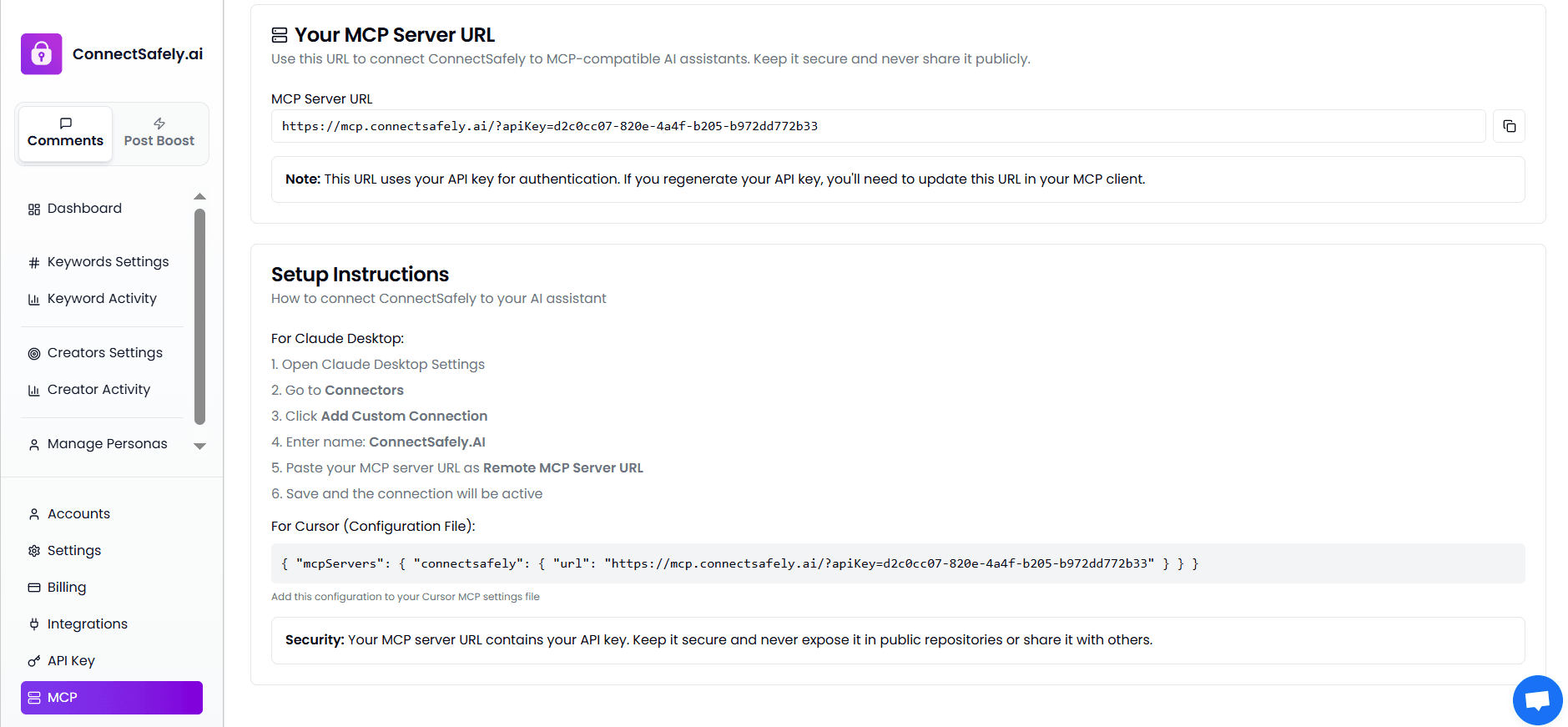
Setup Overview
Connecting ConnectSafely via MCP generally involves:
- Copying your MCP Server URL
- Adding it to your AI tool's MCP or connector settings
- Saving and activating the connection
Once connected, the AI assistant can begin interacting with ConnectSafely based on MCP permissions.
For exact setup steps, follow the instructions shown on this page or refer to tool-specific guides.
Security Considerations
Because the MCP Server URL includes authentication details:
- Do not share it publicly
- Do not commit it to public repositories
- Rotate your API key if it is ever exposed
Keeping your MCP credentials secure protects your data and automation workflows.
When Should You Use MCP?
Use MCP if you:
- Want AI-assisted control over ConnectSafely
- Are building advanced AI-driven automation
- Use AI tools that support Model Context Protocol
- Need context-aware workflows beyond traditional APIs
If you only need basic automation, standard integrations or the API may be sufficient.
Need More Details?
This article explains what MCP is and why it's useful.
For implementation details or tool-specific setup, refer to:
- MCP setup instructions on this page
- Individual tool documentation
- ConnectSafely API documentation (if required)
Article Type: Integration Guide | Audience: Sales teams, HubSpot users | Goal: Connect HubSpot CRM with ConnectSafely automation
HubSpot Integration
The HubSpot integration allows you to connect ConnectSafely with your HubSpot CRM to automate LinkedIn outreach based on CRM events and workflows.
This integration helps sales and marketing teams trigger ConnectSafely actions directly from HubSpot while keeping engagement data connected to their CRM.
What Is the HubSpot Integration?
The HubSpot integration connects your HubSpot workflows with ConnectSafely automation.
It enables you to:
- Trigger LinkedIn engagement from HubSpot events
- Automate outreach based on CRM activity
- Sync engagement actions with your sales workflows
- Reduce manual work between CRM and LinkedIn
This integration is designed for teams already using HubSpot as their primary CRM.
What You Can Do with HubSpot + ConnectSafely
By connecting HubSpot, you can:
- Trigger automation from workflows - Start ConnectSafely actions when contacts enter a HubSpot workflow.
- Align outreach with CRM data - Use HubSpot properties to control targeting and timing.
- Automate LinkedIn engagement - Run engagement actions without leaving HubSpot.
- Scale sales and marketing operations - Maintain consistent outreach across multiple campaigns.
Common Use Cases
Teams typically use the HubSpot integration to:
- Engage LinkedIn prospects when they reach a specific CRM stage
- Automate outreach after lead qualification
- Coordinate LinkedIn engagement with email or sales sequences
- Reduce manual LinkedIn activity for SDRs and marketers
How the Integration Works (High Level)
At a high level, the integration works as follows:
- A contact or event triggers a HubSpot workflow
- HubSpot sends the trigger to ConnectSafely
- ConnectSafely performs the configured automation
- Activity continues based on your setup
This process runs automatically once configured.
When Should You Use the HubSpot Integration?
Use this integration if you:
- Rely on HubSpot for CRM and workflows
- Want CRM-driven LinkedIn automation
- Need consistent, repeatable outreach processes
- Want to reduce manual engagement work
If you don't use HubSpot, other integrations or the API may be a better fit.
Setup & Configuration
This article explains what the HubSpot integration does and when to use it.
For step-by-step setup instructions, permissions, and configuration details, refer to the official documentation:
🔗 HubSpot Integration Docs: https://connectsafely.ai/docs/integrations/hubspot
The documentation covers connecting HubSpot to ConnectSafely, required permissions, workflow configuration, and troubleshooting steps.
Best Practices
- Start with a single workflow
- Test automation on a small contact set
- Monitor activity before scaling
- Keep CRM data clean and up to date
Following these practices ensures predictable and safe automation.
Need Help?
If you need help setting up or troubleshooting the HubSpot integration, our support team can provide guidance specific to your CRM setup.