
Article Type: Overview | Audience: All users | Goal: Explain available integrations and how to choose the right one
The Integrations page allows you to connect ConnectSafely with your existing tools, workflows, and platforms. Integrations help you automate actions, sync data, and extend ConnectSafely beyond the dashboard.
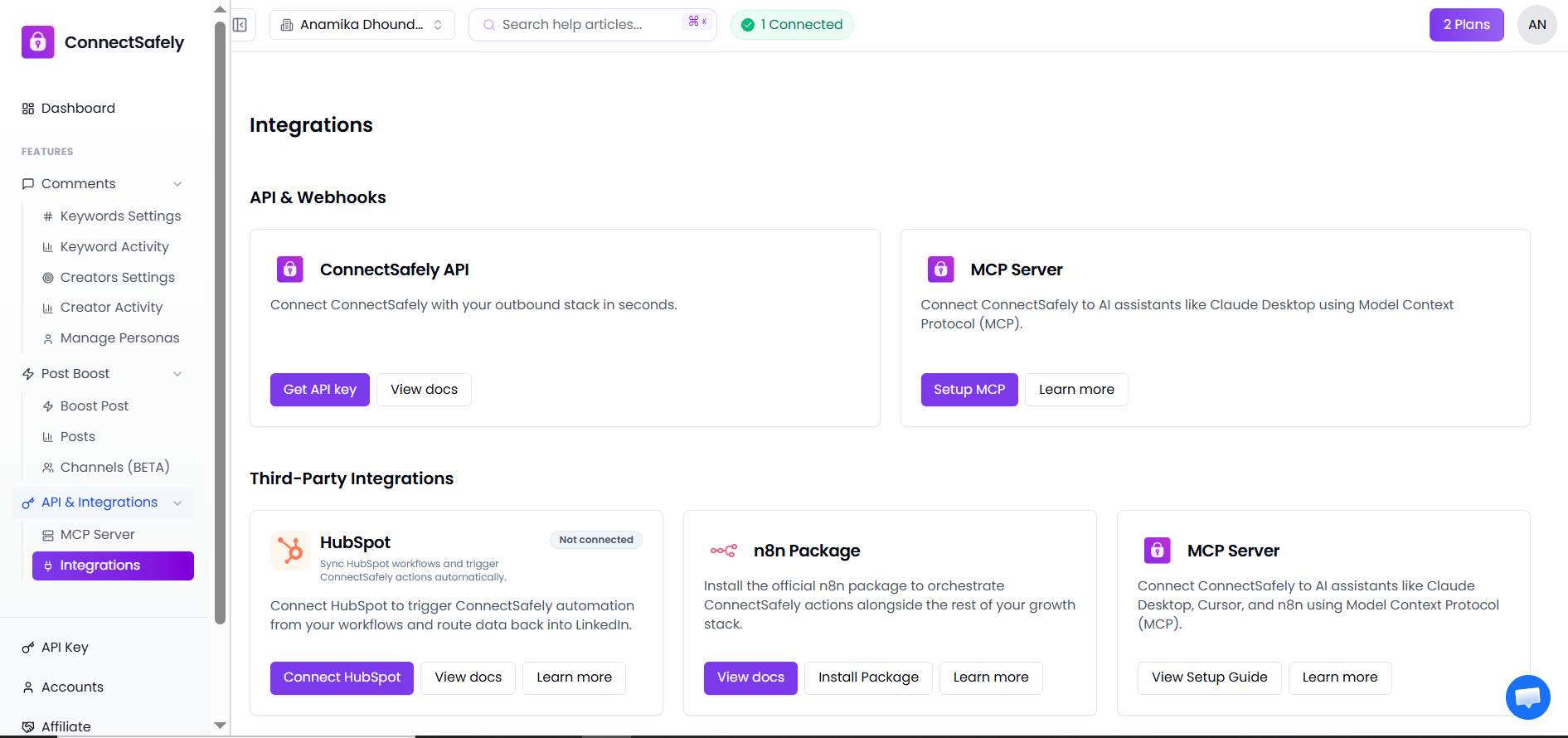
This page is divided into API & Webhooks and Third-Party Integrations, depending on how you want to connect your stack.
What Are Integrations?
Integrations let ConnectSafely communicate with other tools such as CRMs, automation platforms, and AI assistants. This allows you to:
- Trigger ConnectSafely actions from external workflows
- Send data from ConnectSafely to other systems
- Automate outreach at scale
- Build custom workflows using APIs or no-code tools
API & Webhooks
ConnectSafely provides direct API access for developers and technical teams who need precise control over their automation stack.
ConnectSafely API
The ConnectSafely API allows developers and technical teams to integrate ConnectSafely directly into their outbound or automation stack.
You can use the API to:
- Trigger automation programmatically
- Fetch account or campaign data
- Build custom integrations
- Control ConnectSafely from external systems
To get started:
- Generate an API key
- Review the API documentation
- Authenticate requests securely
This option is ideal for custom setups and engineering-led teams.
MCP Server
The MCP (Model Context Protocol) Server lets you connect ConnectSafely to AI assistants and automation tools that support MCP.
With MCP, you can:
- Control ConnectSafely from AI tools
- Use ConnectSafely inside supported AI environments
- Orchestrate actions using shared context
This integration is suitable for advanced workflows involving AI-driven automation.
Third-Party Integrations
Third-party integrations allow you to connect ConnectSafely with popular platforms without building custom code.
HubSpot
The HubSpot integration enables you to connect ConnectSafely with your CRM workflows.
Using HubSpot, you can:
- Trigger ConnectSafely actions from HubSpot workflows
- Sync engagement data back into HubSpot
- Automate LinkedIn outreach based on CRM events
This is ideal for sales and marketing teams already using HubSpot.
n8n Package
The n8n package allows you to orchestrate ConnectSafely actions using n8n's automation workflows.
With n8n, you can:
- Combine ConnectSafely with other tools in a single workflow
- Automate complex multi-step processes
- Control timing, conditions, and logic visually
This option is perfect for no-code and low-code automation setups.
MCP Server (Third-Party Usage)
In addition to direct API usage, the MCP Server can also be used alongside tools like:
- Cursor
- n8n
- AI desktop assistants
This enables advanced orchestration across multiple platforms using shared context and automation logic.
Choosing the Right Integration
Use this quick guide to decide:
- API → Custom development and engineering teams
- HubSpot → CRM-driven outreach and sales workflows
- n8n → Visual automation and no-code orchestration
- MCP Server → AI-driven and context-aware automation
You can use multiple integrations together based on your workflow needs.
Best Practices
- Start with one integration to understand data flow
- Test workflows in small batches
- Monitor automation activity before scaling
- Keep API keys secure
- Review documentation before connecting production systems