 n8n
n8nAI Post Rewriter | n8n + Gemini
Rewrite viral LinkedIn posts in your voice using Gemini AI. Includes Telegram approval workflow before auto-publishing.
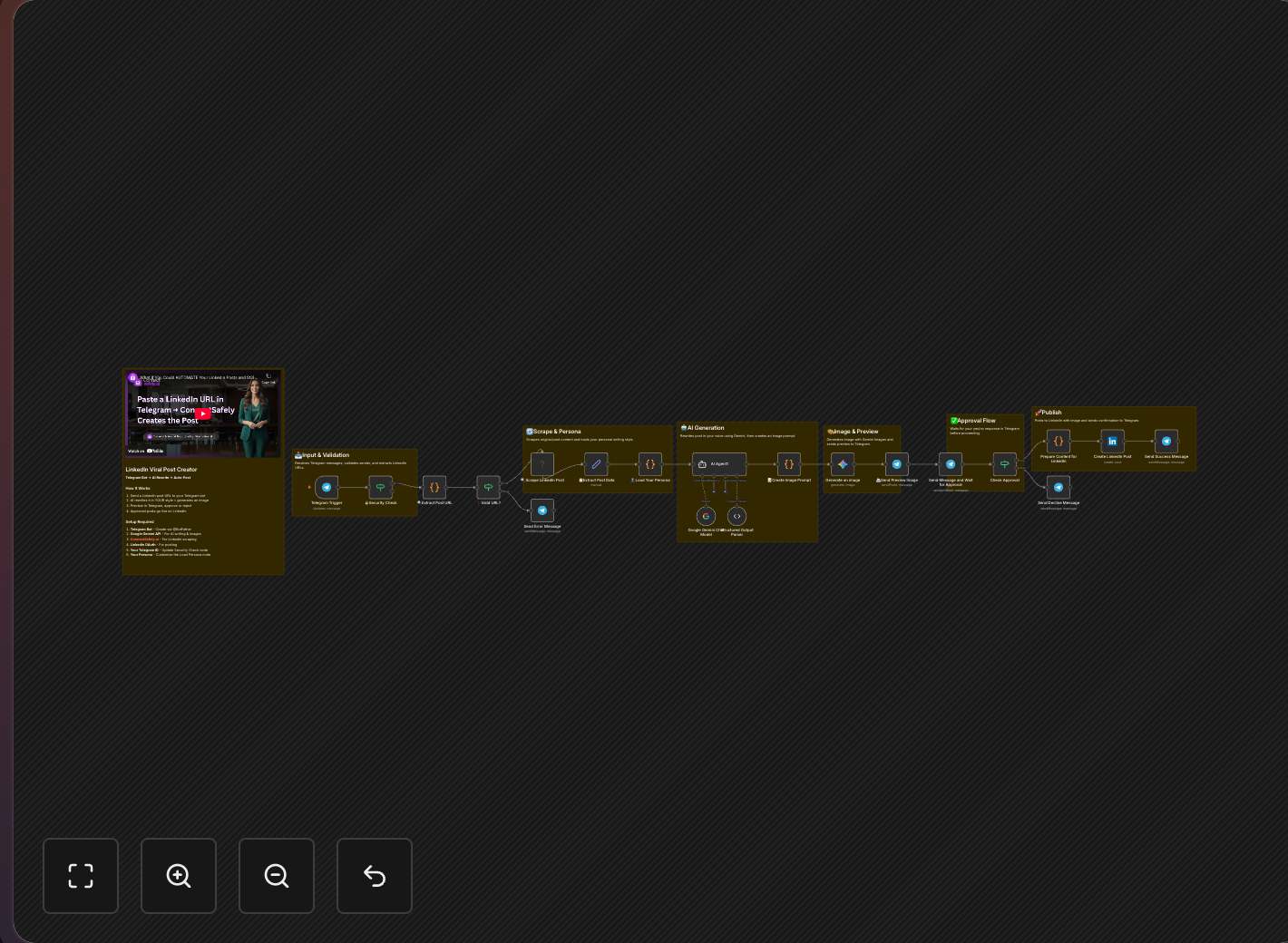
Turn trending content into your own thought leadership using AI. This advanced n8n workflow takes viral LinkedIn posts, rewrites them in your unique voice using Google Gemini, and lets you approve via Telegram before auto-publishing.
Key Takeaways
- Transform viral content into original posts that reflect your unique perspective and expertise
- Human-in-the-loop approval via Telegram ensures quality before anything goes live
- Voice profile training teaches Gemini to write exactly like you
- Mobile-friendly workflow - approve content from anywhere via Telegram
The Content Curation Problem
According to Content Marketing Institute research, creating original content daily is the #1 challenge for marketers. But you notice:
- Some posts go viral on topics you know well
- You could say it differently, maybe better
- Your audience might benefit from your perspective
The solution: AI-assisted content transformation that maintains your authentic voice while leveraging proven content frameworks. This supports your LinkedIn authority building strategy.
Workflow Overview
The Complete Flow
Share URL via Telegram → Scrape post → AI rewrites → Generate image → You approve → Publish
Why This Approach Works
Not Plagiarism, But Inspiration
According to Austin Kleon's creative philosophy:
- Original ideas exist across many posts
- Your perspective and experience are unique
- Same topic, different voice = original content
Human in the Loop
- AI generates, you approve
- Edit before publishing
- Maintain quality control
Mobile-Friendly
- Telegram interface works anywhere
- Quick approval on the go
- No need to open n8n dashboard
Detailed Setup Guide
Part 1: Create Your Telegram Bot
- Message @BotFather on Telegram
- Send
/newbot - Name your bot (e.g., "LinkedIn Content Assistant")
- Save the API token - you'll need this for n8n
Part 2: Configure Google Gemini
- Get API access at Google AI Studio
- Create a prompt template for your voice:
You are a LinkedIn content writer who writes in [YOUR NAME]'s voice.

Voice characteristics:
- [Describe your writing style]
- [Typical sentence length]
- [Favorite phrases or patterns]
- [Topics you usually discuss]

Rewrite the following viral LinkedIn post in this voice. Keep the core insight but make it sound authentically like [YOUR NAME]:

ORIGINAL POST:
{{originalContent}}

Requirements:
- Same general length
- Add your unique perspective
- Include a call-to-action
- Format for LinkedIn (line breaks, emojis if appropriate)
Part 3: Build the n8n Workflow
Trigger: Telegram Webhook
- Listens for messages to your bot
- Extracts LinkedIn URL from message
Node 2: Validate URL
- Check if it's a valid LinkedIn post URL
- Send error message back if not
Node 3: Scrape Post Content
- Use ConnectSafely.ai to fetch post
- Extract: text, author, engagement metrics
Get your API credentials from the ConnectSafely dashboard.
Node 4: Rewrite with Gemini
- Pass original content to AI
- Include your voice profile
- Get rewritten version
Node 5: Generate Image (Optional)
- Use DALL-E or Midjourney API
- Create matching visual for the post
Node 6: Send Preview to Telegram
New Post Ready for Review

Original by: {{originalAuthor}}
Engagement: {{likes}} likes, {{comments}} comments

---
Your rewritten version:

{{rewrittenContent}}

---
Reply with:
PUBLISH - to post now
EDIT - to modify (paste your edits)
SKIP - to discard
Node 7: Wait for Response
- Telegram Trigger waiting for your reply
- Timeout after 24 hours
Node 8: Process Response
- PUBLISH → LinkedIn API post
- EDIT → Use edited content, then publish
- SKIP → Log and end workflow
Node 9: Publish to LinkedIn
- Use LinkedIn OAuth connection
- Post content (and image if generated)
- Send confirmation back to Telegram
Video Tutorial
Crafting Your Voice Profile
Analyze Your Existing Content
Look at your best-performing posts (check our LinkedIn analytics guide):
- How long are your sentences?
- Do you use emojis? Which ones?
- Formal or casual tone?
- Do you tell stories?
- How do you end posts?
Create Voice Guidelines
## [Your Name]'s LinkedIn Voice

### Tone
- Conversational but professional
- Uses humor occasionally
- Direct, not preachy

### Structure
- Short paragraphs (1-2 sentences)
- Heavy use of line breaks
- Ends with a question or CTA

### Language
- Avoids corporate jargon
- Uses analogies often
- Rarely uses exclamation marks

### Topics
- B2B sales and marketing
- AI and automation
- Personal productivity

### Phrases to use
- "Here's the thing..."
- "Let me explain..."
- "The data shows..."

### Phrases to avoid
- "Leveraging synergies"
- "Game changer"
- "Crushing it"
Ethical Considerations
Following content ethics best practices:
Do
- Transform ideas significantly
- Add your unique insights
- Credit original concepts when relevant
- Use for inspiration, not copying
Don't
- Copy word-for-word
- Claim others' experiences as yours
- Use without any transformation
- Post exact same hooks/structures
Advanced Features
Content Quality Filter
Add a node to skip low-quality rewrites:
- Check for minimum length
- Verify it's significantly different from original
- Ensure your voice markers are present
Scheduling
Instead of immediate publish:
- Queue posts for optimal times (see LinkedIn posting strategy)
- Space out content throughout the week
- Integrate with Buffer or native scheduling
Analytics Loop
After publishing, track:
- Engagement vs. original post
- Which topics perform best
- Time to first comment
Comparison: Content Creation Methods
| Method | Time | Quality | Authenticity |
|---|---|---|---|
| Write from scratch | 1-2 hours | High | Highest |
| This AI workflow | 10 minutes | High (with approval) | High |
| Copy-paste | 1 minute | N/A | Zero (plagiarism) |
| Generic AI | 5 minutes | Medium | Low |
Frequently Asked Questions
Is it ethical to rewrite viral LinkedIn posts using AI like Gemini?
Yes, when you genuinely transform, not copy. Add your unique perspective, change examples, and use your authentic voice. Think of it like jazz—same melody, your interpretation. According to Austin Kleon's creative philosophy, inspiration exists across many posts, but your perspective and experience make it original. Never copy word-for-word or claim others' experiences as your own.
How do I train Google Gemini to write LinkedIn posts in my voice?
Create a detailed voice profile with: typical sentence length, tone (casual/formal), favorite phrases, topics you discuss, and phrases to avoid. Include 3-5 examples of your best-performing posts. According to Medium comparisons, Gemini produces more natural-sounding LinkedIn content than competitors when properly trained.
How does the n8n Telegram approval workflow work for LinkedIn posts?
Share a LinkedIn post URL to your Telegram bot. The workflow scrapes the post, Gemini rewrites it in your voice, and sends a preview to Telegram. Reply "PUBLISH" to auto-post, "EDIT" with your changes, or "SKIP" to discard. This human-in-the-loop approach ensures quality before anything goes live.
How do I make AI-rewritten LinkedIn posts sound authentic, not generic?
Focus on your unique voice profile with specific examples, industry context, and personal anecdotes. According to Content Marketing Institute, AI provides structure; you provide authenticity. Always review before publishing and add personal touches. See our content strategy guide for more tips.
Can using AI to rewrite LinkedIn posts help prevent content creator burnout?
Yes, that's the primary use case. According to Content Marketing Institute, creating original content daily is the #1 challenge for marketers. This workflow lets you curate interesting posts and transform them quickly (10 minutes vs 1-2 hours) instead of staring at blank screens. Aim for 1-2 posts daily for sustainable growth.
Related Workflows
- AI-Personalized Connection Requests - AI for outreach personalization
- Auto-Follow LinkedIn Users - Grow your audience strategically
- DM Profile Visitors - Scale your conversations
Create content consistently without burning out. Start your ConnectSafely free trial and transform your content workflow today.
Prerequisites
- n8n instance (self-hosted or cloud)
- ConnectSafely.ai account with API key
- Telegram bot created via @BotFather
- Google Gemini API access
- LinkedIn OAuth2 connected in n8n
Required Integrations
n8n ConnectSafely
 LinkedIn
 Telegram
 Google Gemini
Use Cases
- Repurpose trending content in your unique voice
- Maintain consistent posting schedule without burnout
- Quickly create content around viral topics
- Test content variations before publishing
- Scale content creation while keeping authenticity
Ready to get started?
Download this workflow template and customize it for your needs.
Related Templates
AI LinkedIn Connections with n8n + Gemini
Send AI-personalized LinkedIn connection requests at scale using n8n and Google Gemini. Achieve 40-60% acceptance rates with automated personalization.
View TemplateLinkedIn Auto-Follow from Sheets | n8n
Automate LinkedIn profile following with n8n and Google Sheets. This 4-node workflow follows users from your spreadsheet automatically.
View Template