 n8n
n8nAuto-DM Profile Visitors | n8n LinkedIn
Auto-message LinkedIn profile visitors with n8n. Route DMs to connections and requests to non-connections for 3x better response rates.
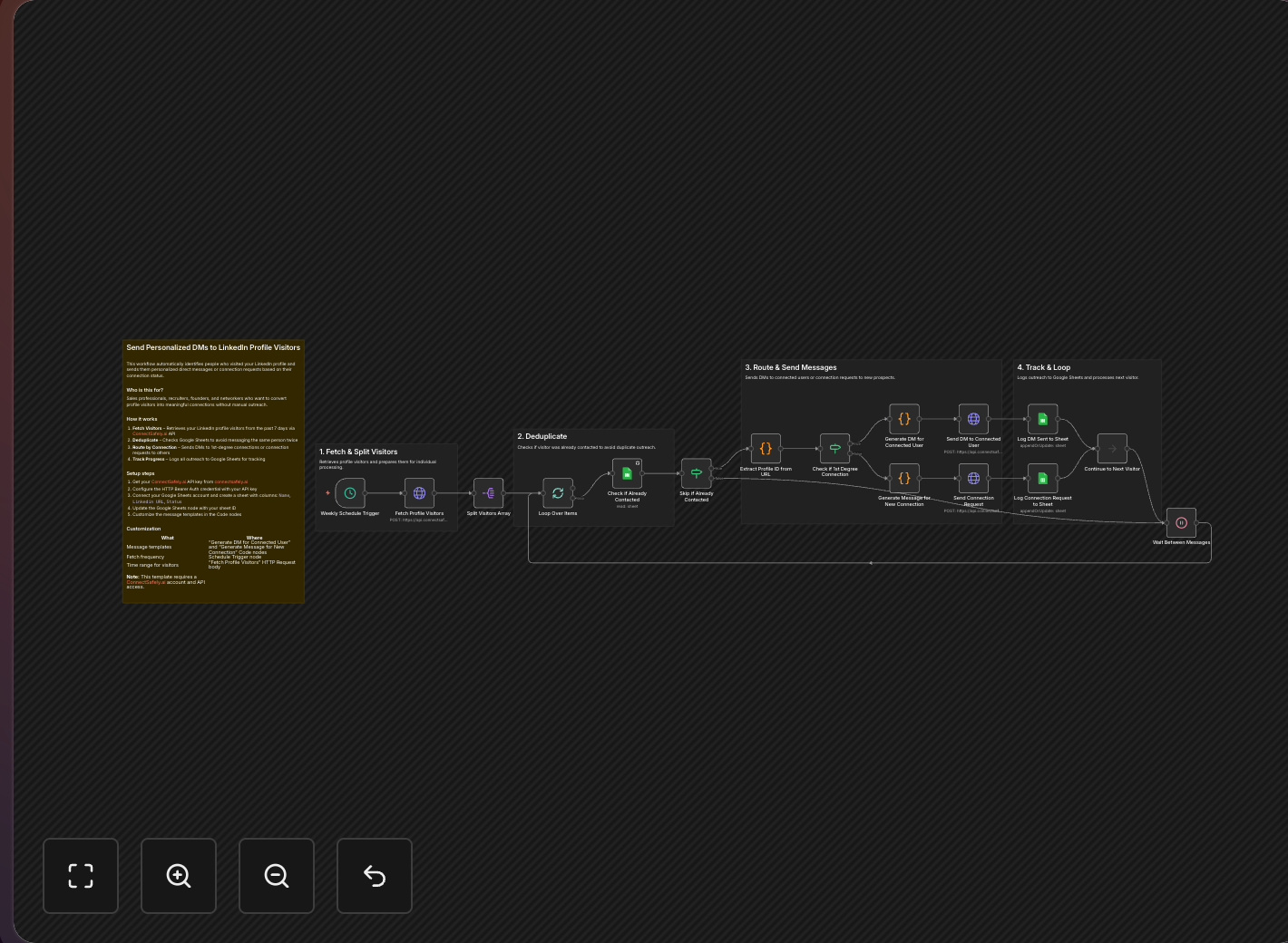
Turn passive profile views into active conversations automatically. This n8n workflow reaches out to people who visit your LinkedIn profile with personalized DMs or connection requests based on connection status.
Key Takeaways
- Profile visitors show buying intent - according to LinkedIn's Sales Navigator data, they're 3x more likely to respond than cold contacts
- Smart routing sends DMs to connections and connection requests to non-connections
- Deduplication tracking prevents messaging the same person twice
- Platform-safe approach using ConnectSafely's compliant automation
The Intent Signal
According to LinkedIn's engagement research, profile visitors demonstrate higher intent than almost any other signal.
When someone views your profile, they're showing intent:
- They searched for someone like you
- They clicked from your content
- They were referred by a connection
- They're researching before reaching out
Don't wait for them to message first. Take the initiative while their interest is fresh. This workflow supports an inbound lead generation strategy.
Workflow Overview
Smart Routing Logic
The workflow handles different scenarios:
| Connection Status | Action | Message Type |
|---|---|---|
| 1st Degree | Send DM | Casual follow-up |
| 2nd/3rd Degree | Send connection request | Introduction with context |
| Already processed | Skip | Avoid duplicate outreach |
Key Features
Deduplication
- Tracks every visitor in Google Sheets
- Never messages the same person twice
- Maintains clean outreach records
Connection-Aware Messaging
- Different messages for connections vs. non-connections
- Adapts tone based on relationship degree
- Personalizes based on their profile data
Rate Limiting
Following LinkedIn's community guidelines:
- Built-in delays between messages
- Respects LinkedIn's daily limits
- Spreads outreach throughout the day
Use ConnectSafely's rate limiting for automatic protection.
Setup Instructions
Step 1: Create Tracking Sheet
Set up a Google Sheet with:
| Column | Purpose |
|---|---|
| Profile URL | Visitor's LinkedIn URL |
| Name | For reference |
| Visit Date | When they visited |
| Connection Degree | 1st, 2nd, or 3rd |
| Action Taken | DM or Connection Request |
| Action Date | When outreach happened |
| Response | Track replies |
Step 2: Configure Message Templates
For 1st Degree Connections (DM)
Hey {{firstName}}!

Noticed you stopped by my profile - thanks for checking it out!

I'm curious what brought you there. If you're looking into [your expertise area], happy to chat about how I might be able to help.

What's on your mind?
For 2nd/3rd Degree (Connection Request)
Hi {{firstName}},

Saw you visited my profile and wanted to reach out. I'm [brief intro] and noticed we share an interest in [common ground from their profile].

Would love to connect and learn more about what you're working on!
See our LinkedIn messaging best practices guide for more templates.
Step 3: Build the Workflow
Node 1: Schedule Trigger
- Run every 4-6 hours
- Catches visitors while they remember visiting
Node 2: Get Profile Visitors
- Fetch last 24 hours of visitors
- Limit to 50 per run
Get your API credentials from the ConnectSafely dashboard.
Node 3: Check if Processed
- Query Google Sheets for existing entries
- Filter out already-contacted visitors
Node 4: Check Connection Status
- For each new visitor, get connection degree
Node 5: Switch Node
- Route based on connection degree:
- 1 → Send DM path
- 2 or 3 → Send connection request path
Node 6a: Send DM (for 1st degree)
- Use the DM template
- Personalize with their name
Node 6b: Send Connection Request (for 2nd/3rd degree)
- Use the connection request template
- Include personalized note (under 300 characters)
Node 7: Log to Sheet
- Record the action taken
- Include timestamp
Message Best Practices
Don't Be Creepy
Bad: "I saw you were looking at my profile at 3:47 PM yesterday..."
Good: "Noticed you stopped by my profile - always nice to meet new people!"
Make It About Them
Bad: "I'm a sales expert with 15 years of experience..."
Good: "I saw you're in [their industry] - that's such an interesting space right now."
Have a Soft CTA
Bad: "Let me know when you're free for a 30-minute call!"
Good: "Curious what brought you by - happy to chat if you have questions!"
Keep It Short
- DMs: 3-4 sentences max
- Connection notes: Under 300 characters (LinkedIn limit)
Learn more about effective LinkedIn outreach.
Handling Edge Cases
Recruiter Visitors
- Option A: Skip them with a filter on headline
- Option B: Send a polite "not looking" message
- Option C: Engage if you're open to opportunities
Competitor Research
- Be professional, not defensive
- Consider if there's partnership potential
- Don't share sensitive information
Anonymous Visitors
- LinkedIn Premium shows some visitors as anonymous
- Can't message these - workflow automatically skips
Measuring Success
Track these KPIs in your Google Sheet:
| Metric | Target | Why It Matters |
|---|---|---|
| Response Rate | 15%+ | Shows message quality |
| Connection Acceptance | 40%+ | Validates targeting |
| Conversation Rate | 10%+ | Real relationship building |
| Opportunity Rate | 5%+ | Business impact |
Frequently Asked Questions
How do I automatically send DMs to LinkedIn profile visitors?
Use n8n with ConnectSafely.ai to fetch visitors, check connection status, and smart-route to DMs (for 1st-degree connections) or connection requests (for 2nd/3rd-degree). The workflow tracks contacts in Google Sheets to prevent duplicate messages. Requires LinkedIn Premium for full visitor access. See the n8n integration guide for setup.
Should I mention that I saw someone view my LinkedIn profile?
No, it comes across as intrusive or even creepy. Instead, find a natural conversation starter: shared interests, mutual connections, or relevant content you noticed. Say "Noticed you stopped by" rather than "I saw you viewed my profile at 2:47 PM." Focus on providing value, not surveillance.
What's the best message to send LinkedIn profile visitors?
Keep it casual and value-focused, not salesy. Ask what brought them by, mention common ground, and offer something helpful. Never pitch on first contact. According to LinkedIn's engagement data, profile visitors are 3x more likely to respond than cold contacts. See our messaging guide for proven templates.
Do I need LinkedIn Premium to see who viewed my profile?
Yes, LinkedIn Premium is required to see the full visitor list with timestamps and titles. Free accounts only show the most recent 5 visitors with limited details, making automation impractical without Premium.
How many LinkedIn profile visitors should I message per day?
10-20 personalized messages maximum to maintain quality and avoid LinkedIn's detection patterns. Focus on visitors matching your ideal customer profile rather than messaging everyone. ConnectSafely's rate limiting automatically enforces safe limits with human-like delays.
Related Workflows
- Sync Visitors to HubSpot CRM - Add visitors to your CRM for longer-term nurturing
- Send Connection Requests to Commenters - Outreach to engaged content viewers
- AI-Powered Connection Requests - Add Gemini AI personalization
Turn profile views into conversations. Start your ConnectSafely free trial and automate your visitor outreach today.
Prerequisites
- n8n instance (self-hosted or cloud)
- ConnectSafely.ai account with API key
- Google Sheets account
- LinkedIn account connected to ConnectSafely
Required Integrations
n8n ConnectSafely
 LinkedIn
 Google Sheets
Use Cases
- Convert profile visitors into conversations
- Automate outreach to warm leads
- Follow up with people researching your profile
- Build relationships with interested prospects
- Scale personal networking efforts
Ready to get started?
Download this workflow template and customize it for your needs.
Related Templates
LinkedIn Visitors to HubSpot | n8n
Auto-sync LinkedIn profile visitors to HubSpot CRM with n8n. Enrich leads with email and company data using Apify.
View TemplateAuto-Connect with Commenters | n8n
Send automated connection requests to LinkedIn post commenters. Get 3-5x higher acceptance rates by connecting with engaged users.
View Template