 n8n
n8nAI LinkedIn Connections with n8n + Gemini
Send AI-personalized LinkedIn connection requests at scale using n8n and Google Gemini. Achieve 40-60% acceptance rates with automated personalization.
Send LinkedIn connection requests that actually get accepted using AI personalization. This n8n workflow uses Google Gemini to craft unique messages based on each prospect's profile data, achieving 40-60% acceptance rates at scale.
Key Takeaways
- AI-personalized messages achieve 40-60% acceptance rates compared to 15-20% for generic requests
- Gemini analyzes profiles for recent posts, job changes, and shared interests to craft relevant messages
- Automated workflow processes hundreds of prospects while maintaining personalization quality
- Platform-safe approach using ConnectSafely's safe LinkedIn automation prevents account restrictions
Why AI Personalization Matters
According to LinkedIn's official data, personalized connection requests are 3x more likely to be accepted than generic ones.
Generic connection requests get ignored:
"I'd like to add you to my professional network."
Personalized requests get accepted:
"Saw your post about AI in healthcare - your point about data privacy really resonated. As someone building in this space, I'd love to connect!"
The problem? Writing personalized messages for hundreds of prospects is impossibly time-consuming.
The solution: Let AI handle personalization while you focus on strategy. This approach aligns with inbound lead generation principles that attract prospects rather than chase them.
Workflow Overview
The AI-Powered Flow
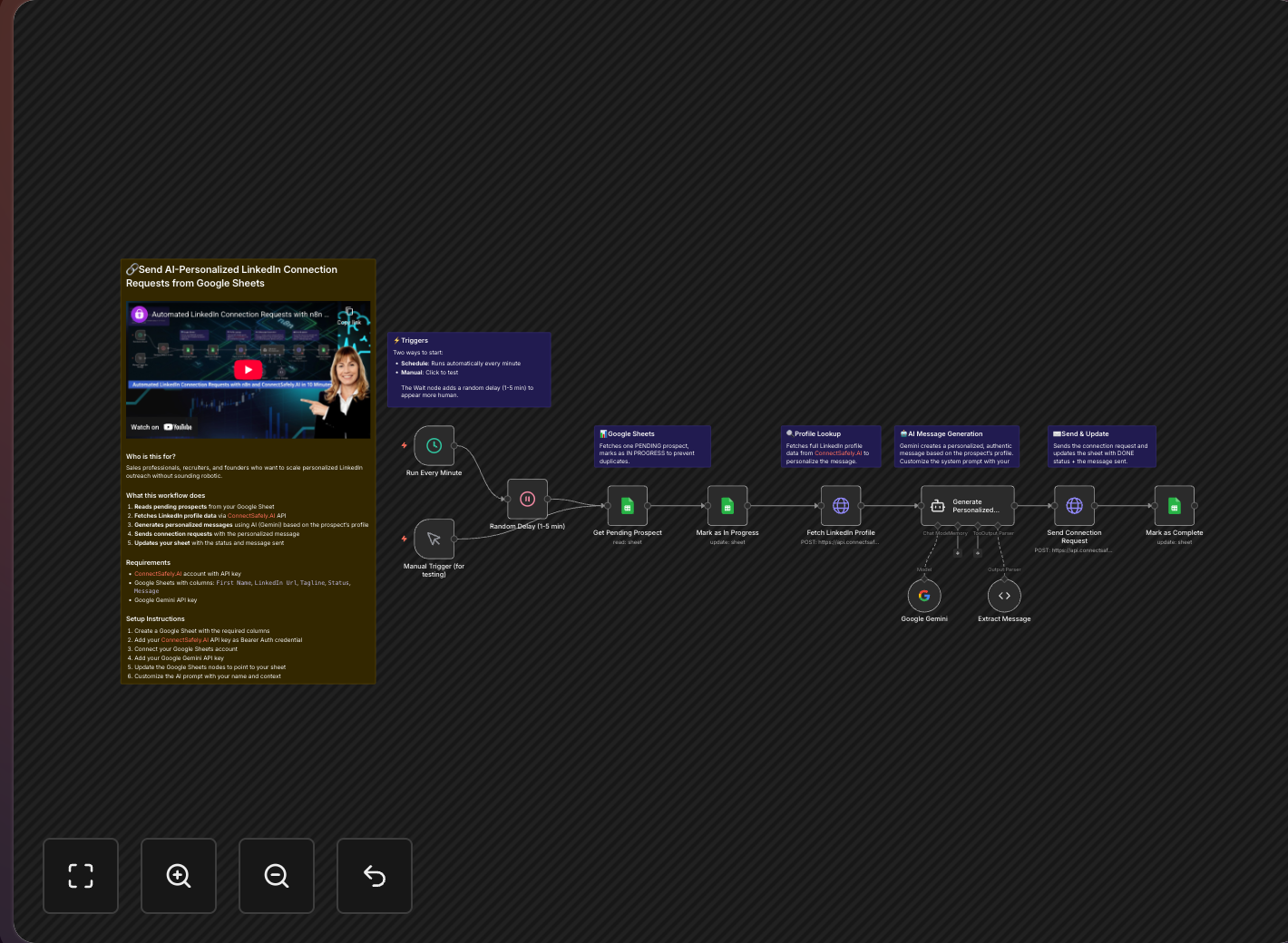
Prospect list → Fetch profile → AI generates message → Send request → Log result
What Makes This Workflow Special
True Personalization
Gemini analyzes each profile for:
- Recent posts and articles
- Job changes and promotions
- Shared connections and groups
- Skills and endorsements
- Common interests
Natural Language
Messages sound human because:
- Varied sentence structures
- Appropriate tone matching
- Context-relevant references
- Natural conversation starters
Scalable Quality
According to HubSpot's research on sales personalization, personalized outreach increases response rates by up to 50%. This workflow delivers:
- Consistent quality at scale
- No copy-paste fatigue
- Every message feels crafted
Setting Up the Workflow
Step 1: Prepare Your Prospect Sheet
Create a Google Sheet with columns:
| Column | Description |
|---|---|
| Profile URL | LinkedIn profile link |
| Name | For reference |
| Status | Pending/Sent/Error |
| Message | AI-generated message (filled by workflow) |
| Sent Date | Timestamp when sent |
Step 2: Configure Google Gemini
Get API Access
- Go to Google AI Studio
- Create an API key
- Add to n8n credentials
Craft Your Prompt Template
You are helping me write LinkedIn connection request messages.

Based on this person's profile:
- Name: {{name}}
- Headline: {{headline}}
- Summary: {{summary}}
- Recent Activity: {{recentPosts}}

Write a short (under 300 characters) connection request that:
1. References something specific from their profile
2. Explains why I want to connect
3. Sounds natural and human
4. Doesn't use cliches like "I'd like to pick your brain"

My context: [Your role/what you do]
Step 3: Build the n8n Workflow
Node 1: Manual Trigger Run on-demand when you have new prospects
Node 2: Google Sheets - Get Prospects
- Filter: Status = "Pending"
- Limit: 20-30 per run (respects LinkedIn's connection limits)
Node 3: ConnectSafely.ai - Get Profile Fetch full profile data for AI context using the ConnectSafely API
Node 4: Google Gemini - Generate Message Use the prompt template with profile data
Node 5: ConnectSafely.ai - Send Request Send connection with AI-generated note
Node 6: Google Sheets - Update Status Mark as "Sent" with timestamp
Video Tutorial
Optimizing AI Output
Good Prompts = Good Messages
Be Specific About Tone
Write in a friendly, peer-to-peer tone.
Avoid: corporate speak, excessive flattery, sales pitches
Include: genuine curiosity, shared interests, specific observations
Provide Context About You
I'm a [role] at [company]. I help [target audience] with [problem].
I'm reaching out to [type of people] because [genuine reason].
Set Constraints
- Maximum 280 characters (LinkedIn limit)
- No emojis
- One clear reason to connect
- End with a soft CTA or observation, not a question
A/B Testing Messages
Track acceptance rates by message style:
- Question vs. statement endings
- Formal vs. casual tone
- Single point vs. multiple references
- With vs. without compliment
Best Practices
Quality Over Quantity
According to LinkedIn's community guidelines, quality engagement is prioritized over volume:
- Review AI messages before sending
- Edit obvious errors
- Skip weak generations
Respect Platform Limits
- 20-30 requests per day max
- Random delays between sends
- Don't rush through your list
Learn more about staying within LinkedIn's limits safely.
Human Review
- Spot check AI output
- Catch hallucinations
- Ensure appropriateness
Track Results
- Monitor acceptance rates (target 30%+)
- Note which profile types convert
- Refine prompt based on data
Common Issues & Fixes
| Issue | Solution |
|---|---|
| Messages sound too similar | Add randomness to prompts, vary profile data used |
| AI mentions wrong details | Clean profile data, add validation step |
| Messages too long | Add strict character limit in prompt |
| Generic despite personalization | Include more specific profile data (posts, articles) |
Frequently Asked Questions
How do I send AI-personalized LinkedIn connection requests at scale?
Use n8n with Google Gemini and ConnectSafely.ai. The workflow fetches prospect data from Google Sheets, uses Gemini to analyze each profile and generate personalized messages, then sends requests automatically. According to HubSpot's research, personalized outreach increases response rates by up to 50%. See our n8n integration guide for setup.
What acceptance rate can I expect from AI-personalized LinkedIn requests?
AI-personalized connection requests typically achieve 40-60% acceptance rates compared to 15-20% for generic requests. According to LinkedIn's data, personalized requests are 3x more likely to be accepted. The key is referencing specific profile details like recent posts or job changes.
How do I avoid getting banned when automating LinkedIn connection requests?
Stay under 20-30 requests daily with random delays between sends. ConnectSafely's automation handles rate limiting and human behavior patterns automatically. According to LinkedIn's User Agreement, the platform monitors for unusual patterns, so genuine personalization is essential.
Can I use this n8n workflow for LinkedIn recruiting?
Yes, modify the Gemini prompt to focus on career growth, skills, and project experience rather than sales messaging. Recruiters see significant improvements in candidate response rates with AI personalization. See our LinkedIn recruiting guide for prompt templates.
What's the daily limit for LinkedIn connection requests in 2026?
LinkedIn allows approximately 100 connection requests per week (about 20-30 per day for safe practice). Start conservatively at 20 requests daily and increase gradually. Focus on quality over quantity—connections who engage with your content provide more value than network size alone.
Related Workflows
- Send Connection Requests to Commenters - Engagement-based outreach
- Rewrite Viral Posts with Gemini - AI content creation
- DM Profile Visitors - Follow-up messaging after connections accept
Ready to scale your LinkedIn networking with AI? Start your ConnectSafely free trial and deploy this workflow today.
Prerequisites
- n8n instance (self-hosted or cloud)
- ConnectSafely.ai account with API key
- Google Sheets account
- Google Gemini API access
- LinkedIn account connected to ConnectSafely
Required Integrations
n8n ConnectSafely
 LinkedIn
 Google Sheets
 Google Gemini
Use Cases
- Scale personalized connection requests without sounding robotic
- Automate sales prospecting on LinkedIn
- Send context-aware connection messages at scale
- Build recruiting pipelines with AI personalization
- Grow your network with meaningful connections
Ready to get started?
Download this workflow template and customize it for your needs.
Related Templates
Auto-Connect with Commenters | n8n
Send automated connection requests to LinkedIn post commenters. Get 3-5x higher acceptance rates by connecting with engaged users.
View TemplateAI Post Rewriter | n8n + Gemini
Rewrite viral LinkedIn posts in your voice using Gemini AI. Includes Telegram approval workflow before auto-publishing.
View Template