
 n8n
n8nLinkedIn Visitors to HubSpot | n8n
Auto-sync LinkedIn profile visitors to HubSpot CRM with n8n. Enrich leads with email and company data using Apify.
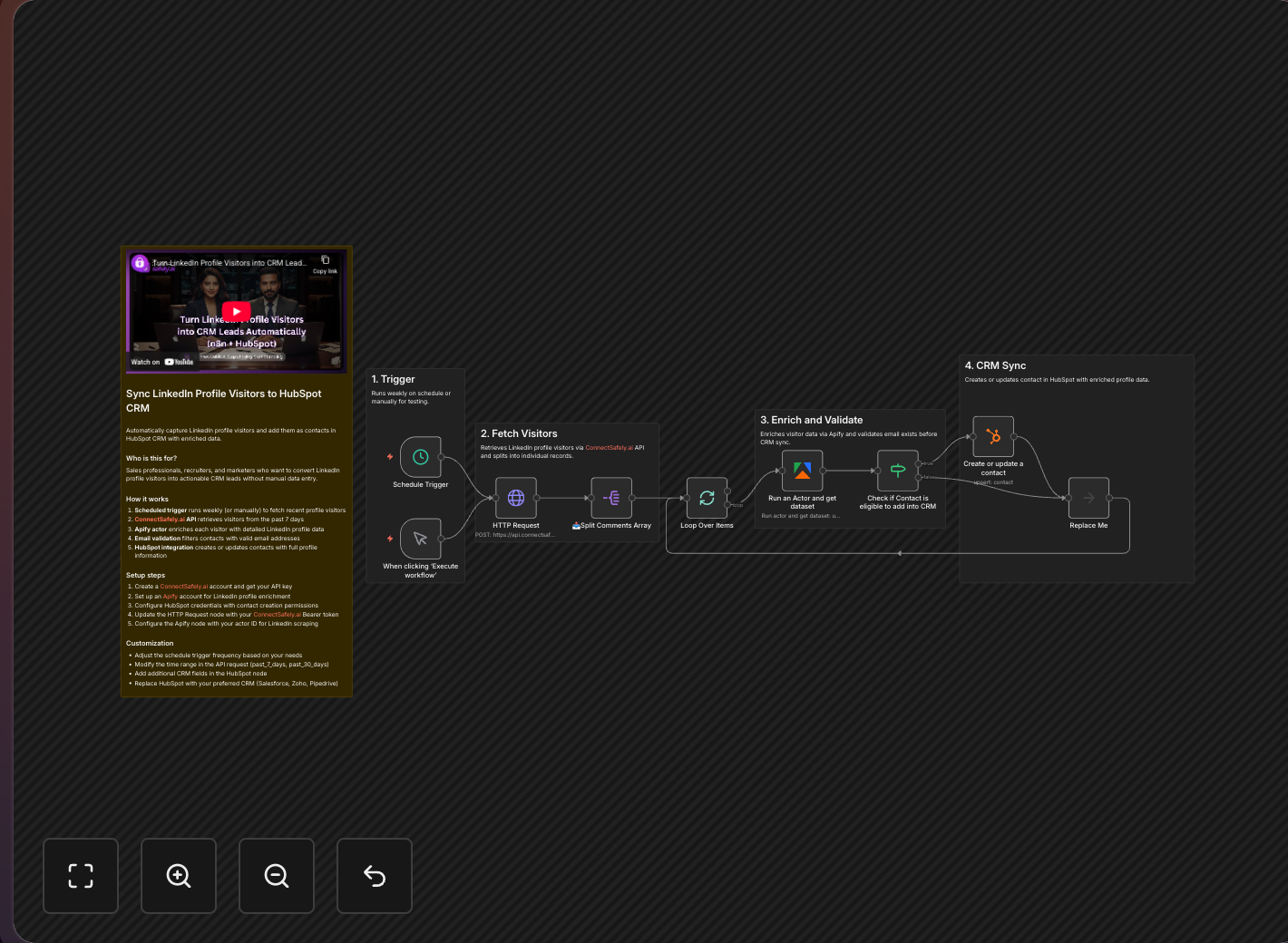
Your LinkedIn profile visitors are showing buying intent—they're researching you before reaching out. This n8n workflow automatically captures that signal and syncs enriched visitor data to HubSpot CRM.
Key Takeaways
- Profile visitors show buying intent - they're actively researching you before reaching out
- Automated enrichment adds email, company details, and job title to each visitor
- Real-time CRM sync ensures leads are captured before interest fades
- Inbound-first approach aligns with ConnectSafely's lead generation philosophy
The Hidden Value of Profile Visitors
According to LinkedIn's own research, profile visitors are among the highest-intent prospects in B2B sales.
When someone views your LinkedIn profile, they might be:
- Researching you before a meeting or call
- Evaluating your expertise for a potential project
- Checking credentials before reaching out
- Comparing options among competitors
These are warm leads with demonstrated interest. Don't let them slip away. This workflow is part of an effective inbound lead generation strategy.
Workflow Overview
Data Flow
Profile visitors → Enrich with Apify → Create HubSpot contacts → Notify sales team
What Gets Captured
From LinkedIn (via ConnectSafely)
| Data Point | Description |
|---|---|
| Profile URL | Direct link for follow-up |
| Name and headline | Basic identification |
| Current company | Account matching |
| Visit timestamp | Timing for outreach |
| Connection degree | Warm intro potential |
From Apify Enrichment
- Verified email address
- Phone number (when available)
- Full work history
- Education background
- Skills and endorsements
- Company details (size, industry, revenue)
In HubSpot
- New contact record (or updated existing)
- Source: "LinkedIn Profile Visit"
- Visit date in timeline
- All enriched properties populated
Setup Guide
Prerequisites Check
Before starting, ensure you have:
- LinkedIn Premium (required for visitor details)
- ConnectSafely Pro plan
- HubSpot CRM access
- Apify account with credits
Step 1: HubSpot Contact Properties
Create custom properties in HubSpot:
linkedin_profile_url(Single-line text)linkedin_visit_date(Date)linkedin_headline(Single-line text)lead_source(Dropdown - add "LinkedIn Profile Visit")
Step 2: n8n Workflow Configuration
Schedule Trigger
- Frequency: Every 4-6 hours
- Why: LinkedIn updates visitor data periodically
ConnectSafely.ai Node
- Operation: Get Profile Visitors
- Time Range: Last 24 hours
- Limit: 50 visitors
Get your API credentials from the ConnectSafely dashboard.
Apify Node
- Actor: LinkedIn Profile Scraper
- Input: Profile URLs from previous node
- Proxy: Use Apify residential proxies
HubSpot Node
- Operation: Create or Update Contact
- Lookup: By email or LinkedIn URL
- Properties: Map all enriched fields
Step 3: Optional Enhancements
Slack Notification Add a Slack node to alert your sales team when high-value visitors are detected. Learn about sales notification workflows.
Lead Scoring Add an IF node to filter visitors by:
- Company size
- Job title seniority
- Industry match
Auto-Outreach Connect to an outreach workflow for automated follow-up using our DM automation template.
Video Tutorial
Best Practices
Timing Matters
According to HubSpot's lead response research, responding within 5 minutes increases conversion 9x:
- Run the workflow regularly (4-6 hours)
- LinkedIn visitor data has a time limit
- Process visitors before they're forgotten
Prioritize Quality
Not all visitors are leads:
- Filter out recruiters if you're not hiring
- Focus on decision-maker job titles
- Prioritize visitors from target industries
Use ConnectSafely's filtering capabilities to focus on high-value prospects.
Respect Privacy
Following LinkedIn's professional community guidelines:
- Don't be creepy about reaching out
- Wait a natural amount of time
- Reference shared interests, not their visit
Clean Your Data
- Deduplicate contacts regularly
- Update existing records vs creating duplicates
- Archive cold visitors after 30 days
ROI Comparison
| Metric | Without Automation | With This Workflow |
|---|---|---|
| Visitors captured | ~20% (manual check) | 100% (automated) |
| Time to CRM entry | 1-2 days | Real-time |
| Email match rate | 0% (manual) | 40-60% (Apify) |
| Sales follow-up speed | Delayed | Same day |
Measuring ROI
Track these metrics to prove value:
| Metric | How to Measure | Target |
|---|---|---|
| Visitors Captured | Weekly HubSpot count | 20+/week |
| Enrichment Rate | % with valid email | 40%+ |
| Pipeline Generated | Deals from visitor leads | Track attribution |
| Conversion Rate | Visitors → Customers | 2-5% |
Frequently Asked Questions
How do I automatically sync LinkedIn profile visitors to HubSpot CRM?
Use n8n with ConnectSafely.ai and Apify. The workflow fetches visitors every few hours, enriches with email and company data via Apify, and syncs to HubSpot automatically as new contacts. Requires LinkedIn Premium for full visitor access. See the n8n integration guide for detailed setup instructions.
Do I need LinkedIn Premium to see who viewed my profile for CRM sync?
Yes, Premium is required to see the full visitor list with details. Free accounts only show the last 5 visitors with limited data. LinkedIn Premium provides timestamps, job titles, and complete visitor history—essential for effective CRM enrichment and follow-up prioritization.
Can I automatically get email addresses from LinkedIn profile visitors?
Yes, Apify's LinkedIn enrichment discovers professional emails when publicly available. Match rates are typically 40-60% depending on industry. For higher rates, supplement with Hunter.io or Apollo.io in your n8n workflow.
What's the best way to reach out to LinkedIn profile visitors from HubSpot?
Never mention you saw them view your profile—according to LinkedIn's community guidelines, this feels intrusive. Find a natural reason to connect: shared interests, mutual connections, or relevant content you published. Use HubSpot sequences triggered by "LinkedIn Profile Visit" source for automated follow-up.
How often should I sync LinkedIn visitors to HubSpot CRM?
Run every 4-6 hours while visitor interest is fresh. According to HubSpot's lead response research, responding within 5 minutes increases conversion 9x. LinkedIn has retention limits on visitor data, so frequent syncs prevent missing high-intent leads.
Related Workflows
- Add LinkedIn Commenters to HubSpot - Engagement-based leads
- Send DMs to Profile Visitors - Direct outreach to visitors
- AI-Powered Connection Requests - Personalized networking
Capture every profile visitor as a CRM lead. Start your ConnectSafely free trial and automate your inbound pipeline today.
Prerequisites
- n8n instance (self-hosted or cloud)
- ConnectSafely.ai account with API key
- HubSpot account with contact creation permissions
- Apify account for LinkedIn enrichment
- LinkedIn account connected to ConnectSafely
Required Integrations
n8n ConnectSafely
 LinkedIn
 HubSpot
 Apify
ApifyUse Cases
- Convert profile visitors into CRM leads automatically
- Capture warm leads who are researching you
- Build sales pipelines from inbound interest
- Enrich visitor data with email and company info
- Track profile visitor engagement over time
Ready to get started?
Download this workflow template and customize it for your needs.
Related Templates
LinkedIn Commenters to HubSpot | n8n
Capture LinkedIn post commenters and sync them to HubSpot CRM automatically. Enrich contacts with email and company data using Apify.
View TemplateAuto-DM Profile Visitors | n8n LinkedIn
Auto-message LinkedIn profile visitors with n8n. Route DMs to connections and requests to non-connections for 3x better response rates.
View Template