 Make
MakeTurn LinkedIn Commenters into Connections: Make.com Scenario
Automatically send LinkedIn connection requests to people who comment on posts. Stop manually following up — let Make.com and ConnectSafely do it for you.
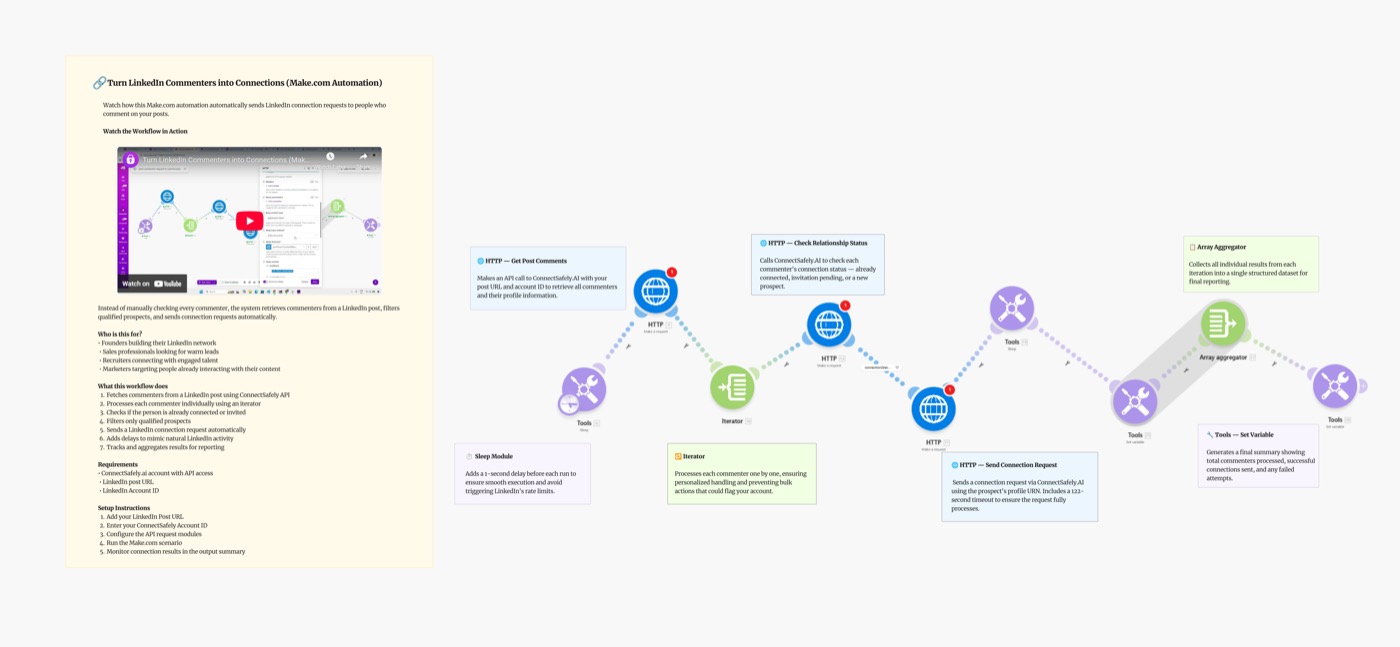
Stop manually sending LinkedIn connection requests to post commenters. This Make.com scenario automatically sends connection requests to everyone who comments on a LinkedIn post — turning your best content into a lead generation engine.
Scenario Overview
Video Tutorial
Why Target Commenters?
People who comment on LinkedIn posts are warm, engaged prospects — they've already shown interest in the topic. Compared to cold outreach:
- Commenters know who you are — they interacted with your content
- Context for connection — you can reference the post they commented on
- Higher acceptance rates — warm connections accept ~60-75% vs 25-35% for cold
- No research needed — targeting is done by LinkedIn's own engagement
According to LinkedIn's engagement data, people who engage with content are 3x more likely to respond to connection requests from the original poster.
What You'll Build
A Make.com scenario that runs automatically and:
- Fetches commenters from a specified LinkedIn post via ConnectSafely API
- Iterates through each profile with built-in rate limiting
- Sends a connection request to every commenter
- Logs the result for tracking and review
Trigger (Schedule/Manual) → Fetch Commenters → Iterator → Send Connection → Log Result
Key Takeaways
- Zero manual work — runs on a schedule after initial setup
- Warm outreach — every prospect has already engaged with your content
- Safe by design — ConnectSafely handles LinkedIn rate limits automatically
Setting Up the Blueprint
Step 1: Get Your ConnectSafely API Key
- Log in to ConnectSafely.ai
- Go to Settings → API Key
- Copy your API key
- In Make, open the HTTP module and add:
Authorization: Bearer YOUR_API_KEY
Step 2: Identify Your Target Post
Get the LinkedIn post URL you want to target commenters from. You can use:
- Your own high-performing posts
- A competitor's viral post in your niche
- Industry thought leaders' discussions
Post URL format:
https://www.linkedin.com/posts/[author]/[post-id]
Step 3: Configure the Scenario Modules
Module 1: Schedule Trigger
- Run: Once daily (recommended)
- Timing: During business hours (9AM–5PM your timezone)
Module 2: ConnectSafely — Get Post Commenters
GET https://api.connectsafely.ai/v1/posts/commenters
Headers: Authorization: Bearer YOUR_API_KEY
Body: { "postUrl": "YOUR_LINKEDIN_POST_URL" }
Returns a list of profiles who commented, including LinkedIn URL and name.
Module 3: Iterator
- Loops through each commenter profile returned from Step 2
- Make's built-in Iterator module handles this automatically
Module 4: Filter (Optional but Recommended)
Add a filter to skip:
- People you're already connected with
- Profiles outside your target geography or industry
- Profiles with no headline (low-quality accounts)
Module 5: ConnectSafely — Send Connection Request
POST https://api.connectsafely.ai/v1/connections/send
Headers: Authorization: Bearer YOUR_API_KEY
Body: {
  "linkedinUrl": "{{profile.linkedinUrl}}",
  "message": "Hey {{profile.firstName}}, saw your comment on [post topic] — really resonated. Would love to connect!"
}
Module 6: Sleep (Rate Limiting)
- Add: 30–60 seconds between each send
- Prevents triggering LinkedIn's automation detection
Module 7: Log Result
- Use Make's built-in Data Store or Google Sheets to log:
- Profile URL
- Name
- Status (Sent / Error)
- Timestamp
Step 4: Test the Scenario
- Run the scenario manually with a single post URL
- Check ConnectSafely dashboard to confirm the request was sent
- Verify the log captures the result correctly
- Enable the schedule when you're confident it's working
Personalizing Your Connection Message
The default message works well, but personalizing it per post increases acceptance rates significantly.
Generic (works):
Hey {{firstName}}, saw your comment and thought we should connect!
Personalized (better):
Hey {{firstName}}, your comment about [specific topic] really resonated — I'm working on the same problem. Would love to connect and share notes.
Topic-specific (best): Write a template per post topic so the context is always relevant. Use Make's Text module to swap templates based on which post URL triggered the run.
Note: Keep messages under 280 characters — LinkedIn's hard limit for connection notes.
Best Practices
Which Posts to Target
Select posts with:
- High comment volume (50+ comments) — maximize reach per post
- Recent engagement (last 7 days) — people will remember the post
- Relevant audience — commenters match your ICP (ideal customer profile)
- Your own content — highest acceptance rates, they already know you
Safe Sending Limits
| Scenario | Daily Limit |
|---|---|
| New accounts (< 3 months old) | 10–15/day |
| Established accounts | 20–25/day |
| Premium accounts | 25–30/day |
Start conservatively at 10/day and increase gradually over 2–3 weeks.
Avoid These Mistakes
- ❌ Don't run on the same post twice — duplicates annoy people and waste operations
- ❌ Don't send at odd hours — 3AM sends look robotic
- ❌ Don't skip the message — blank connection requests have 40% lower acceptance
- ✅ Do filter out existing connections — check before sending
Scaling the Blueprint
Once the basics work, extend it to:
- Multi-post targeting — feed a list of post URLs and process all commenters at once
- CRM sync — push new connections to HubSpot or Salesforce after they accept
- Follow-up DM — send a message 24 hours after the connection is accepted
- AI personalization — use Google Gemini to generate a custom message per commenter (see our AI outreach blueprint)
Common Issues & Fixes
| Issue | Solution |
|---|---|
| No commenters returned | Check the post URL is correct and publicly accessible |
| Duplicate sends | Add a Data Store check before Module 5 to skip already-sent profiles |
| API rate limit (429) | Increase Sleep module to 60–120 seconds |
| Connection requests failing | Verify LinkedIn account is connected in ConnectSafely dashboard |
| Scenario uses too many operations | Reduce iterator batch size to 10 per run |
Frequently Asked Questions
How do I automatically connect with LinkedIn post commenters?
Use this Make.com scenario with ConnectSafely's API. The scenario fetches commenters from any LinkedIn post URL and automatically sends each one a personalized connection request. Get started by connecting your API key.
Is it safe to automate LinkedIn connection requests to commenters?
Yes, when done within LinkedIn's limits (20–25/day) with randomized delays between sends. ConnectSafely's API uses human-like behavior patterns to stay compliant. Targeting commenters is especially safe because they've already engaged with your content, making the connection feel natural.
How many connection requests can I send per day safely?
Start with 10–15/day for new accounts, or 20–25/day for established accounts. Use ConnectSafely's built-in rate limiting and add a 30–60 second Sleep module in Make between each send. Gradually increase over weeks rather than jumping to maximum limits immediately.
What's a good connection message for post commenters?
Keep it short, specific, and reference the post: "Hey [Name], your comment on [topic] caught my attention — I'm working on the same problem. Would love to connect!" Under 280 characters, reference the post context, no pitches in the first message. See the FAQ in our AI outreach blueprint for more message templates.
Can I use this for someone else's post (not just my own)?
Yes — any public LinkedIn post URL works. Targeting commenters on competitor or industry thought leader posts is a powerful strategy for reaching pre-qualified audiences who are already engaging with your niche.
Related Workflows
- AI-Powered LinkedIn Outreach with Make.com + Gemini - Add AI personalization to your outreach
- n8n: Send Connections to Post Commenters - Same workflow, built on n8n
- LinkedIn Commenters to HubSpot CRM - Sync commenters directly to your CRM
Ready to turn your LinkedIn engagement into real connections? Start your ConnectSafely free trial to launch in minutes.
Prerequisites
- Make.com account (free tier works for testing)
- ConnectSafely.ai account with API key
- LinkedIn account connected to ConnectSafely
- LinkedIn post URL(s) to target commenters from
Required Integrations
Make.com ConnectSafely
 LinkedIn
Use Cases
- Automatically connect with everyone who comments on your LinkedIn posts
- Turn content engagement into real network growth
- Follow up with people already interested in your content
- Convert post commenters into leads without manual outreach
- Grow your LinkedIn network from warm, engaged prospects
Ready to get started?
Download this workflow template and customize it for your needs.
Related Templates
AI-Powered LinkedIn Outreach: Make.com Scenario
Automate personalized LinkedIn outreach at scale with Make.com, Google Sheets, Gemini AI, and ConnectSafely.ai. Build a complete AI-powered lead gen scenario.
View TemplateAuto-Connect with Commenters | n8n
Send automated connection requests to LinkedIn post commenters. Get 3-5x higher acceptance rates by connecting with engaged users.
View TemplateLinkedIn Commenters to HubSpot | n8n
Capture LinkedIn post commenters and sync them to HubSpot CRM automatically. Enrich contacts with email and company data using Apify.
View Template