
 n8n
n8nLinkedIn Group Members to Sheets | n8n
Extract LinkedIn group members to Google Sheets with n8n. Filter for premium members and export prospect lists automatically.
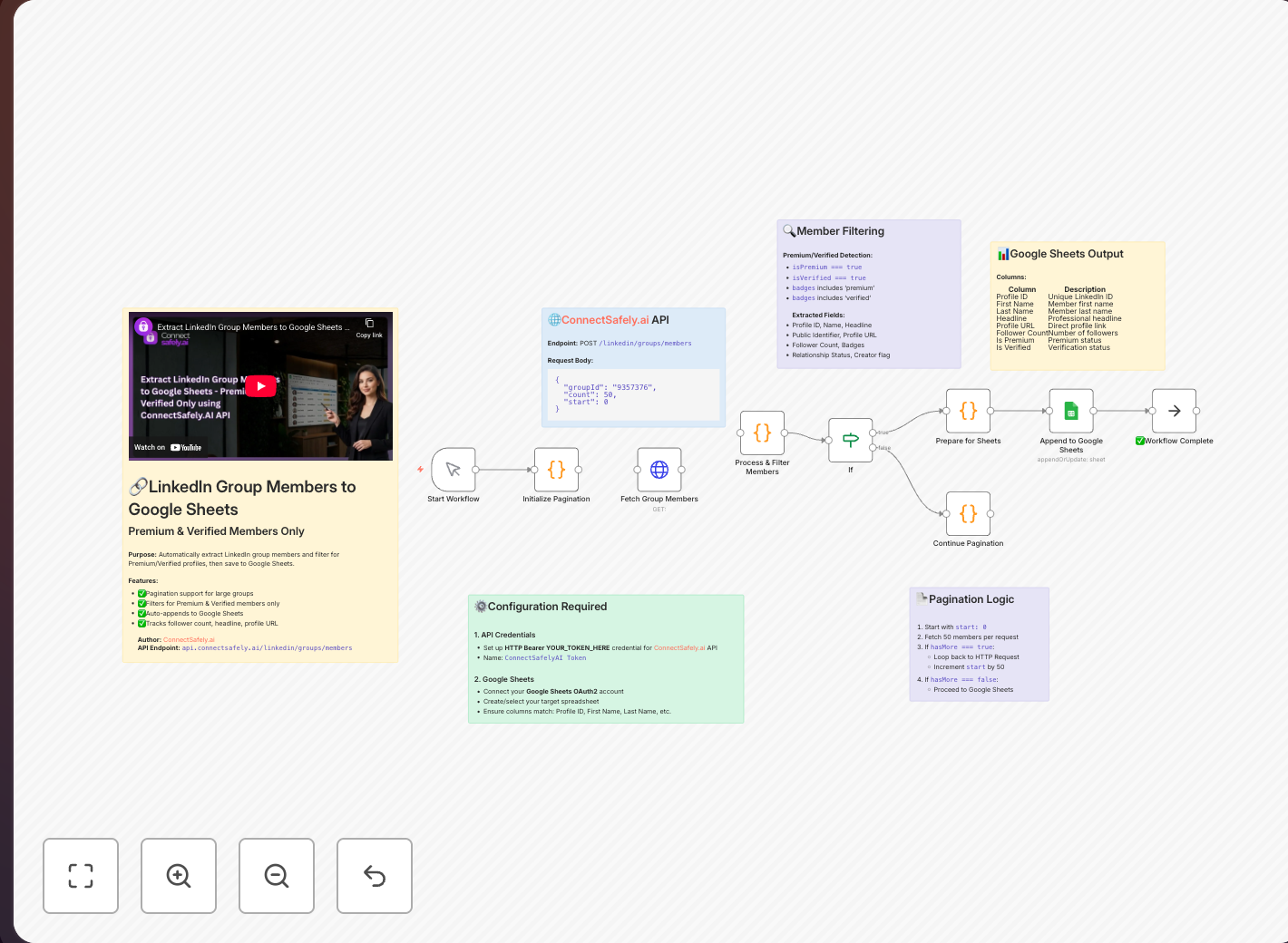
Build highly targeted prospect lists by extracting members from LinkedIn groups in your industry. This workflow helps you identify and export qualified leads who have already self-selected into relevant communities.
Key Takeaways
- Group members convert 2-3x better than cold prospects because they've self-identified interest in your industry
- Premium member filtering focuses your outreach on decision-makers with LinkedIn Premium subscriptions
- Automated extraction processes groups with thousands of members efficiently
- Platform-safe approach using ConnectSafely's compliant automation protects your account
The Power of Group-Based Prospecting
According to LinkedIn's B2B marketing statistics, LinkedIn groups contain some of the most engaged professionals on the platform.
LinkedIn groups are goldmines for B2B prospecting because members have:
- Self-identified interest in your industry or topic
- Active engagement signals (they joined for a reason)
- Common ground for personalized outreach
This workflow automates the tedious process of manually reviewing group members and building prospect lists. Learn more about inbound prospecting strategies.
Workflow Overview
Key Features
- Premium Member Filtering: Focus on decision-makers with LinkedIn Premium
- Verified Profile Detection: Prioritize profiles with verification badges
- Batch Processing: Handle groups with thousands of members efficiently
- Deduplication: Avoid adding the same person twice across runs
What Gets Exported
For each group member, the workflow captures:
| Field | Description | Why It Matters |
|---|---|---|
| Profile URL | Direct link to LinkedIn profile | For personalized outreach |
| Full Name | First and last name | Personalization |
| Headline | Current job title/description | Role qualification |
| Company | Current employer | Company targeting |
| Location | Geographic location | Territory assignment |
| Premium Status | LinkedIn Premium subscriber | Decision-maker signal |
| Connection Degree | 1st, 2nd, or 3rd degree | Warm intro potential |
Setup Guide
Prerequisites
- Group Membership: You must be a member of the LinkedIn group you want to extract
- ConnectSafely Account: Pro plan with API access enabled
- Google Account: With Google Sheets access
Step-by-Step Configuration
1. Create Your Google Sheet
Set up a spreadsheet with these columns:
- Profile URL
- Name
- Headline
- Company
- Location
- Premium
- Extracted Date
2. Configure n8n Credentials
ConnectSafely.ai: Get your credentials from the ConnectSafely dashboard:
API Key: your-api-key
Account ID: your-account-id
Google Sheets:
- Use OAuth2 authentication
- Grant read/write access to your sheets
3. Build the Workflow
- Manual Trigger: Start the workflow on-demand
- ConnectSafely.ai Node:
- Operation: Get Group Members
- Group URL:
https://www.linkedin.com/groups/YOUR-GROUP-ID - Limit: 100 (adjust based on needs)
- Filter Node:
- Condition:
isPremiumequalstrue
- Condition:
- Google Sheets Node:
- Operation: Append Row
- Sheet: Your target spreadsheet
- Map fields to columns
Best Practices
Respect Rate Limits
According to LinkedIn's platform guidelines:
- Extract 100-200 members per run maximum
- Wait 24 hours between large extractions
- Rotate between different groups
Use ConnectSafely's built-in rate limiting for automatic protection.
Quality Over Quantity
- Focus on groups with active discussions
- Prioritize smaller, niche groups over massive ones
- Filter for job titles relevant to your ICP (Ideal Customer Profile)
Organize Your Data
- Create separate sheets per group
- Add extraction date for freshness tracking
- Tag members by group topic/industry
Common Use Cases
1. Sales Prospecting
Extract members from groups where your ideal customers gather. Filter by job title and company size, then import to your CRM for outreach. See our HubSpot integration template for CRM sync.
2. Competitive Research
Join competitor user groups to understand their customer base, common pain points, and feature requests. This intelligence informs your content strategy.
3. Event Promotion
Find relevant professionals for webinars, conferences, or product launches by extracting from industry groups. Combine with our DM automation for outreach.
4. Partnership Development
Identify potential partners, affiliates, or collaborators within professional communities. Premium members often indicate business leaders open to partnerships.
Comparison: Manual vs. Automated Extraction
| Aspect | Manual Extraction | This Workflow |
|---|---|---|
| Time per 100 members | 2-3 hours | 5 minutes |
| Data accuracy | Prone to errors | Consistent |
| Premium filtering | Difficult | Automatic |
| Scalability | Limited | Unlimited |
| Freshness tracking | Manual | Automatic timestamps |
Frequently Asked Questions
How do I export LinkedIn group members to Google Sheets automatically?
Use n8n with ConnectSafely.ai to fetch group members, filter by quality signals (like Premium status), and export directly to Google Sheets. You must be a member of the group to access its member list. According to tools like TexAu and PhantomBuster, LinkedIn limits extraction to 2,500 members per group. See the n8n integration guide for setup.
Can I scrape LinkedIn group members without getting my account banned?
Yes, when done correctly. ConnectSafely's platform-compliant approach respects rate limits and uses safe patterns. Industry best practice is keeping extractions under 200 members per day and waiting 24 hours between large runs. According to Evaboot, extracting 1 group or up to 2,500 members per day keeps your account safe.
How do I filter LinkedIn group members by job title in n8n?
Add a Filter node after the extraction step. Match the headline field for titles like "VP", "Director", or "CEO". For complex filtering with multiple criteria (e.g., "VP OR Director" AND "Marketing"), use n8n's Code node to parse headlines programmatically.
Is it legal to extract data from LinkedIn groups?
Extracting data from groups you're a member of for legitimate business purposes is generally acceptable. Use compliant methods, respect privacy, and never sell extracted data. Follow LinkedIn's User Agreement. The key is using the data for professional networking, not mass marketing.
Why should I filter for LinkedIn Premium members when prospecting?
Premium subscribers are typically decision-makers, active professionals, or sales leaders. They're 3x more likely to respond to outreach according to industry benchmarks. Premium status signals investment in professional networking, making these members higher-quality prospects for B2B outreach.
Related Workflows
- Export LinkedIn Search Results to Google Sheets - Search-based prospecting
- Add LinkedIn Post Commenters to HubSpot CRM - Engagement-based leads
- AI-Powered Connection Requests - Personalized outreach
Build targeted prospect lists from LinkedIn groups. Start your ConnectSafely free trial and automate your prospecting today.
Prerequisites
- n8n instance (self-hosted or cloud)
- ConnectSafely.ai account with API key
- Google Sheets account
- LinkedIn account connected to ConnectSafely
- Membership in target LinkedIn groups
Required Integrations
n8n ConnectSafely
 LinkedIn
 Google Sheets
Use Cases
- Extract qualified leads from industry LinkedIn groups
- Build targeted prospect lists for outreach campaigns
- Filter for premium LinkedIn members only
- Export group member data for CRM import
- Research competitor communities and audiences
Ready to get started?
Download this workflow template and customize it for your needs.
Related Templates
LinkedIn Search to Sheets | n8n 2026
Export LinkedIn search results to Google Sheets with n8n. Build prospect lists automatically with this simple 3-node workflow.
View TemplateLinkedIn Commenters to HubSpot | n8n
Capture LinkedIn post commenters and sync them to HubSpot CRM automatically. Enrich contacts with email and company data using Apify.
View Template