
 n8n
n8nLinkedIn Search to Sheets | n8n 2026
Export LinkedIn search results to Google Sheets with n8n. Build prospect lists automatically with this simple 3-node workflow.
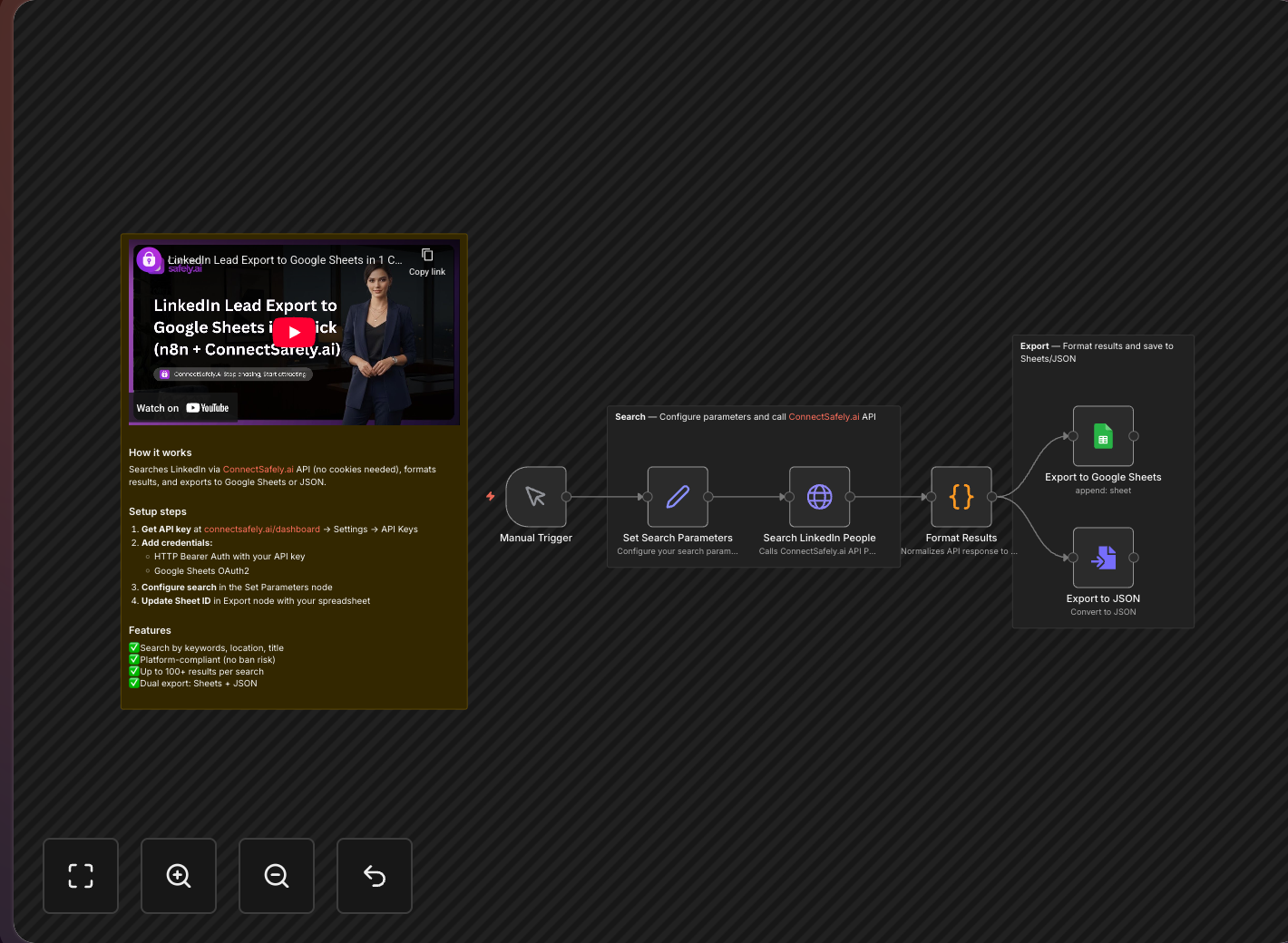
The simplest way to build prospect lists from LinkedIn using n8n. Enter your search criteria, run the 3-node workflow, and get a clean spreadsheet of matching profiles ready for outreach.
Key Takeaways
- 3-node workflow makes this the easiest n8n + ConnectSafely automation to set up
- Automate hours of manual work - no more copy-pasting from LinkedIn search results
- Structured data export captures profile URL, name, headline, company, and location
- Perfect for beginners learning LinkedIn automation with n8n
Perfect for Beginners
According to n8n's community data, LinkedIn integrations are among the most requested workflow types. This template delivers results with minimal setup.
With just 3 nodes, you can automate hours of manual LinkedIn searching and copy-pasting. This workflow serves as an excellent foundation for more advanced lead generation strategies.
Workflow Overview
How It Works
- You provide a LinkedIn search URL (with your filters applied)
- ConnectSafely.ai executes the search and retrieves profiles
- Google Sheets stores each result in a clean, organized spreadsheet
What You'll Get
Each search result includes:
| Field | Description | Use Case |
|---|---|---|
| Profile URL | Direct link to LinkedIn | For follow-up outreach |
| Full Name | First and last name | Personalization |
| Headline | Current title/description | Role qualification |
| Company | Current employer | Company targeting |
| Location | Geographic location | Territory assignment |
| Connection Degree | How you're connected | Warm intro potential |
Quick Start Guide
Step 1: Prepare Your LinkedIn Search
- Go to LinkedIn and use the search bar
- Apply filters (location, industry, job title, company, etc.)
- Copy the URL from your browser - it contains all your filters
Example URL:
https://www.linkedin.com/search/results/people/?keywords=marketing%20director&location=San%20Francisco
Learn more about advanced LinkedIn search techniques.
Step 2: Set Up Google Sheets
Create a new spreadsheet with columns:
- Profile URL
- Name
- Headline
- Company
- Location
- Date Added
Step 3: Build the n8n Workflow
Node 1: Manual Trigger
- Simple trigger to start the workflow
Node 2: ConnectSafely.ai
- Operation: Search People
- Search URL: Paste your LinkedIn search URL
- Results Limit: 25-100
Get your API credentials from the ConnectSafely dashboard.
Node 3: Google Sheets
- Operation: Append Row
- Sheet: Your spreadsheet
- Map the fields from ConnectSafely to your columns
Step 4: Run and Verify
- Click "Execute Workflow"
- Check your Google Sheet for new entries
- Verify the data looks correct
Pro Tips
Refine Your Searches
The better your LinkedIn filters, the better your results:
- Job Title: Be specific (e.g., "VP of Marketing" vs just "Marketing")
- Location: Target specific metros for local businesses
- Company Size: Filter by employee count
- Industry: Narrow down to relevant sectors
Batch Processing
For large searches:
- Run the workflow multiple times with pagination
- Add a delay between runs (1-2 minutes)
- Keep each batch under 100 results
Use ConnectSafely's rate limiting to stay within platform guidelines.
Data Hygiene
- Remove duplicates in Google Sheets (Data > Remove duplicates)
- Add a "Status" column to track outreach progress
- Archive old searches to separate sheets
Use Cases
Sales Teams
Build weekly prospect lists based on ICP criteria. Export to CRM for sequence enrollment. See our HubSpot integration for direct CRM sync.
Recruiters
Search for candidates by skills, location, and experience. Track pipeline in sheets before ATS import. According to LinkedIn's Talent Solutions data, targeted searches yield 3x better candidate quality.
Market Research
Analyze competitor employee profiles. Understand team structures and hiring patterns. This data informs your competitive positioning strategy.
Event Marketing
Find potential attendees by industry and job function. Build invite lists for webinars or conferences. Combine with our DM automation for outreach.
Comparison: Manual vs. Automated Export
| Aspect | Manual Process | This Workflow |
|---|---|---|
| Time per 100 profiles | 1-2 hours | 3 minutes |
| Data accuracy | Error-prone | Consistent |
| Repeatability | Tedious | One-click |
| Scalability | Limited | Unlimited batches |
Frequently Asked Questions
How do I export LinkedIn search results to Google Sheets with n8n?
Use n8n with ConnectSafely.ai for automated export. Copy your LinkedIn search URL (with filters applied), paste it into the workflow, and profile data flows directly into your spreadsheet. This is a simple 3-node workflow perfect for beginners. According to n8n's community data, LinkedIn integrations are among the most requested workflow types. See the n8n integration guide for setup.
Can I scrape LinkedIn search results without getting my account banned?
Yes, with proper precautions. ConnectSafely's compliant approach uses platform-safe patterns. According to PhantomBuster, keep batches under 100 profiles, add delays between runs, and stay under 300 exports daily. LinkedIn only displays the first 1,000 results of any search—break large searches into smaller queries.
What profile data can I extract from LinkedIn search results?
This workflow captures profile URL, full name, headline, current company, location, and connection degree. For email enrichment, add Apify or use our HubSpot integration template which includes automatic email discovery.
Does the n8n LinkedIn search export work with Sales Navigator?
Yes, Sales Navigator URLs work perfectly with ConnectSafely.ai. You get the same data extraction plus access to more advanced filtering options and larger result sets. According to LinkedIn's Talent Solutions, targeted Sales Navigator searches yield 3x better prospect quality.
How many LinkedIn profiles can I safely export per day without triggering restrictions?
Export 200-300 profiles maximum per day in batches of 50-100. Add 2-5 minute delays between batches. According to Evaboot, these limits keep your account safe from restrictions. ConnectSafely's rate limiting automates this protection automatically.
Next Steps
Once you've mastered this workflow, level up with:
- Send Connection Requests to Prospects - Automate outreach
- AI-Personalized Messages with Gemini - Add AI personalization
- Extract LinkedIn Group Members - Group-based prospecting
Build prospect lists in minutes, not hours. Start your ConnectSafely free trial and automate your LinkedIn prospecting today.
Prerequisites
- n8n instance (self-hosted or cloud)
- ConnectSafely.ai account with API key
- Google Sheets account
- LinkedIn account connected to ConnectSafely
Required Integrations
n8n ConnectSafely
 LinkedIn
 Google Sheets
Use Cases
- Build prospect lists from LinkedIn searches
- Export candidate profiles for recruiting pipelines
- Create targeted outreach lists by industry or role
- Research market segments and competitors
- Automate lead list building workflows
Ready to get started?
Download this workflow template and customize it for your needs.
Related Templates
LinkedIn Group Members to Sheets | n8n
Extract LinkedIn group members to Google Sheets with n8n. Filter for premium members and export prospect lists automatically.
View TemplateAuto-Connect with Commenters | n8n
Send automated connection requests to LinkedIn post commenters. Get 3-5x higher acceptance rates by connecting with engaged users.
View Template