How to Hibernate Your LinkedIn Account (and Undo It)
Hibernating hides your LinkedIn profile without deleting it. The exact steps, the 24-hour lock, what survives, and the four things that break while you're away.

Hibernating a LinkedIn account hides your profile from everyone — including your own connections — without deleting your data. Your connections, messages, posts and endorsements all survive; they simply stop having your name attached to them. You reactivate by logging back in, but not for 24 hours after you hibernate. That 24-hour lock is the single fact most guides bury, and it is the one that catches people out.
Key Takeaways
- Hibernation is reversible; deletion is not. Hibernated data is held intact. A closed account is permanently deleted after a 14-day grace window.
- You cannot log back in for 24 hours. Reactivation is blocked for a full day after you hibernate — plan around it if you have interviews or a live job application.
- Your content stays up, attributed to "A LinkedIn member." Posts, comments, recommendations and endorsements you gave remain visible with your name and photo stripped out.
- Premium keeps billing. Hibernation does not pause or cancel a Premium, Sales Navigator or Recruiter subscription — cancel it separately first.
- Company page admin roles block it. If you are the only admin of a company page, LinkedIn makes you reassign the role before it will let you hibernate.
Hibernate vs. Close: Which One Do You Actually Want?
These are two different settings that live next to each other in the same menu, and picking the wrong one is unrecoverable in one direction.
| Hibernate | Close (delete) | |
|---|---|---|
| Profile visibility | Hidden from everyone, including connections | Removed |
| Connections | Kept | Deleted |
| Message history | Kept, shown as "A LinkedIn member" | Removed from your side |
| Posts and comments | Stay live, de-identified | Removed within ~24 hours, may linger in search caches |
| Recommendations you gave | Stay live, de-identified | Deleted |
| Reversible? | Yes, any time after 24 hours | Only within the 14-day grace period |
| Profile appears in LinkedIn search | No | No |
| Profile appears in Google | Drops out as the page 404s | Drops out, slowly |
| Premium billing | Continues | Must be cancelled separately |
The rule: if there is any chance you will want the account back, hibernate. Deletion has a 14-day grace period, but after that your connection graph — the part that took years to build — is gone and cannot be rebuilt from an export.
Want to Generate Consistent Inbound Leads from LinkedIn?
Get our complete LinkedIn Lead Generation Playbook used by B2B professionals to attract decision-makers without cold outreach.
No spam. Just proven strategies for B2B lead generation.
If you have decided you genuinely want out for good, our guide to deleting a LinkedIn account covers the data export you should run first.
How to Hibernate Your LinkedIn Account
The setting is in the same place on desktop and mobile, but the mobile app hides it one level deeper.
Step 1: Open Settings & Privacy
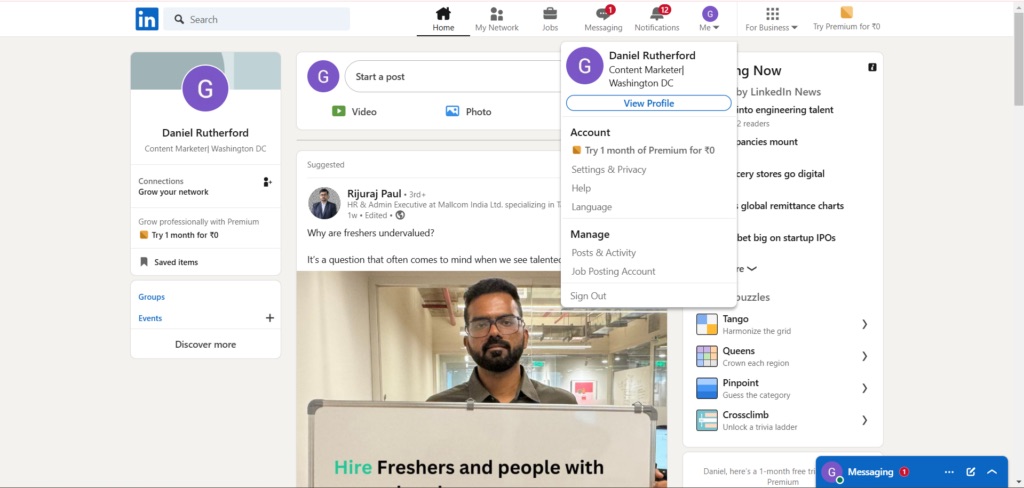
Click your profile photo in the top navigation bar, then Settings & Privacy. On the mobile app, tap your photo in the top-left corner, then the Settings gear icon.
Step 2: Go to Account preferences → Account management
In the left-hand rail, select Account preferences, then scroll to the Account management block at the bottom. You will see two entries: Hibernate account and Close account.
They sit next to each other deliberately, and they are easy to mis-click. Read the heading before you click Change.
Step 3: Select Hibernate account
Click Change next to Hibernate account. LinkedIn will surface any blockers at this point — see the troubleshooting section below if you get stopped here rather than moving to the next screen.
Step 4: Choose a reason
LinkedIn asks why you are hibernating (too many emails, privacy concerns, taking a break, and so on). This is feedback collection; the reason you pick does not change what happens to your account.
Step 5: Enter your password and confirm
Type your password and click Hibernate account. You are signed out immediately.
At this point the 24-hour clock starts. Do not attempt to log back in before it expires — you will simply be refused, and there is no support path to shorten it.
What Actually Happens While You Are Hibernated
Per LinkedIn's own documentation, hibernation de-identifies rather than removes:
- Your profile is not visible to anyone, including your first-degree connections.
- You do not appear in LinkedIn search or in LinkedIn Recruiter search results.
- Recommendations and endorsements you gave others stay on their profiles, credited to "A LinkedIn member."
- Messages you sent stay in the other person's inbox with your name replaced by "A LinkedIn member" and your photo replaced by a generic icon.
- Posts and comments you made stay live, de-identified the same way.
That last point is the one people misread. Hibernation is not a content delete. If your reason for stepping back is a specific post you regret, hibernating leaves the post up — anonymously, but up. Delete the post first, then hibernate.
What Most Guides Get Wrong About Hibernating
Wrong: "hibernating cancels your Premium subscription." It does not. Hibernation is an account-visibility state; billing is a separate system. A hibernated account on Premium Business keeps charging every month while nobody can see the profile it is attached to. Cancel the subscription first — our Premium cancellation guide covers the App Store and Google Play cases, which have their own billing paths LinkedIn cannot touch.
Wrong: "you can hibernate and come straight back." The 24-hour reactivation lock is firm. If you hibernate on a Sunday night because you are sick of the feed, and a recruiter emails Monday morning asking you to send your profile, you cannot get back in.
Wrong: "hibernation hides you from Google." Eventually, yes — your public profile URL stops resolving, so the page drops out of the index on Google's own schedule, which can take days to weeks. Hibernating the evening before a background check does not clear your search results by morning. If Google visibility is the actual goal, the public profile visibility setting under Visibility → Edit your public profile is the faster lever, and it does not cost you the account.
Wrong: "it's the private-browsing setting." It is not. Private mode changes how you appear when you view other people's profiles. Hibernation removes your profile from view entirely. If you only want to browse without leaving a trace, see LinkedIn private mode — it is a much smaller hammer.
Why LinkedIn Might Not Let You Hibernate
If the Hibernate account option is missing, greyed out, or throws an error, it is almost always one of these:
| Blocker | What LinkedIn wants |
|---|---|
| Sole admin of a company page | Add another admin, or transfer the role, before hibernating |
| Unpaid balance on Premium, Recruiter or ad accounts | Settle the outstanding invoice |
| Active LinkedIn Ads account with live campaigns | Pause campaigns and reassign account access |
| Sole owner of a LinkedIn group | Assign another owner or delete the group |
| Recently changed password or email | Wait out the short security hold, then retry |
| Using an old app build | Hibernate on desktop instead — the web flow is the reliable one |
If the page returns a 404 rather than an error, you have almost certainly hit a stale in-app link. Go to the desktop site and navigate through Settings & Privacy → Account preferences → Account management by hand rather than following a deep link.
How to Unhibernate (Reactivate)
There is no "reactivate" button and no form to fill in. You log in normally with your usual email and password, and the account comes back.
Three things to expect on the way back:
- The 24-hour lock must have expired. Before that, login is refused outright.
- Connection and follower counts wobble for up to 48 hours. LinkedIn is re-indexing you. The numbers settle on their own; do not panic-post about lost followers.
- Your reach starts cold. Nothing was deleted, but the algorithm has had no engagement signal from you for however long you were away. Expect your first two or three posts to underperform your pre-hibernation baseline before distribution normalises.
That third point is worth planning around. If you are hibernating for a month and you rely on LinkedIn for inbound, budget two weeks of rebuild on the other side.
The Real Question: Why Are You Hibernating?
In practice, people hibernate for one of four reasons, and hibernation is the right answer to only two of them.
| Reason | Is hibernation right? | Better option |
|---|---|---|
| Job hunting and your employer might see | No | Turn off profile-change broadcasts and set Open To Work to recruiters only |
| Too many recruiter InMails | No | Set Open To Work off and turn off InMail from strangers in messaging preferences |
| Genuine burnout, taking months off | Yes | — |
| Privacy during a sensitive life event | Yes | — |
The job-hunting case is the one worth flagging hardest. Hibernating during a job search removes you from exactly the recruiter searches you want to appear in. It solves a visibility problem by deleting your visibility.
If the Problem Is the Grind, Not the Platform
A lot of hibernation decisions are really outreach-fatigue decisions. The account is exhausting because it has become a channel for sending 40 connection requests a day and chasing people who never asked to hear from you — a treadmill that produces low returns and a lot of guilt about the days you skip.
That is worth naming, because the fatigue is a symptom of the outbound model rather than of LinkedIn itself. HubSpot's research puts inbound leads closing at 14.6% against 1.7% for outbound. The inbound version of a LinkedIn presence — publishing, commenting where your buyers already are, and letting the interested party open the conversation — does not require daily volume, so it does not produce the same burnout.
ConnectSafely is built for that model: authority-building activity within LinkedIn's own limits, at $39/month, rather than the connection-request volume that gets accounts restricted in the first place. It will not help you if what you need is a genuine break from professional networking — that is what hibernation is for, and it is a legitimate use of it. But if you are hibernating to escape an outreach quota, changing the quota is the smaller change.
Our inbound growth strategies guide covers what that looks like week to week.
Frequently Asked Questions
How do I hibernate my LinkedIn account?
Click your profile photo → Settings & Privacy → Account preferences → Account management → Hibernate account → Change. Pick a reason, enter your password, and confirm. You are signed out immediately and cannot log back in for 24 hours.
How long can a LinkedIn account stay hibernated?
Indefinitely. LinkedIn publishes no maximum hibernation period and does not auto-delete hibernated accounts. The only time limit runs the other way: a mandatory 24-hour wait before you can reactivate.
Can people see my profile if I hibernate my LinkedIn account?
No. A hibernated profile is hidden from everyone, including your first-degree connections, and does not appear in LinkedIn search or LinkedIn Recruiter. Content you previously posted stays visible but is attributed to "A LinkedIn member" with a generic profile icon.
Does hibernating LinkedIn delete my connections and messages?
No. Connections, message history, posts and endorsements are all retained and come back exactly as they were when you reactivate. Only your identity is detached while you are away. Deleting your account is what removes them.
Does hibernating my LinkedIn account cancel LinkedIn Premium?
No. Premium, Sales Navigator and Recruiter subscriptions keep billing while your account is hibernated. Cancel the subscription separately before you hibernate, or you will pay for months of a profile nobody can see.
Why can't I hibernate my LinkedIn account?
The usual blockers are being the only admin on a company page, being the sole owner of a group, an unpaid Premium or Ads balance, or an active advertising campaign. Resolve the blocker LinkedIn names, then retry on desktop rather than in the mobile app.
What is the difference between hibernating and deleting a LinkedIn account?
Hibernating hides your profile while preserving every piece of underlying data, and is reversible at any point after 24 hours. Deleting removes your account permanently after a 14-day grace period, taking your connections, messages and recommendations with it.
Coming back and want the first posts to land? The free virality checker scores a draft before you publish — no signup.
See How It Works
Watch how people get more LinkedIn leads with ConnectSafely




Related Articles