
 Make
MakeAutomate LinkedIn Follows from Google Sheets: Make.com Scenario
Stop clicking the follow button one by one. This Make.com scenario reads your target list from Google Sheets and automatically follows each LinkedIn profile.
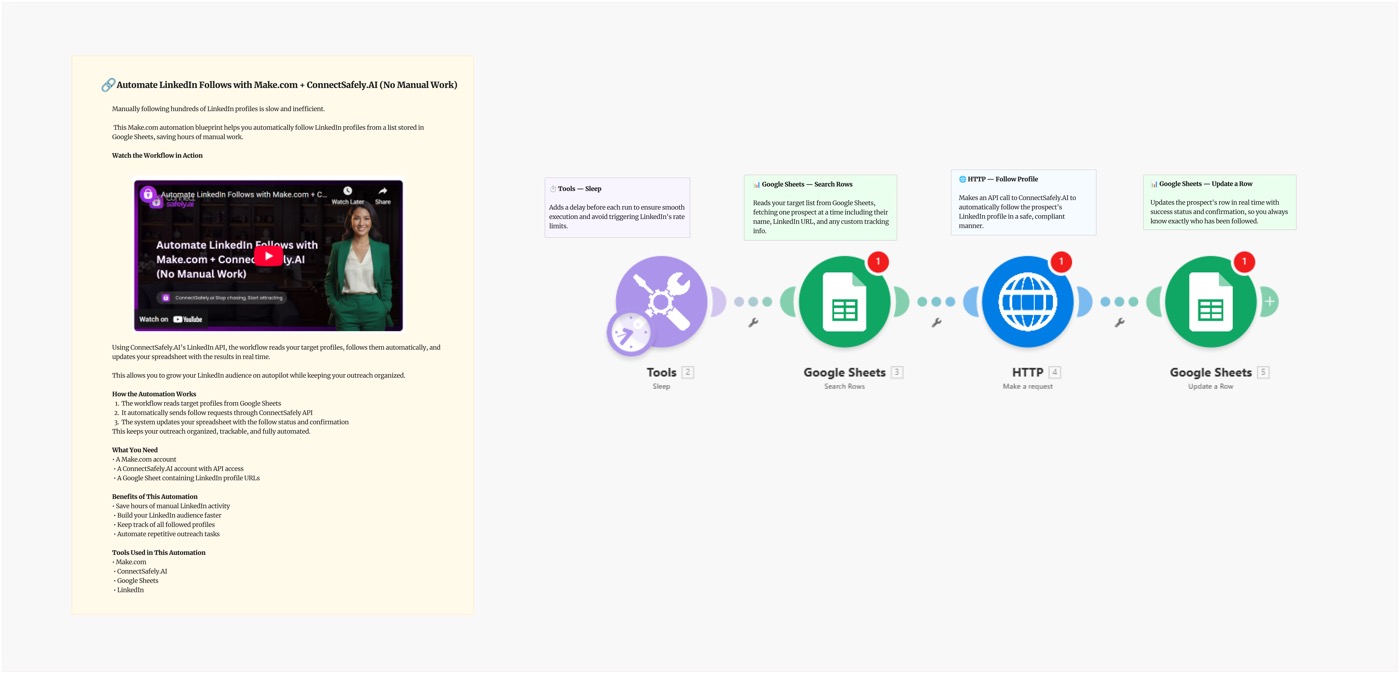
Stop clicking the follow button one by one on LinkedIn. This Make.com scenario reads your target list directly from Google Sheets and automatically follows each profile using ConnectSafely — no manual work, no browser extensions, no limits headaches.
Video Tutorial
Why Automate LinkedIn Follows?
Following is a low-friction, high-impact LinkedIn growth strategy:
- No approval needed — unlike connection requests, follows are instant
- Warms up prospects — they see your name before you ever reach out
- Algorithm signal — following creators boosts their content in your feed
- Scales safely — LinkedIn is far more lenient on follows than connections
- Sequencing play — follow → engage with content → connect → message
Many top sales teams use "follow → comment → connect" as their warm outreach sequence. This blueprint handles step one at scale.
Scenario Overview
What You'll Build
A Make.com scenario that:
- Reads LinkedIn URLs from your Google Sheet
- Iterates through each profile with safe delays
- Follows each profile via ConnectSafely API
- Updates the sheet row with status and timestamp
Google Sheets (New Rows) → Iterator → ConnectSafely (Follow) → Update Row
Setting Up the Blueprint
Step 1: Prepare Your Google Sheet
Create a sheet with these columns:
| Column | Description |
|---|---|
| LinkedIn URL | Full profile URL (required) |
| Name | For reference |
| Status | Pending / Done / Error |
| Followed Date | Filled by Make automatically |
Step 2: Connect Your API Key
- Go to ConnectSafely.ai → Settings → API Key
- Add to Make's HTTP module:
Authorization: Bearer YOUR_API_KEY
Step 3: Configure the Modules
Module 1: Google Sheets — Watch Rows
- Trigger: New rows where
Status = Pending - Limit: 50–100 rows per run
Module 2: Iterator
- Loop through each row returned
Module 3: ConnectSafely — Follow Profile
POST https://api.connectsafely.ai/v1/follows/send
Headers: Authorization: Bearer YOUR_API_KEY
Body: { "linkedinUrl": "{{row.LinkedInURL}}" }
Module 4: Sleep
- 10–30 second delay between follows
- Follows are lower-risk than connections but still worth spacing out
Module 5: Google Sheets — Update Row
- Set
Status=Done - Set
Followed Date={{now}}
Step 4: Build Your Target List
Best sources for your follow list:
- LinkedIn search results (use the LinkedIn Search to Sheets Blueprint)
- Event attendee lists
- Industry conference speakers
- Competitor follower lists
- Podcast guest lists in your niche
Best Practices
Safe Daily Follow Limits
| Account Type | Max Follows/Day |
|---|---|
| New account | 50–80/day |
| Established account | 100–150/day |
| Premium account | 150–200/day |
Follows are much safer than connection requests — LinkedIn allows significantly more.
Sequencing Strategy
Use follows as step one of a multi-touch warm outreach sequence:
- Day 1: Follow profile (this blueprint)
- Day 3–5: Like or comment on their recent post
- Day 7: Send connection request with context
- Day 10: Send DM after connection accepted
This sequence achieves 50–70% connection acceptance vs. 25–35% for cold requests.
Target the Right People
Follow people who:
- Match your ICP (ideal customer profile)
- Are active posters (check if they post regularly)
- Work at target accounts you want to sell to
- Are thought leaders whose followers are your audience
Common Issues & Fixes
| Issue | Solution |
|---|---|
| Follow fails (404) | LinkedIn profile URL may be incorrect or profile deleted |
| Rate limit error (429) | Increase Sleep module delay |
| Sheet not updating | Check Google Sheets module permissions in Make |
| Only some rows processed | Check "Limit" setting in Watch Rows module |
Frequently Asked Questions
How do I bulk follow LinkedIn profiles automatically?
Use this Make.com scenario with ConnectSafely's API. Paste your target LinkedIn URLs into Google Sheets, connect your API key, and the scenario reads each row and follows every profile automatically with safe rate limiting.
How many LinkedIn profiles can I follow per day?
LinkedIn allows roughly 100–200 follows per day for established accounts. Unlike connection requests (limited to ~100/week), follows are much more permissive. Start at 50/day and increase gradually. ConnectSafely handles safe sending patterns automatically.
Will people know I followed them?
Yes — LinkedIn notifies users when someone follows them (unless they've disabled notifications). This is a feature, not a bug — it creates passive visibility before you ever reach out directly.
Related Workflows
- AI-Powered Outreach with Make.com + Gemini - Follow-up with connection requests after following
- Turn Commenters into Connections - Convert engaged followers into connections
- n8n: LinkedIn Follow Automation - Same workflow built on n8n
Start building your LinkedIn presence at scale. Start your ConnectSafely free trial to go live today.
Prerequisites
- Make.com account (free tier works for testing)
- ConnectSafely.ai account with API key
- LinkedIn account connected to ConnectSafely
- Google Sheets list of LinkedIn profile URLs to follow
Required Integrations
Make.com ConnectSafely
 LinkedIn
 Google Sheets
Use Cases
- Follow hundreds of target prospects without clicking one by one
- Build visibility with key accounts before outreach
- Follow industry thought leaders and influencers at scale
- Warm up prospects by following them before sending a connection request
- Automate LinkedIn audience building from any prospect list
Ready to get started?
Download this workflow template and customize it for your needs.
Related Templates
AI-Powered LinkedIn Outreach: Make.com Scenario
Automate personalized LinkedIn outreach at scale with Make.com, Google Sheets, Gemini AI, and ConnectSafely.ai. Build a complete AI-powered lead gen scenario.
View TemplateTurn LinkedIn Commenters into Connections: Make.com Scenario
Automatically send LinkedIn connection requests to people who comment on posts. Stop manually following up — let Make.com and ConnectSafely do it for you.
View TemplateLinkedIn Auto-Follow from Sheets | n8n
Automate LinkedIn profile following with n8n and Google Sheets. This 4-node workflow follows users from your spreadsheet automatically.
View Template