
 Make
MakeFrom Comment to DM: Make.com Scenario
Post 'Comment AI and I'll send you the link' — then let Make.com handle every DM automatically. This scenario detects keyword comments and sends the resource.
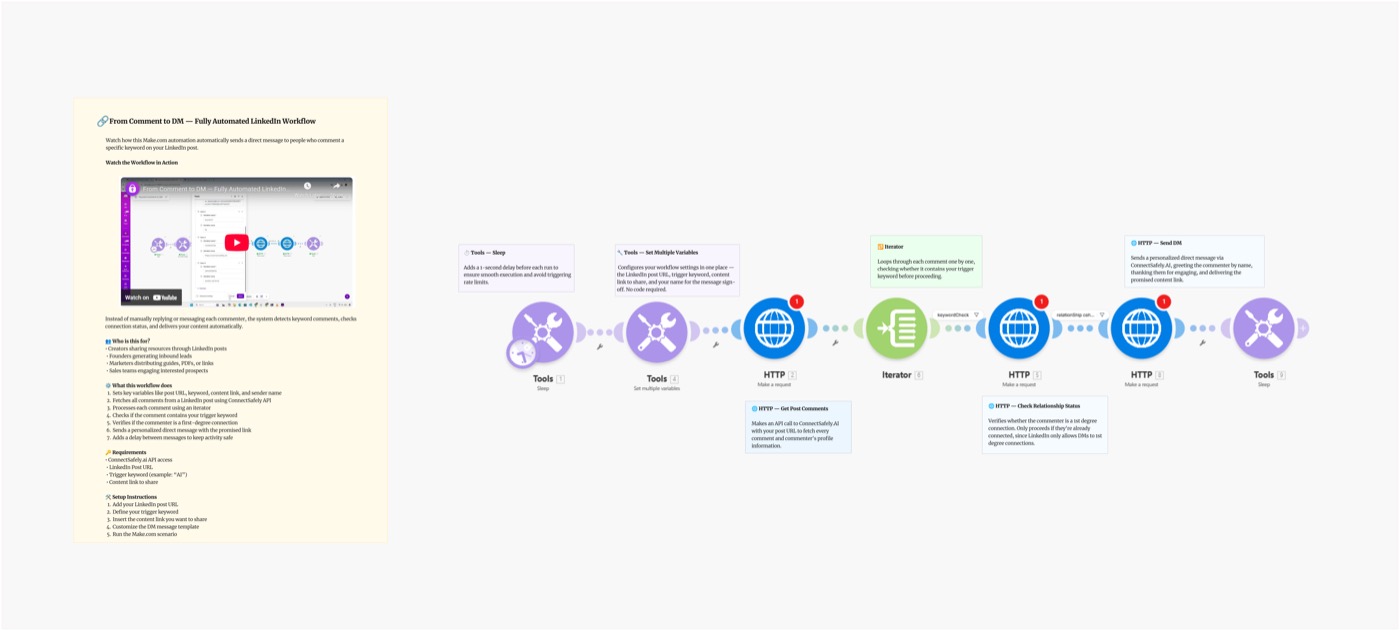
Ever posted on LinkedIn saying "Comment AI and I'll send you the link" — then spent hours manually DMing everyone? This Make.com scenario automates the entire process. Detect keyword comments on your post and send the resource automatically — at scale, with zero manual effort.
Scenario Overview
Video Tutorial
Why the "Comment to DM" Strategy Works
The keyword comment strategy is one of the most powerful LinkedIn growth tactics in 2026:
- Algorithm boost — every comment increases your post's reach dramatically
- Lead magnet delivery — deliver guides, templates, or links automatically
- Warm leads — people who comment are actively interested in the topic
- Scales infinitely — 10 or 10,000 comments, same effort on your end
Popular keyword triggers:
"Comment AI and I'll DM you the free guide" "Drop YES in the comments for the template" "Comment GUIDE and get the playbook instantly"
What You'll Build
A fully automated Make.com scenario that:
- Monitors your post for new comments on a schedule
- Filters comments containing your keyword (e.g. "AI", "YES", "GUIDE")
- Sends a DM with your resource link to each matching commenter
- Deduplicates — each person only gets one DM
- Logs results for tracking
Schedule → Fetch Comments → Keyword Filter → Dedup Check → Send DM → Log
Setting Up the Blueprint
Step 1: Connect Your API Key
- Go to ConnectSafely.ai → Settings → API Key
- Add to Make's HTTP module:
Authorization: Bearer YOUR_API_KEY
Step 2: Configure the Modules
Module 1: Schedule Trigger
- Run every 15–30 minutes for fast response
- Or hourly for lower-volume posts
Module 2: ConnectSafely — Get Post Comments
GET https://api.connectsafely.ai/v1/posts/comments
Headers: Authorization: Bearer YOUR_API_KEY
Body: { "postUrl": "YOUR_LINKEDIN_POST_URL" }
Module 3: Iterator
- Loop through each comment returned
Module 4: Text Filter (Keyword Match)
- Condition:
comment.textcontains"AI"(or your chosen keyword) - Case insensitive — catches "ai", "AI", "Ai"
- Add multiple keywords with OR conditions
Module 5: Data Store — Deduplication Check
- Skip if LinkedIn URL already in "Messaged" store
- Prevents sending the same person multiple DMs
Module 6: ConnectSafely — Send DM
POST https://api.connectsafely.ai/v1/messages/send
Headers: Authorization: Bearer YOUR_API_KEY
Body: {
  "linkedinUrl": "{{commenter.linkedinUrl}}",
  "message": "Hey {{commenter.firstName}}, here's the resource you asked for: [YOUR LINK] — let me know what you think!"
}
Module 7: Data Store — Mark as Messaged
- Save LinkedIn URL to prevent future duplicates
Module 8: Sleep
- 20–40 second delay between each DM
Step 3: Write Your Trigger Post
Structure your post for maximum response:
[Hook that creates curiosity]

[3–5 bullet points of value they'll get]

💬 Comment "[KEYWORD]" below and I'll DM you the [resource] instantly.

↩️ Repost to help others find this too
Tip: Posts with keyword CTAs typically get 5–10x more comments than regular posts. The algorithm loves it.
Message Templates
For a guide or PDF:
Hey {{firstName}}! Here's the [Guide Name] you asked for: [LINK]

Worth [X minutes] of your time — let me know what you found most useful!
For a tool or template:
{{firstName}}, here's the free [Template Name]: [LINK]

Inside you'll find [key benefit]. Happy to answer questions if anything's unclear!
For a waitlist or offer:
Hey {{firstName}}, you're on the list! [LINK] — I'll keep you posted as we get closer to launch. Thanks for the support!
Best Practices
Keyword Selection
| Keyword | Best For |
|---|---|
| Single word (AI, YES, GUIDE) | Easiest to filter, fewest false positives |
| Emoji (🔥, ✅) | Fun engagement, works for viral posts |
| Number (1, 42) | Ultra-specific, very easy to detect |
Post Timing
- Post between Tu–Th, 8–10 AM or 12–2 PM (your audience's timezone)
- Run the scenario every 15 minutes for the first 2 hours — most comments arrive early
- Switch to hourly after the initial burst
Response Speed
The faster you DM, the better:
- Under 5 minutes → highest conversion
- Under 1 hour → still good
- Over 24 hours → people forget they commented
Common Issues & Fixes
| Issue | Solution |
|---|---|
| DMs not sending | Check LinkedIn account is connected in ConnectSafely |
| False positives in keyword filter | Use exact-match condition (not "contains") |
| Same person getting multiple DMs | Verify Data Store dedup before Send module |
| Scenario missing comments | Increase schedule frequency to every 10 minutes |
Frequently Asked Questions
How do I automatically DM people who comment a keyword on LinkedIn?
Use this Make.com scenario with ConnectSafely's API. The scenario polls your post for new comments, filters ones containing your keyword, and sends a DM with your resource automatically. Get started by connecting your API key.
Why use keyword comments for LinkedIn lead generation?
Keyword comments increase your post's engagement signal to LinkedIn's algorithm, boosting reach dramatically. Meanwhile, everyone who comments is actively requesting your resource — making follow-up DMs expected and welcome, not intrusive.
How quickly should I DM people after they comment?
As fast as possible — within 5 minutes is ideal. People are still actively on LinkedIn and will remember commenting on your post. Set your Make schedule to run every 10–15 minutes for maximum speed.
Related Workflows
- Turn Commenters into Connections - Connect with everyone who comments, not just keyword commenters
- AI-Powered Outreach with Gemini - Add AI personalization to follow-up messages
- n8n: Connection Requests to Commenters - Same workflow built on n8n
Ready to automate your LinkedIn lead magnet delivery? Start your ConnectSafely free trial and go live in minutes.
Prerequisites
- Make.com account (free tier works for testing)
- ConnectSafely.ai account with API key
- LinkedIn account connected to ConnectSafely
- A LinkedIn post with a keyword CTA (e.g. 'Comment AI')
Required Integrations
Make.com ConnectSafely
 LinkedIn
Use Cases
- Auto-DM everyone who comments a keyword on your post
- Distribute lead magnets (PDFs, guides, links) via LinkedIn DM automatically
- Run giveaways and resource drops without manual follow-up
- Grow your DM conversations from viral content engagement
- Boost post reach — keyword comments = more LinkedIn algorithm signals
Ready to get started?
Download this workflow template and customize it for your needs.
Related Templates
Turn LinkedIn Commenters into Connections: Make.com Scenario
Automatically send LinkedIn connection requests to people who comment on posts. Stop manually following up — let Make.com and ConnectSafely do it for you.
View TemplateAI-Powered LinkedIn Outreach: Make.com Scenario
Automate personalized LinkedIn outreach at scale with Make.com, Google Sheets, Gemini AI, and ConnectSafely.ai. Build a complete AI-powered lead gen scenario.
View TemplateAuto-Connect with Commenters | n8n
Send automated connection requests to LinkedIn post commenters. Get 3-5x higher acceptance rates by connecting with engaged users.
View Template