 Make
MakeAuto-Message LinkedIn Profile Visitors: Make.com Scenario
Stop letting LinkedIn profile visitors leave without a conversation. This Make.com scenario automatically messages everyone who views your LinkedIn profile.
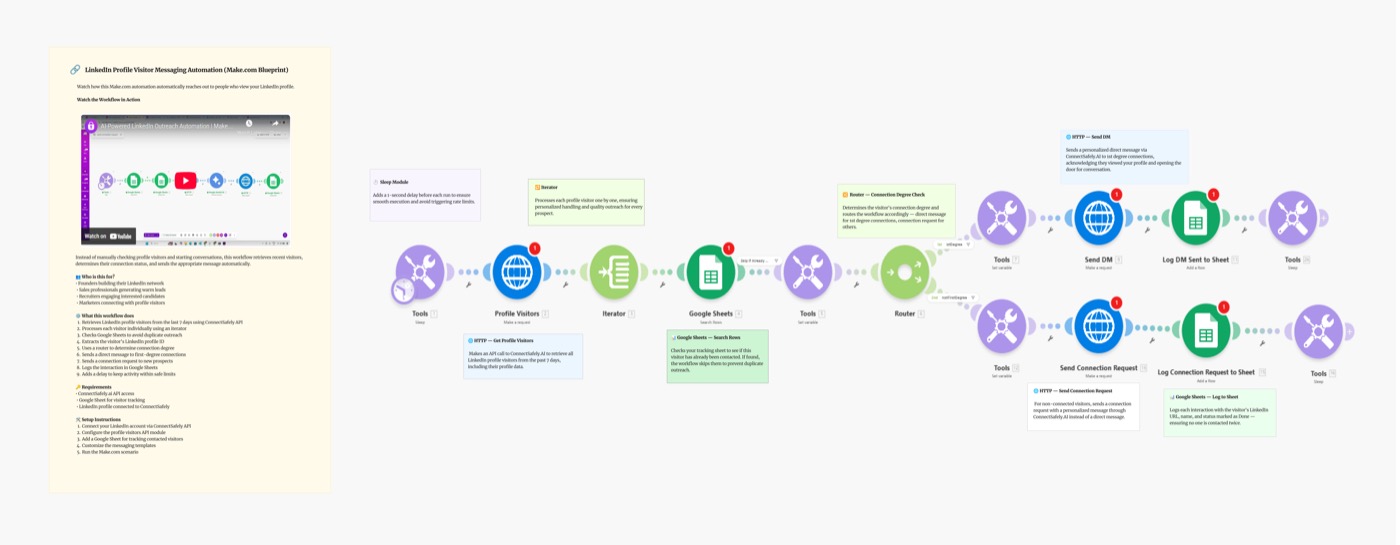
Stop letting LinkedIn profile visitors leave without starting a conversation. This Make.com scenario automatically detects who viewed your LinkedIn profile and sends them a personalized message — turning passive profile views into real leads on autopilot.
Scenario Overview
Video Tutorial
Why Message Profile Visitors?
Profile visitors are your hottest warm leads — they've already looked you up, which means:
- They know who you are — you're not cold outreach to them
- Intent signal — visiting your profile = some level of interest
- Response rates 3–5x higher than cold DMs or cold connection requests
- Zero research needed — they came to you first
Most people ignore their visitor list entirely. This blueprint turns that hidden opportunity into a systematic lead follow-up machine.
What You'll Build
A Make.com scenario that:
- Fetches profile visitors daily via ConnectSafely API
- Deduplicates — only messages each visitor once
- Sends a DM to each new visitor automatically
- Logs results for tracking and review
Schedule Trigger → Fetch Visitors → Deduplicate → Send DM → Log Result
Setting Up the Blueprint
Step 1: Connect Your ConnectSafely API Key
- Go to ConnectSafely.ai → Settings → API Key
- Copy your API key
- In Make, paste into the HTTP Authorization header:
Authorization: Bearer YOUR_API_KEY
Step 2: Configure the Modules
Module 1: Schedule Trigger
- Run: Once daily at 9 AM your local time
- Consistency matters more than frequency
Module 2: ConnectSafely — Get Profile Visitors
GET https://api.connectsafely.ai/v1/profile/visitors
Headers: Authorization: Bearer YOUR_API_KEY
Returns list of profiles who visited in the last 24 hours.
Module 3: Data Store — Check Already Messaged
- Use Make's built-in Data Store to track LinkedIn URLs already contacted
- Skip any profile already in the store
Module 4: Iterator
- Loop through each new visitor
Module 5: ConnectSafely — Send DM
POST https://api.connectsafely.ai/v1/messages/send
Headers: Authorization: Bearer YOUR_API_KEY
Body: {
  "linkedinUrl": "{{visitor.linkedinUrl}}",
  "message": "Hey {{visitor.firstName}}, noticed you checked out my profile — happy to connect if there's something I can help with!"
}
Module 6: Data Store — Mark as Messaged
- Save the LinkedIn URL so they're not messaged again
Module 7: Sleep
- 30–60 second delay between each message
- Prevents rate limiting
Step 3: Craft Your Message
Keep it short, low-pressure, and context-aware:
High performing template:
Hey {{firstName}}, saw you stopped by my profile — always happy to connect with people in [your industry]. What are you working on these days?
Direct but friendly:
Hi {{firstName}}, noticed your visit — if you're exploring [your topic/service], I'd love to share what we're doing. Worth a quick chat?
Rule: Under 300 characters, no pitch, no sales language in the opening message.
Best Practices
Safe Daily Limits
| Account Type | Max DMs/Day |
|---|---|
| New accounts | 10–15 |
| Established accounts | 20–30 |
| Premium accounts | 30–40 |
Message Timing
- Send between 8 AM–6 PM in the visitor's likely timezone
- Avoid weekends for B2B audiences
- Run the scenario once per day — not more
What NOT to Do
- ❌ Don't pitch in the first message — builds trust first
- ❌ Don't send to visitors older than 72 hours — context fades
- ❌ Don't reuse the same opener for every industry
Common Issues & Fixes
| Issue | Solution |
|---|---|
| No visitors returned | LinkedIn Premium required for full visitor list |
| Duplicate messages | Check Data Store logic is saving URLs correctly |
| DM rate limit 429 | Increase Sleep to 60–120 seconds |
| Visitor messaged twice | Verify Data Store "Check" module runs before Send |
Frequently Asked Questions
How do I automatically message LinkedIn profile visitors?
Use this Make.com scenario with ConnectSafely's API. The scenario runs daily, fetches your visitor list, checks who hasn't been messaged yet, and sends each new visitor a personalized DM automatically. Get started by connecting your API key.
Do I need LinkedIn Premium to see profile visitors?
For the full visitor list (past 90 days), LinkedIn Premium is recommended. Free accounts can only see a limited subset of visitors. The ConnectSafely API mirrors what LinkedIn makes available on your account type.
What's a good message to send profile visitors on LinkedIn?
Keep it short and low-pressure: "Hey [Name], saw you stopped by my profile — happy to connect if there's something I can help with!" Reference your niche if possible. Never pitch in the first message — establish connection first.
Related Workflows
- Profile Visitors to HubSpot CRM - Push visitor data directly into HubSpot
- AI-Powered LinkedIn Outreach with Make.com + Gemini - Add AI personalization to outreach
- n8n: DM Profile Visitors - Same workflow built on n8n
Turn your profile viewers into real conversations. Start your ConnectSafely free trial to go live in minutes.
Prerequisites
- Make.com account (free tier works for testing)
- ConnectSafely.ai account with API key
- LinkedIn account connected to ConnectSafely
Required Integrations
Make.com ConnectSafely
 LinkedIn
Use Cases
- Automatically follow up with everyone who visits your LinkedIn profile
- Convert profile views into real conversations and leads
- Reach warm prospects who already know who you are
- Never miss a hot lead hiding in your profile visitor list
Ready to get started?
Download this workflow template and customize it for your needs.
Related Templates
Turn LinkedIn Profile Visitors into HubSpot Leads: Make.com Scenario
Most people let LinkedIn profile visitors disappear. This Make.com scenario automatically captures your LinkedIn profile visitors and pushes them to HubSpot.
View TemplateAI-Powered LinkedIn Outreach: Make.com Scenario
Automate personalized LinkedIn outreach at scale with Make.com, Google Sheets, Gemini AI, and ConnectSafely.ai. Build a complete AI-powered lead gen scenario.
View TemplateAuto-DM Profile Visitors | n8n LinkedIn
Auto-message LinkedIn profile visitors with n8n. Route DMs to connections and requests to non-connections for 3x better response rates.
View Template