
Follow up without a tool on LinkedIn, using one prompt
Last updated 2026-10-16 · Tested on a real LinkedIn account
Short answer
Follow up without ever sending “just checking in”. You ask in plain English. Your AI assistant runs the LinkedIn CLI for you, so you never type a command yourself.
What do I actually type?
This one sentence. That is the whole thing.
“What's my quota — how many messages do I have left today?”
How does it work, step by step?
Paste these one at a time. Each one is written in normal English — no command names, no flags.
We gave these exact prompts to a real AI assistant and wrote down every command it ran. It chose 7 commands: list-linkedin-accounts, get-account-quota, list-conversations, get-conversation-messages, get-latest-posts, get-profile, get-post-reactions-v2. Nobody told it which ones to use.
“What's my quota — how many messages do I have left today?”
First, always. Reports what is actually left on your specific account today, which beats any number in any article including this one.
your assistant picks this“Find conversations where I sent the last message more than ten days ago and got no reply. Show me the last exchange in each.”
The definition of a stalled thread, expressed once, and it is the whole filter. Ten days is short enough that the context still exists on both sides, and long enough that you are not chasing somebody who was on annual leave. Note what it excludes: if they sent the last message, you owe them a reply, which is a different job.
your assistant picks this“For each, check the four sources of new information. Posts they have published. A role change on their profile. Company news since we last spoke. Any of my mutuals reacting to what I posted about the topic. If at least one is true, note it. If none is, note that too.”
The discipline the whole thing hangs on. The assistant is not asked to write anything yet — only to decide which threads have earned a message. Roughly half do. The other half get a line in the file reading "no new information; leave until next check" and I do not read those.
your assistant picks thisWhat it printed when we ran it
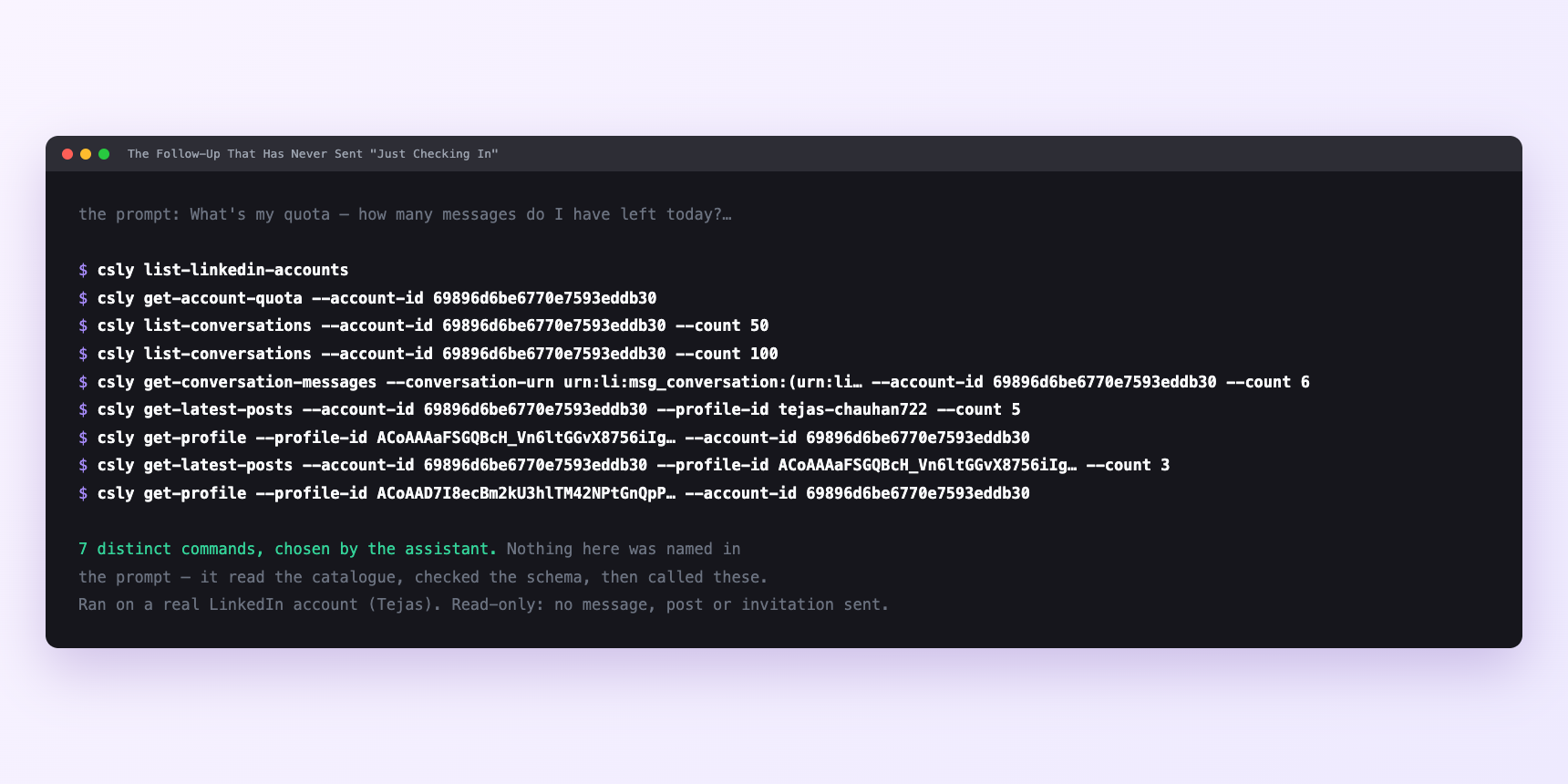
Not a mock-up. This is the actual run: the assistant was given the prompts above and nothing else, and these are the 7 distinct commands it chose from the catalogue. It ran read-only on a real LinkedIn account — nothing was sent, posted or invited.
Can I make it run on its own?
Yes. Add one more sentence and it keeps happening without you. This is the part a chat window cannot do — a saved job runs on the days you are busy.
“For each that earned it, draft a follow-up that references our last exchange and adds the new thing. No 'just checking in'. Under four lines. Show me before sending.”
How many LinkedIn actions does this use?
LinkedIn limits how much any account can do in a day. These are the real numbers, and your assistant checks what is left before it starts.
- Messages are capped at 150 a day, reset midnight UTC. A nightly run typically produces three or four drafts — a tenth of the budget on the busiest day of the month. Your inbox has other jobs; 150 is a ceiling, not a target.
- Reading the inbox is free. Inbox reads are the one uncapped velocity class, and that is not an oversight: they are 41% of all traffic and the weakest predictor of an account getting into trouble. The nightly sweep itself costs nothing. Only the sending costs.
- Writes are capped at fifteen a minute. So the four approved drafts fired off together sits inside every limit and is still exactly the wrong shape.
- The supply of honest reasons is smaller than the budget, and that is what you size against. A weekly total against two hundred open conversations lands at twelve to fifteen sends, at three or four a day. If your sweep is producing forty a week, you are not finding reasons — you are inventing them.
Watch it instead
4 minutes
Common questions
- What if the sweep returns nothing?
- Usually the filter, not the inbox. Ten days is a narrow definition; widen it to fourteen and see whether the list appears.
- What if the drafts all sound the same?
- Either the ban did not make it into the prompt, or there was no new information. which is an answer, not a failure. Drop them from this batch.
- What if nobody has posted anything?
- Activity data covers the last fifteen days, not thirty. An empty result means quiet for a fortnight, not a dormant account.
- What if it acted as the wrong account?
- Almost always a stale saved setting. Ask which account it is using and rehearse any send before it goes out.
- How many LinkedIn actions does follow up without a tool use up?
- Messages are capped at 150 a day, reset midnight UTC. A nightly run typically produces three or four drafts — a tenth of the budget on the busiest day of the month. Your inbox has other jobs; 150 is a ceiling, not a target.
How do I set this up?
Once, and it takes about four minutes. After this you only write sentences.
$ npm install -g @connectsafely/cli$ export CONNECTSAFELY_API_KEY=...$ csly list-linkedin-accounts$ export CONNECTSAFELY_ACCOUNT_ID=...$ csly skill installThe package is @connectsafely/cli on npm. You need Node 20 or newer.
Then start your chat with this line, so your assistant uses the CLI instead of trying to open LinkedIn itself and hitting a login page:
“Use the ConnectSafely CLI (csly) for anything that touches LinkedIn. Run csly commands to see what exists, and csly schema before calling one. Don't guess a command name.”
Other things you can do
Try this on your own LinkedIn account
From $10 a month, on the LinkedIn account you already use, with zero ban risk.
What the CLI actually is— 86 commands, same plan, no extra cost.