
Keep your account safe on LinkedIn, using one prompt
Last updated 2026-10-16 · Tested on a real LinkedIn account
Short answer
Catch the three numbers that move before an account gets restricted. You ask in plain English. Your AI assistant runs the LinkedIn CLI for you, so you never type a command yourself.
What do I actually type?
This one sentence. That is the whole thing.
“Every night at 23:00 UTC, read the account's quota, writes log and silent-rejection log for the day. Compute the three signals — write-velocity trend, silent-rejection rate, quota-fraction-consumed slope — and write the result to `account-health/<account>-<date>.md`. If any signal has tripped its threshold, pause writes on that account for tomorrow and say so at the top of the file.”
How does it work, step by step?
Paste these one at a time. Each one is written in normal English — no command names, no flags.
We gave these exact prompts to a real AI assistant and wrote down every command it ran. It chose 5 commands: list-linkedin-accounts, get-account-status, get-account-quota, get-account-activity, get-sent-invitations. Nobody told it which ones to use.
“Every night at 23:00 UTC, read the account's quota, writes log and silent-rejection log for the day. Compute the three signals — write-velocity trend, silent-rejection rate, quota-fraction-consumed slope — and write the result to `account-health/<account>-<date>.md`. If any signal has tripped its threshold, pause writes on that account for tomorrow and say so at the top of the file.”
That is the whole configuration. The file lands overnight. Your review is you glancing at the top line before you commit to a run.
your assistant picks thisWhat it printed when we ran it
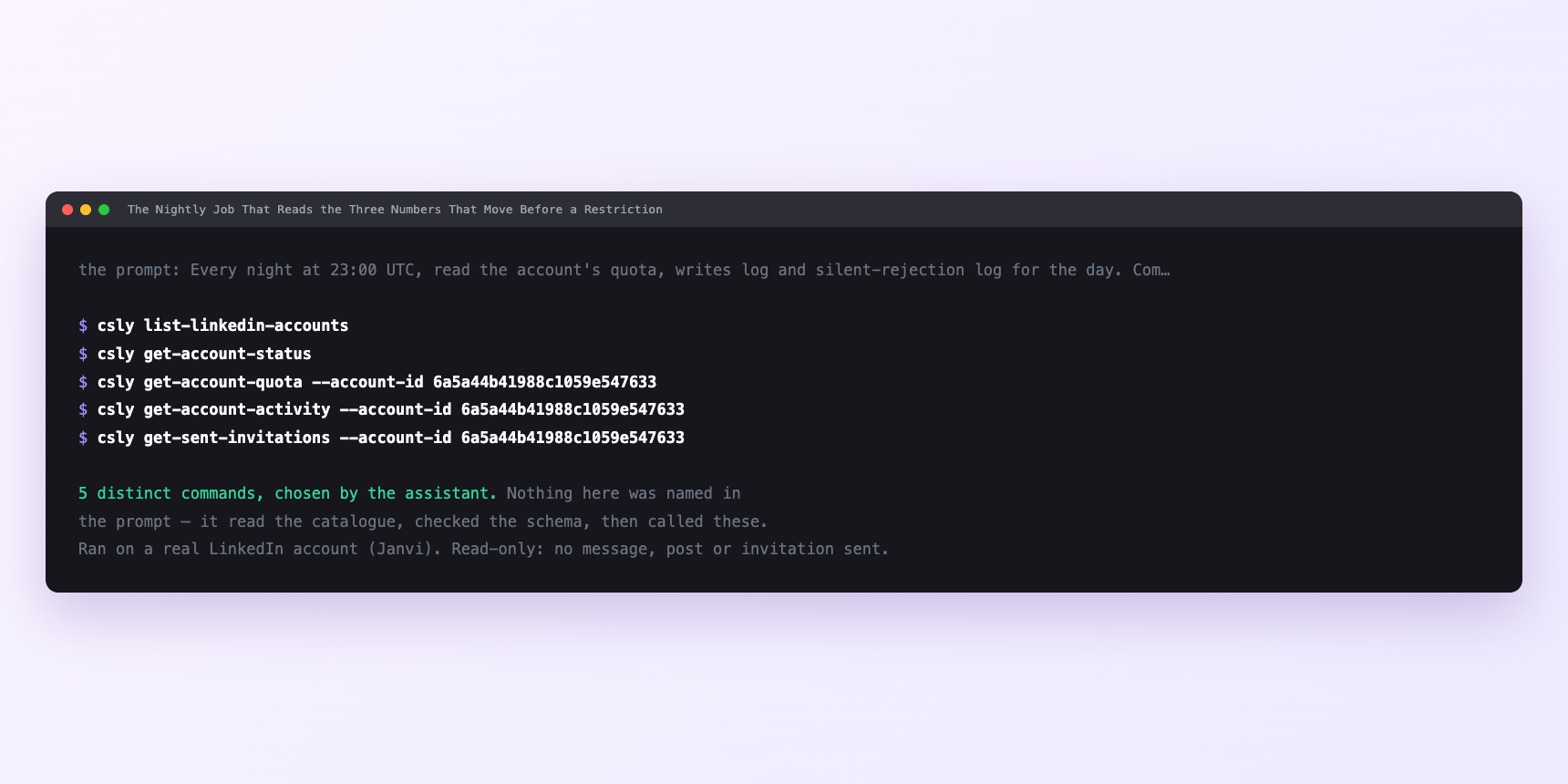
Not a mock-up. This is the actual run: the assistant was given the prompts above and nothing else, and these are the 5 distinct commands it chose from the catalogue. It ran read-only on a real LinkedIn account — nothing was sent, posted or invited.
How many LinkedIn actions does this use?
LinkedIn limits how much any account can do in a day. These are the real numbers, and your assistant checks what is left before it starts.
- Profile views: 120 a day, reset midnight UTC. The tightest daily budget most workflows meet.
- Connection requests: 90 a week, reset Monday. Exceed it and the account is held for twenty-four hours. This is the cap behind the restriction recovery guide that most agencies eventually need.
- Writes: 15 a minute, per account. The velocity cap on the class that correlates most strongly with disabled accounts. This is the ceiling the trend signal is measured against.
- Silent-rejection hold: two hours, applied automatically when the server sees one on a comment or reaction. The hold is not the enforcement — it is the warning.
Watch it instead
4 minutes
Common questions
- What if the pause was wrong?
- Read the file that produced it. All three signals are logged with the numbers behind them; if the trend was noise, unpause the account and note why. Do not routinely override. a pause you always cancel is a signal you are not reading.
- What if a signal never trips and you know something is wrong?
- Check what is writing to the account. If a job is running from another window and not accounted for in the writes log, the trend is measured against a partial view. get-account-quota counts everything; the writes log records only what the CLI itself did. If the two disagree, believe the quota.
- What if the reset landed at the wrong time?
- LinkedIn's daily reset is midnight UTC, not local. A signal computed at midnight local time will read the wrong day if you are far from UTC. The default runs the job at 23:00 UTC, before the reset, which is the point where the reading is complete.
- What if everything is failing at once?
- Session, not signal. A session that needs reconnecting fails silently. The health job puts session status on the first line for exactly this reason.
- How many LinkedIn actions does keep your account safe use up?
- Profile views: 120 a day, reset midnight UTC. The tightest daily budget most workflows meet.
How do I set this up?
Once, and it takes about four minutes. After this you only write sentences.
$ npm install -g @connectsafely/cli$ export CONNECTSAFELY_API_KEY=...$ csly list-linkedin-accounts$ export CONNECTSAFELY_ACCOUNT_ID=...$ csly skill installThe package is @connectsafely/cli on npm. You need Node 20 or newer.
Then start your chat with this line, so your assistant uses the CLI instead of trying to open LinkedIn itself and hitting a login page:
“Use the ConnectSafely CLI (csly) for anything that touches LinkedIn. Run csly commands to see what exists, and csly schema before calling one. Don't guess a command name.”
Other things you can do
Try this on your own LinkedIn account
From $10 a month, on the LinkedIn account you already use, with zero ban risk.
What the CLI actually is— 86 commands, same plan, no extra cost.