
Map everyone on a deal on LinkedIn, using one prompt
Last updated 2026-10-16 · Tested on a real LinkedIn account
Short answer
Map everyone who will touch a deal at one company, and find who can introduce you. You ask in plain English. Your AI assistant runs the LinkedIn CLI for you, so you never type a command yourself.
What do I actually type?
This one sentence. That is the whole thing.
“Look up Snowflake. Find their VP Engineering, Head of Security, Head of Data and CFO — try a couple of title variations for each. For everyone you find, give me tenure, previous company, whether I'm connected, and which of my connections could introduce me.”
How does it work, step by step?
Paste these one at a time. Each one is written in normal English — no command names, no flags.
We gave these exact prompts to a real AI assistant and wrote down every command it ran. It chose 1 command: search-companies. Nobody told it which ones to use.
“Look up Snowflake — headcount, industry, the official page. If more than one company matches that name, show me the options before picking one.”
Frames everything after it: function titles at a four-hundred-person company mean something different from the same titles at forty thousand. The disambiguation clause is not decoration — a plain search for a name like Snowflake returns the data company, an unrelated recruiter and a hotel, and the wrong one produces a confident, entirely useless map. It is two calls: find the company, then read it for the headcount.
search-companies → get-company-details“Find their VP Engineering, Head of Security, Head of Data and CFO. Give me two or three title variations per function — Head of Security, CISO, VP Infrastructure — and tell me if you can't find one.”
The synonyms instruction is not optional. A search for 'Head of Security' at a company that calls it 'Director, Trust & Safety' returns nothing, which reads identically to 'they don't have one'. The 'tell me if you can't find one' clause is what stops a confident empty result.
search-people“For each person you found, add tenure, previous company, and my connection degree to them. Pull the full role history so tenure is measured on the role they hold now — the search rows already carry the degree, so don't run a separate relationship check.”
Tenure changes how you sell to each of them: a CFO six months in is looking for things to cut and is a different person from one six years in who approved the current spend. Connection degree decides how you reach them, and it comes back on the search row already.
fetch-profile“Who at Snowflake is a 2nd-degree connection, and which of my 1st-degree connections could introduce me?”
The column no data vendor can sell, because it is a fact about your account rather than about the company. An introduction path is worth more than any amount of research about a stranger.
get-connections“Pull the last five posts from their Head of Security so I know what they care about before the call.”
Their own words are the best objection preview available. Security and compliance is where deals die, structurally: they are not measured on whether the deal closes, they are measured on whether something goes wrong, and they arrive in week four to six uninvited. Twenty minutes of value for one line of prompt.
get-latest-postsWhat it printed when we ran it
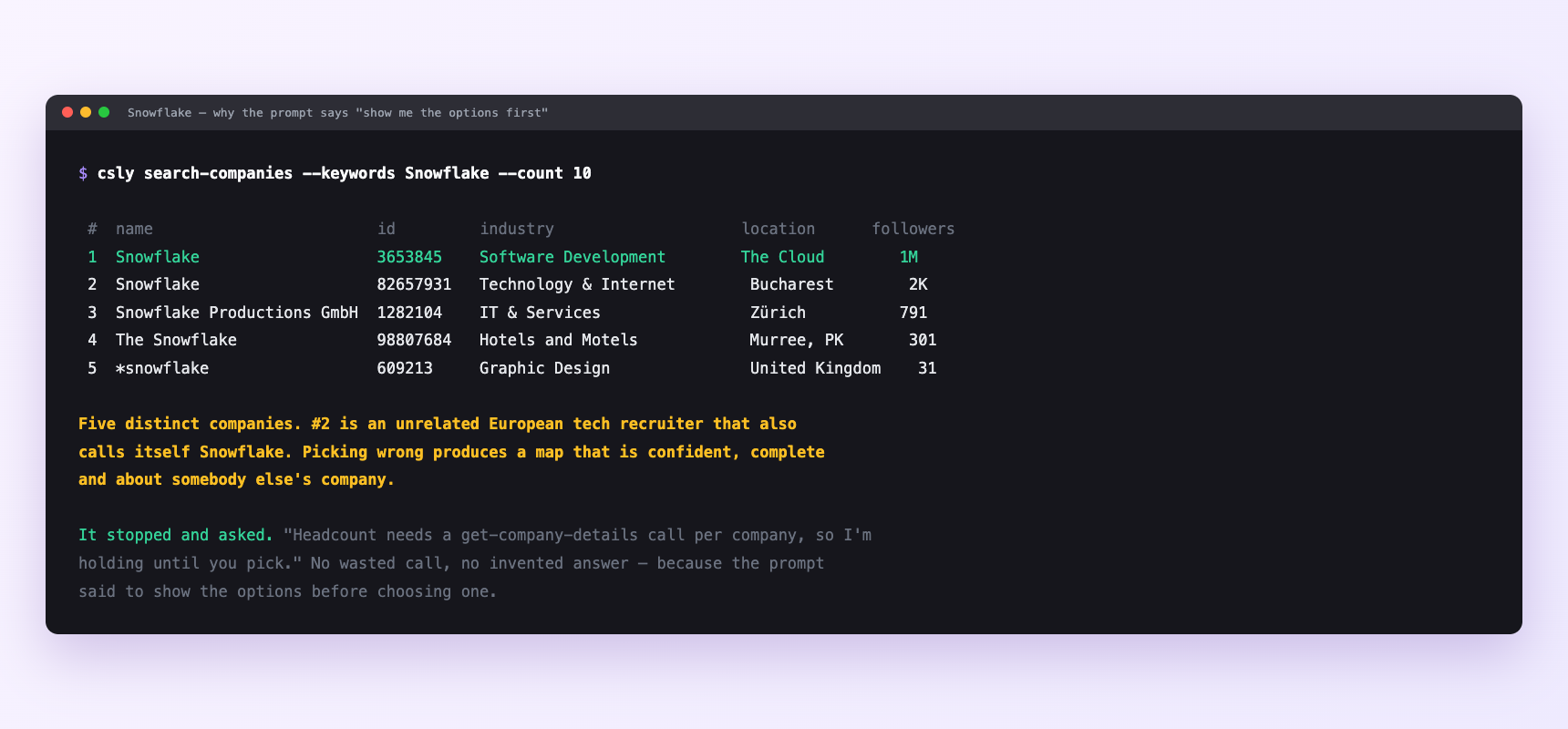
One search for “Snowflake” returns five different companies — a data cloud, a European recruiter, a Swiss IT firm, a hotel and a design studio. It stopped and asked which one rather than spending a details call on a guess, because the prompt told it to show the options first. Pick wrong and the map is confident, complete and about somebody else’s company.
Can I make it run on its own?
Yes. Add one more sentence and it keeps happening without you. This is the part a chat window cannot do — a saved job runs on the days you are busy.
“Do this for every open opportunity at the start of each month, and tell me what changed since last time.”
How many LinkedIn actions does this use?
LinkedIn limits how much any account can do in a day. These are the real numbers, and your assistant checks what is left before it starts.
- One account is about ten profile reads plus a handful of searches. Four accounts a day is comfortable; twelve is the ceiling with nothing left for anything else.
- Profile views: 120 a day. A twenty-account territory refreshed monthly is five days of background work. Refreshing two hundred accounts is not a thing that happens on one LinkedIn account.
- This workflow is search-heavy by design — four functions with two or three title variations each is up to a dozen searches per account.
- Which is why LinkedIn's own commercial use limit is the binding constraint here, not ours. Ten accounts a month is comfortable on a free account. Forty is not. At volume this is a Sales Navigator workflow, and that is the actual constraint rather than a pitch.
Watch it instead
4 minutes
Common questions
- What if it could not find a Head of Security?
- either the company genuinely has no dedicated one, which is itself worth knowing, or they call it something you did not list. Ask it to search on responsibilities rather than titles.
- What if it found eleven VP Engineerings?
- big company, and they are all real. Ask for the ones closest to the product area in the deal.
- What if reporting lines are inferred, never stated?
- LinkedIn does not publish an org chart, so a hierarchy is a hypothesis assembled from titles and tenure. Confirm it on the call, early.
- What if do not contact all five?
- Five near-simultaneous approaches from the same vendor to five colleagues is noticed, discussed, and undermines your champion. Use the map to prepare and let the champion make the introductions. the exception is the security lead, who is usually glad to be approached early.
- How many LinkedIn actions does map everyone on a deal use up?
- One account is about ten profile reads plus a handful of searches. Four accounts a day is comfortable; twelve is the ceiling with nothing left for anything else.
How do I set this up?
Once, and it takes about four minutes. After this you only write sentences.
$ npm install -g @connectsafely/cli$ export CONNECTSAFELY_API_KEY=...$ csly list-linkedin-accounts$ export CONNECTSAFELY_ACCOUNT_ID=...$ csly skill installThe package is @connectsafely/cli on npm. You need Node 20 or newer.
Then start your chat with this line, so your assistant uses the CLI instead of trying to open LinkedIn itself and hitting a login page:
“Use the ConnectSafely CLI (csly) for anything that touches LinkedIn. Run csly commands to see what exists, and csly schema before calling one. Don't guess a command name.”
Other things you can do
Try this on your own LinkedIn account
From $10 a month, on the LinkedIn account you already use, with zero ban risk.
What the CLI actually is— 86 commands, same plan, no extra cost.