
Fill in missing CRM data on LinkedIn, using one prompt
Last updated 2026-10-16 · Tested on a real LinkedIn account
Short answer
Fill in missing titles, companies and locations on a CSV of contacts, forty rows a morning. You ask in plain English. Your AI assistant runs the LinkedIn CLI for you, so you never type a command yourself.
What do I actually type?
This one sentence. That is the whole thing.
“Take accounts.csv. For each row, find the person's LinkedIn profile and give me back the same file with current title, company, location, years in role, whether they're a 1st, 2nd or 3rd-degree connection to me, and a one-line summary. Flag anyone you're not confident you matched.”
How does it work, step by step?
Paste these one at a time. Each one is written in normal English — no command names, no flags.
We gave these exact prompts to a real AI assistant and wrote down every command it ran. It chose 1 command: search-people. Nobody told it which ones to use.
“What's my profile view quota today?”
First, because it decides the batch size, and the batch size is the thing people get wrong. Faced with four hundred rows the natural move is to ask for four hundred — and what happens is the run stops partway through the day's budget, leaving a partial file and no record of which rows completed. That is worse than not starting.
get-account-quota“I have names and companies but no LinkedIn URLs. Resolve the first forty rows of accounts.csv to profiles. Flag anything you're not confident about instead of picking the closest match.”
Resolution before enrichment, and the flag instruction is not optional. Name-only matching is genuinely ambiguous, and a model asked to produce a table will produce a table — confidently, with the wrong person in row nineteen. Always supply the company alongside the name. The search result already carries the connection degree, so that column is answered here rather than costing a separate lookup.
search-people“Now enrich those forty: current title, company, location, years in role, connection degree, one-line summary. Include the full role history so the current title is the current one. The connection degree is already on the search row and on the profile read, so don't run a separate relationship check. Leave blanks where the profile doesn't say — don't infer.”
The explicit 'don't infer' earns its place. Left alone, a helpful assistant fills gaps plausibly, and a plausible wrong title is worse than an empty cell because nobody checks it. Years in role is the undervalued column: it separates a buyer with a mandate from a buyer who owns the current setup, which changes the message more than seniority does.
fetch-profile --include-experience“Write it back to accounts-enriched.csv and tell me which rows still need doing.”
The second half is what makes tomorrow's run trivial. Writing results after each batch is what lets the next run ask 'what is still empty' rather than 'where did I get to'.
(no call — file write)What it printed when we ran it
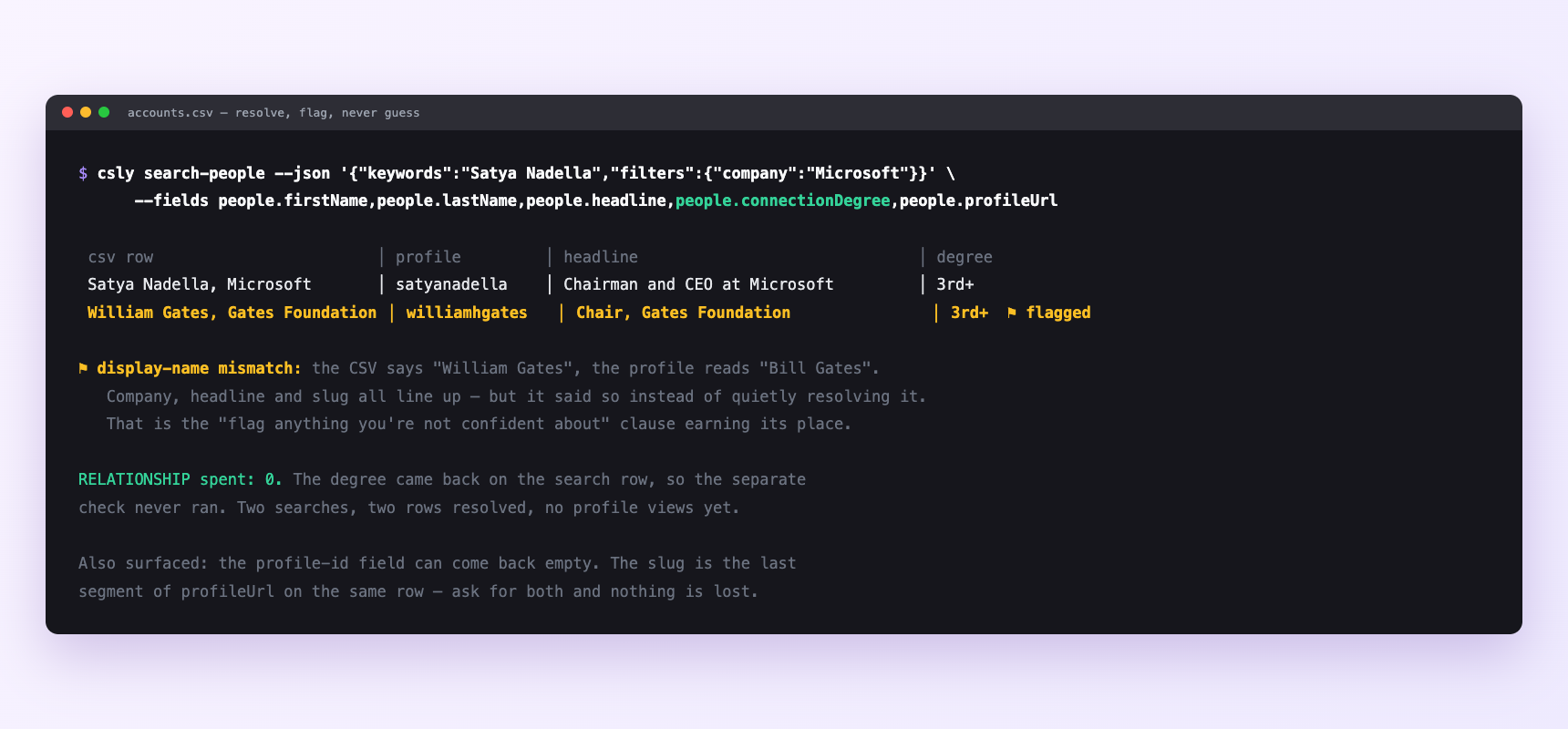
Two rows resolved, zero relationship checks — the connection degree came back on the search row itself. Row two was flagged rather than quietly resolved: the CSV says William Gates, the profile reads Bill Gates. Everything else lines up, but being told is the point.
Can I make it run on its own?
Yes. Add one more sentence and it keeps happening without you. This is the part a chat window cannot do — a saved job runs on the days you are busy.
“Run this every morning against whatever's still empty, forty rows at a time, until the file is done.”
How many LinkedIn actions does this use?
LinkedIn limits how much any account can do in a day. These are the real numbers, and your assistant checks what is left before it starts.
- Profile views: 120 a day — the ceiling on everything here. A run should take about a third, which is where forty comes from. Four hundred records ÷ forty a day = ten working days. That is the real number, and it is much better to know it before you promise a timeline.
- The connection degree is the column no enrichment vendor can sell you, because it is a fact about your account rather than about the person. It comes back with the search row and again with the profile read, so it never needs a lookup of its own.
- Searches: 1,000 calls a day per search type on our side, and that is not what stops you.
- LinkedIn's own commercial use limit on people search is what bites this workflow, because a list of names with no URLs needs a search per row. If your rows already have LinkedIn URLs you will never meet it.
Watch it instead
4 minutes
Common questions
- What if row nineteen is the wrong person?
- the flag instruction was dropped, or the row had no company. Add the company, re-run just the flagged rows, and never let an unflagged guess into the CRM.
- What if the resolved rows have no profile id in them?
- Search results can come back with that field empty; the slug is the last segment of the profile URL on the same row, which is the same value. Ask for the URL as well as the id and nothing is lost.
- What if a whole batch came back empty?
- check the account status before assuming the data is missing.
- What if it filled in fields the profile does not contain?
- it inferred. Put 'leave blanks, do not infer' back in the prompt; it is the instruction most often dropped when people shorten it.
- How many LinkedIn actions does fill in missing crm data use up?
- Profile views: 120 a day — the ceiling on everything here. A run should take about a third, which is where forty comes from. Four hundred records ÷ forty a day = ten working days. That is the real number, and it is much better to know it before you promise a timeline.
How do I set this up?
Once, and it takes about four minutes. After this you only write sentences.
$ npm install -g @connectsafely/cli$ export CONNECTSAFELY_API_KEY=...$ csly list-linkedin-accounts$ export CONNECTSAFELY_ACCOUNT_ID=...$ csly skill installThe package is @connectsafely/cli on npm. You need Node 20 or newer.
Then start your chat with this line, so your assistant uses the CLI instead of trying to open LinkedIn itself and hitting a login page:
“Use the ConnectSafely CLI (csly) for anything that touches LinkedIn. Run csly commands to see what exists, and csly schema before calling one. Don't guess a command name.”
Other things you can do
Try this on your own LinkedIn account
From $10 a month, on the LinkedIn account you already use, with zero ban risk.
What the CLI actually is— 86 commands, same plan, no extra cost.