
Reach a rival's followers on LinkedIn, using one prompt
Last updated 2026-10-16 · Tested on a real LinkedIn account
Short answer
Pull the people who follow a rival's page, and see who is new since last quarter. You ask in plain English. Your AI assistant runs the LinkedIn CLI for you, so you never type a command yourself.
What do I actually type?
This one sentence. That is the whole thing.
“For each competitor in `rivals.txt`, find people who follow their page and match my ICP, intersect with everyone who commented on their last three posts, and give me the shortlist. Exclude anyone whose current employer is the rival. Save it to `competitor-audiences/<rival>-<yyyy-mm>.tsv` and tell me which rows are new since the last file. Don't message anyone.”
How does it work, step by step?
Paste these one at a time. Each one is written in normal English — no command names, no flags.
We gave these exact prompts to a real AI assistant and wrote down every command it ran. It chose 7 commands: list-linkedin-accounts, get-account-quota, search-companies, get-company-details, get-company-followers, get-organizations, get-latest-posts. Nobody told it which ones to use.
“What's my quota — profile views, connection requests, and search calls left today? LinkedIn's own monthly search limit is not reported anywhere, so don't put a number on it.”
The monthly search limit is the one number nothing can tell you. Our own caps come back from a real quota call — profile views, connection requests, search calls, all of them exact. LinkedIn's commercial use limit does not: LinkedIn does not publish it, computes it partly from behaviour, and no endpoint reports it. Ask an assistant for it anyway and it will give you a confident figure it has no way of knowing, which is worse than not asking. Track searches run per month yourself if you need a number.
your assistant picks this“Look up the three pages in `rivals.txt` on LinkedIn — headcount, industry, size. I want to know whether each of their customers looks like mine before I spend anything on their audience.”
Cheap qualification, and it resolves which page you mean when three companies share a name. A rival with the wrong customer profile has the wrong followers however many they have.
your assistant picks this“For each qualified rival, find people who follow their page and are Head of Data, VP Analytics or Director of Platform, at companies between 200 and 2,000 people. Exclude anyone whose current employer is that rival. Then pull everyone who commented on their last three posts and give me the intersection.”
Everything happens in one call per rival. The followerOf filter reaches the audience without admin rights. The title and size filters apply in the same query, so the unfiltered forty thousand never passes through your hands. Three title variants, not one — job titles are whatever the target company decided in 2019, and a single title misses whoever owns the problem under a different name.
your assistant picks this“Save this quarter's shortlist to `competitor-audiences/<rival>-<yyyy-mm>.tsv` and tell me which rows are not in the previous file. Read the profiles for the new rows only.”
Only the diff pays for a profile view. Everything else is either already-contacted or already-decided.
your assistant picks thisWhat it printed when we ran it
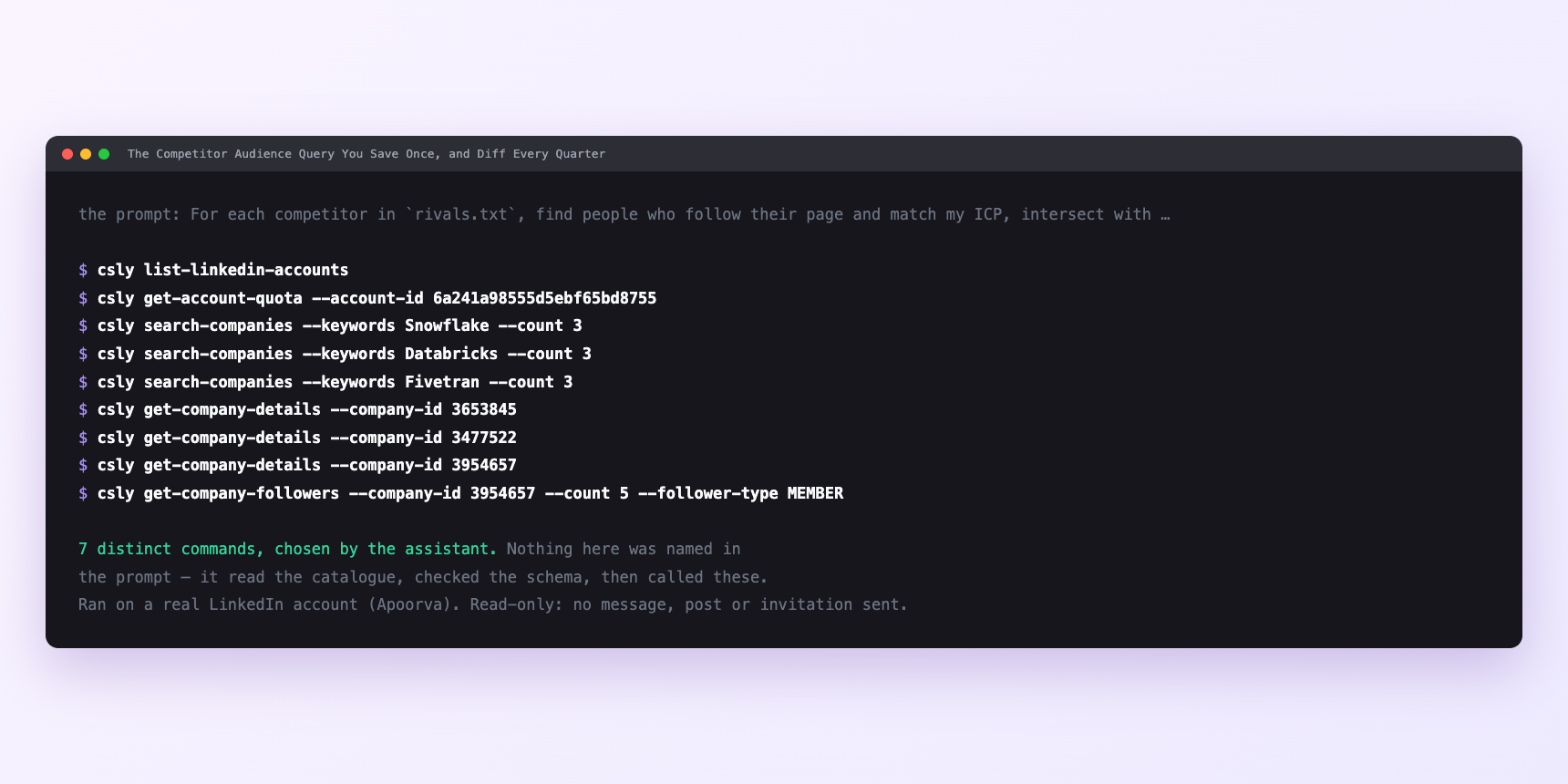
Not a mock-up. This is the actual run: the assistant was given the prompts above and nothing else, and these are the 7 distinct commands it chose from the catalogue. It ran read-only on a real LinkedIn account — nothing was sent, posted or invited.
How many LinkedIn actions does this use?
LinkedIn limits how much any account can do in a day. These are the real numbers, and your assistant checks what is left before it starts.
- A filtered followerOf search against a large rival with three title variants runs five or six pages and returns two hundred to four hundred names. The intersection with recent commenters knocks that to twenty or thirty. Enriching twenty new-since-last-quarter rows costs twenty profile views — one-sixth of the daily cap of one hundred and twenty. Three rivals is around sixty, which is half of one day's budget. This is not the run that gets your account into trouble.
- Searches are capped at one thousand calls a day per search type, billed per page fetched rather than per question asked, so that cap never binds on a quarterly run of this size.
- The one that binds is not a ConnectSafely limit at all. LinkedIn applies its own commercial use limit to people search — roughly a hundred searches a month on a free account, about three hundred on Premium Career, five hundred on Premium Business, effectively unlimited with Sales Navigator. LinkedIn does not publish the number, computes it from search frequency and pages browsed, and nothing warns you first. Searches simply stop returning what they should, and it resets on the 1st. Five or six searches per rival across three rivals is around eighteen searches a quarter — comfortable on a free account until you remember every other sourcing job on the same seat draws from the same monthly budget. There is more on how the search limit behaves if it is biting.
- Most of the reason this is a quarterly job. The other reason is that follower bases do not move fast enough for monthly to surface anything new — running the same query in four weeks returns nearly the same names and spends your scarcest budget learning nothing.
Watch it instead
4 minutes
Common questions
- What if results are full of their employees?
- The exclusion did not apply. Make it an explicit filter on current employer, not an aside at the end of the prompt.
- What if the overlap is empty?
- Either the page barely posts, its posts draw no comments, or the ICP filter is too tight. Check posting activity first. a rival with a dead page has an audience you cannot second-signal at all.
- What if the follower tool returned an error?
- That is the admin wall working as designed. Right tool, wrong page. get-company-followers works perfectly on your own page. read who follows you with the same ICP filter and compare against what followerOf returns for a rival. That tells you which of you has the better audience rather than the bigger one. If the answer stings, growing the page is the longer fix.
- What if searches quietly return less than they used to?
- LinkedIn's commercial use limit, not a bug. It resets on the 1st.
- How many LinkedIn actions does reach a rival's followers use up?
- A filtered followerOf search against a large rival with three title variants runs five or six pages and returns two hundred to four hundred names. The intersection with recent commenters knocks that to twenty or thirty. Enriching twenty new-since-last-quarter rows costs twenty profile views — one-sixth of the daily cap of one hundred and twenty. Three rivals is around sixty, which is half of one day's budget. This is not the run that gets your account into trouble.
How do I set this up?
Once, and it takes about four minutes. After this you only write sentences.
$ npm install -g @connectsafely/cli$ export CONNECTSAFELY_API_KEY=...$ csly list-linkedin-accounts$ export CONNECTSAFELY_ACCOUNT_ID=...$ csly skill installThe package is @connectsafely/cli on npm. You need Node 20 or newer.
Then start your chat with this line, so your assistant uses the CLI instead of trying to open LinkedIn itself and hitting a login page:
“Use the ConnectSafely CLI (csly) for anything that touches LinkedIn. Run csly commands to see what exists, and csly schema before calling one. Don't guess a command name.”
Other things you can do
Try this on your own LinkedIn account
From $10 a month, on the LinkedIn account you already use, with zero ban risk.
What the CLI actually is— 86 commands, same plan, no extra cost.