
Turn post likes into leads on LinkedIn, using one prompt
Last updated 2026-10-16 · Tested on a real LinkedIn account
Short answer
Turn the likes and comments on a post into a ranked shortlist of people worth contacting. You ask in plain English. Your AI assistant runs the LinkedIn CLI for you, so you never type a command yourself.
What do I actually type?
This one sentence. That is the whole thing.
“Pull everyone who reacted to and commented on this post. Filter to Heads and VPs at companies over 200 people. Rank the commenters above the reactors, put anyone who asked a question at the top, and draft a connection note for the top ten that quotes their own comment back to them.”
How does it work, step by step?
Paste these one at a time. Each one is written in normal English — no command names, no flags.
We gave these exact prompts to a real AI assistant and wrote down every command it ran. It chose 2 commands: get-all-post-comments, get-post-reactions-v2. Nobody told it which ones to use.
“How many connection requests do I have left this week?”
First, and it changes what the rest of the run should attempt. Four hundred reactions is not four hundred invitations — it is over a month of sends at the cap. That is the single most common misreading of a post that does well.
get-account-quota“Pull the reactions and all the comments on this post. Don't read anyone's profile yet — just give me the list with names and headlines.”
The money-saving instruction. Reaction rows come back carrying a name, a headline and a profile URL, and comment rows carry the full comment text — enough to cut four hundred down to thirty without spending a single profile view. Filter first, read second, which is the whole reason this is cheap enough to run on every post.
get-post-reactions-v2 + get-all-post-comments“Filter to Heads and VPs at companies over 200 people. Group the commenters by whether they agreed, disagreed or asked a question, and give me the questioners first.”
Grouping by stance is the thing only a language model can do — no filter grid on any platform has a 'disagreed with the premise' checkbox. Rank questioner over disagreer over commenter over reactor, always. Ten questioners beat a hundred reactors and the difference in reply rate is not subtle.
(no call — the list is already on disk)“Now read the profiles of the top thirty and draft a connection note for the top ten that quotes their own comment back in one line. Show me before sending anything.”
Thirty reads, not four hundred. The personalisation is not a merge field — it is the sentence they wrote about your category today, which is the best opening material you will ever have.
fetch-profileWhat it printed when we ran it
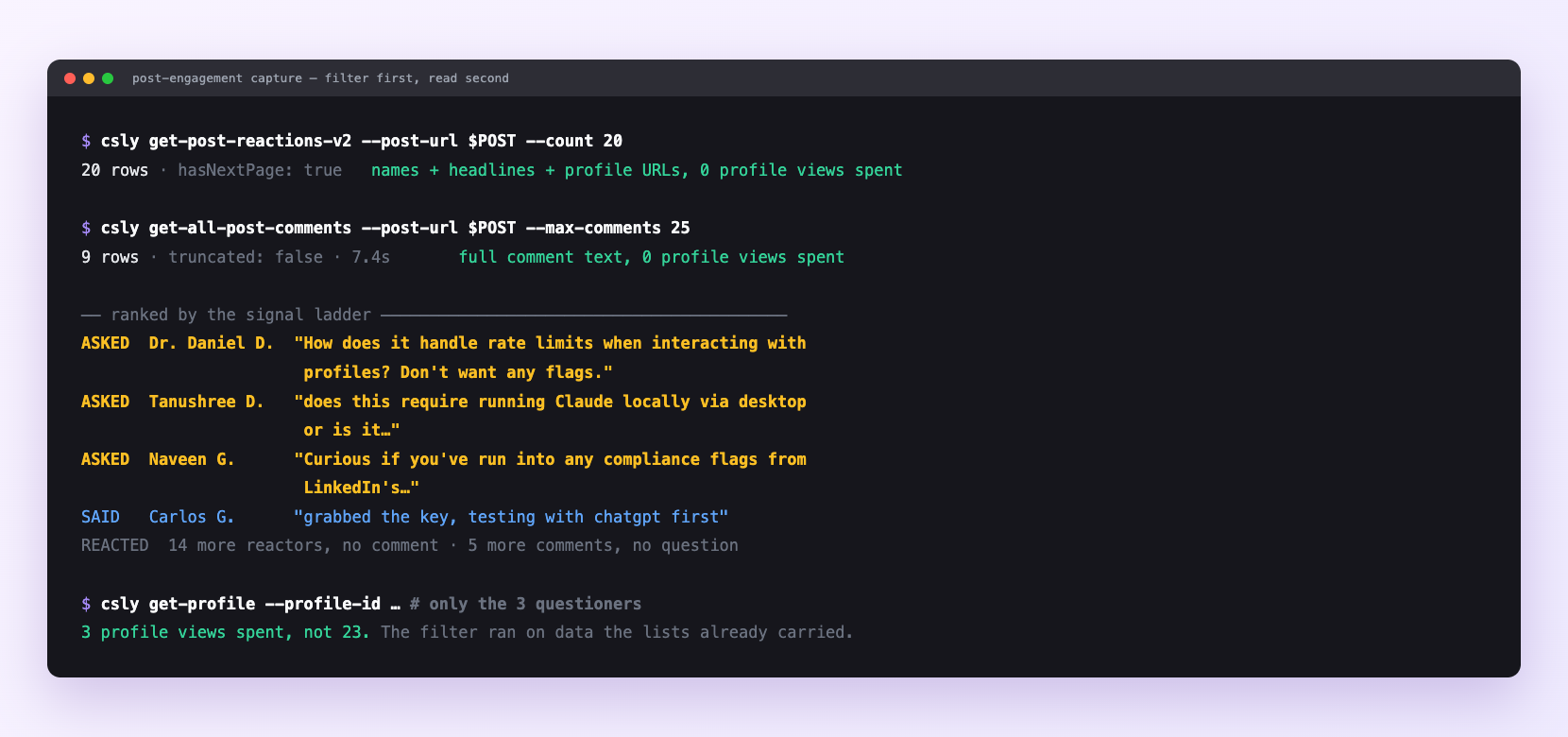
A real run on one post. Twenty reactions and nine comments — twenty-three distinct people — read for no profile views at all, because the lists already carry names, headlines and full comment text, which is what the filter runs on. Only the three who asked a question were worth a profile read. Surnames shortened here; every number is as it came back.
Can I make it run on its own?
Yes. Add one more sentence and it keeps happening without you. This is the part a chat window cannot do — a saved job runs on the days you are busy.
“Do this an hour after anything I publish, and leave the shortlist in leads/ for me.”
How many LinkedIn actions does this use?
LinkedIn limits how much any account can do in a day. These are the real numbers, and your assistant checks what is left before it starts.
- Reading reaction and comment lists costs no profile views. It is the cheapest large signal available on LinkedIn, which is why the filter goes first.
- Profile views: 120 a day. Enrich thirty, not four hundred.
- Connection requests: 90 a week — so the honest output of a post that did well is not four hundred leads. It is thirty worth having, sent over a week and a half.
- Very large posts paginate deeply. Say how many you want rather than 'all' on a five-thousand-reaction post.
Common questions
- What if the list came back smaller than the reaction count?
- deep pagination on a large post takes real time and it may have stopped at a sensible depth. Reactor quality falls off sharply after the first few hundred, so usually it is not worth going further.
- What if everyone in the shortlist is irrelevant?
- your filter matched on headline text, and headlines lie. Add the company-size condition, or ask it to check the company rather than trusting the title string.
- What if two people got near-identical notes?
- they wrote near-identical comments. Ask for the drafts to be varied deliberately, and read them.
- What if do not treat the reaction as the reason?
- 'I saw you liked my post' is a weak opening that also admits you are working from a list.
- How many LinkedIn actions does turn post likes into leads use up?
- Reading reaction and comment lists costs no profile views. It is the cheapest large signal available on LinkedIn, which is why the filter goes first.
How do I set this up?
Once, and it takes about four minutes. After this you only write sentences.
$ npm install -g @connectsafely/cli$ export CONNECTSAFELY_API_KEY=...$ csly list-linkedin-accounts$ export CONNECTSAFELY_ACCOUNT_ID=...$ csly skill installThe package is @connectsafely/cli on npm. You need Node 20 or newer.
Then start your chat with this line, so your assistant uses the CLI instead of trying to open LinkedIn itself and hitting a login page:
“Use the ConnectSafely CLI (csly) for anything that touches LinkedIn. Run csly commands to see what exists, and csly schema before calling one. Don't guess a command name.”
Other things you can do
Try this on your own LinkedIn account
From $10 a month, on the LinkedIn account you already use, with zero ban risk.
What the CLI actually is— 86 commands, same plan, no extra cost.