
Brief yourself before a call on LinkedIn, using one prompt
Last updated 2026-10-16 · Tested on a real LinkedIn account
Short answer
Get a one-paragraph brief on everyone joining tomorrow's calls, before you sit down. You ask in plain English. Your AI assistant runs the LinkedIn CLI for you, so you never type a command yourself.
What do I actually type?
This one sentence. That is the whole thing.
“I have three calls tomorrow — here are the attendees. Give me a paragraph on each: current role, how long they've been in it, where they were before, what they've posted about recently, and two opening lines that aren't 'I saw your post'.”
How does it work, step by step?
Paste these one at a time. Each one is written in normal English — no command names, no flags.
We gave these exact prompts to a real AI assistant and wrote down every command it ran. It chose 3 commands: get-profile, get-latest-posts, scrape-post. Nobody told it which ones to use.
“Here are tomorrow's three calls and who's on each. One paragraph per person: role, tenure, previous company, and what they've been posting about. Pull the full role history — tenure is the field I care most about and the summary view can be a role behind.”
A paragraph, not bullets. This matters more than it sounds — asked for structure, an assistant produces fourteen bullets per person that you will not read in a lift. Asked for a paragraph, it has to decide what is important, which is most of the work. Tenure is the highest-value field and the one most often skipped: someone six months into a role and someone six years into it are different buyers with opposite incentives.
fetch-profile --include-experience + get-latest-posts“For the CTO specifically, pull the last ten posts including reposts, and tell me which are reposts they added their own line to.”
The candid layer, and the shape of the ask matters. There is no way to list everything a stranger has commented on anywhere — replies under other people's posts are not exposed as a list. The closest honest substitute is a repost carrying their own sentence on top: somebody reacting to a thought that was not theirs, which is where the unguarded version of their position sits. Expect a second call here that you did not ask for: told to work out which reposts carry added commentary, an assistant will open the individual post to check, because the list view does not always make that clear.
get-latest-posts --include-reposts → scrape-post“Anything about the company worth knowing? Headcount, industry, whether they're hiring for this team.”
Hiring is the cheapest signal on LinkedIn and a good proxy for where the budget went. A team posting three roles is expanding; a team posting none after a year of growth is under pressure. Company lookups are two calls — find the company, then read it — and the find step matters, because several unrelated companies share almost any name.
search-companies → get-company-details“Now give me two opening lines for each that aren't 'I saw your post'.”
Forcing the constraint is what pushes past the obvious. 'I saw your post' is what every other vendor opens with, and by the third one it reads as a script. Ask for a recommendation, not a description — left alone an assistant will describe rather than advise.
(no call — drafting only)What it printed when we ran it
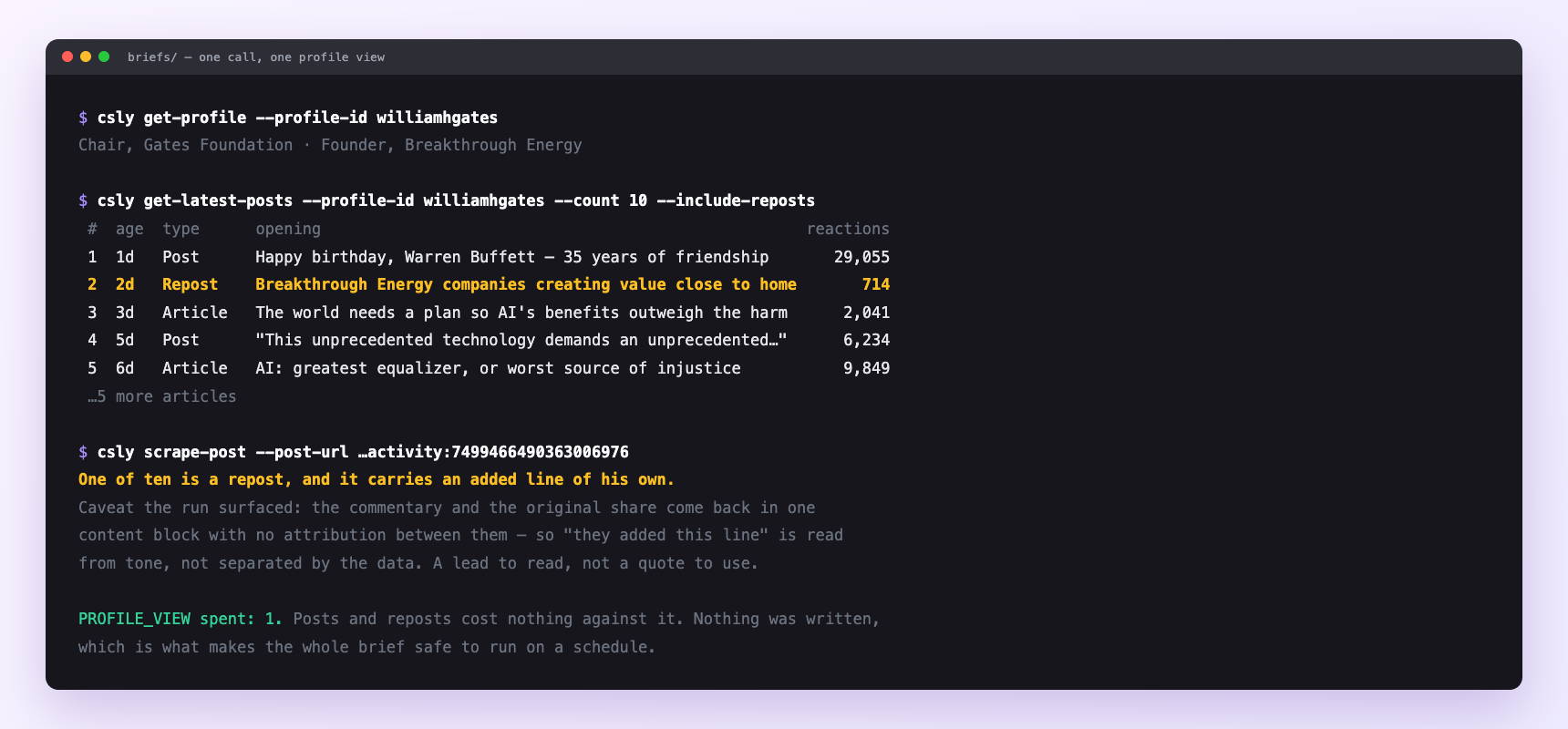
A real brief for one attendee: one profile view, ten posts, one of them a repost carrying his own added line. Posts and reposts cost nothing against the profile budget and nothing here writes anything, which is what makes the whole thing safe to put on a schedule. The caveat in the last block came out of the run, not out of the docs.
Can I make it run on its own?
Yes. Add one more sentence and it keeps happening without you. This is the part a chat window cannot do — a saved job runs on the days you are busy.
“Do this every evening for the next day's calendar and leave it in briefs/.”
How many LinkedIn actions does this use?
LinkedIn limits how much any account can do in a day. These are the real numbers, and your assistant checks what is left before it starts.
- Profile views: 120 a day. A meeting brief is two to five reads, so a day with six calls and three attendees each is eighteen — fifteen percent of the budget. This is the cheap end of LinkedIn automation; the ration-everything instinct developed on outreach does not apply.
- Reading a profile this way is invisible. It does not put you in anybody's 'Who viewed your profile' list — that is a separate, deliberate visit, and nothing here performs one unless you ask.
- If you do want to be seen, ask for it: a visit costs the same one profile view as a read, so a brief plus a deliberate visit for the main contact is two, not one.
- Posts and company lookups cost nothing against the profile budget, and nothing in this workflow writes anything — which is what makes the whole thing safe to schedule.
Watch it instead
3 minutes
Common questions
- What if the brief is a wall of bullets?
- you asked for structure. Ask for a paragraph explicitly, and say you will read it in a lift.
- What if it briefed the wrong person?
- common names resolve ambiguously. Give it the company alongside the name, or the profile URL, and ask it to flag anyone it is not confident about rather than picking one.
- What if it says a repost carries their own line and you cannot see where theirs ends?
- Opening an individual repost returns the added commentary and the original share collapsed into one block with no attribution between them, so 'they added this line' is an inference from tone, not something the data separates. Treat it as a lead to read, not a quote to use.
- What if someone has no recent activity?
- plenty of buyers do not post. That is information: the opener has to come from tenure, background or what the company is hiring for.
- How many LinkedIn actions does brief yourself before a call use up?
- Profile views: 120 a day. A meeting brief is two to five reads, so a day with six calls and three attendees each is eighteen — fifteen percent of the budget. This is the cheap end of LinkedIn automation; the ration-everything instinct developed on outreach does not apply.
How do I set this up?
Once, and it takes about four minutes. After this you only write sentences.
$ npm install -g @connectsafely/cli$ export CONNECTSAFELY_API_KEY=...$ csly list-linkedin-accounts$ export CONNECTSAFELY_ACCOUNT_ID=...$ csly skill installThe package is @connectsafely/cli on npm. You need Node 20 or newer.
Then start your chat with this line, so your assistant uses the CLI instead of trying to open LinkedIn itself and hitting a login page:
“Use the ConnectSafely CLI (csly) for anything that touches LinkedIn. Run csly commands to see what exists, and csly schema before calling one. Don't guess a command name.”
Other things you can do
Try this on your own LinkedIn account
From $10 a month, on the LinkedIn account you already use, with zero ban risk.
What the CLI actually is— 86 commands, same plan, no extra cost.