
Build a candidate list on LinkedIn, using one prompt
Last updated 2026-10-16 · Tested on a real LinkedIn account
Short answer
Build a candidate pipeline that remembers who you already looked at. You ask in plain English. Your AI assistant runs the LinkedIn CLI for you, so you never type a command yourself.
What do I actually type?
This one sentence. That is the whole thing.
“Update `candidates.csv` with the top thirty senior backend engineers in Berlin who've worked at a company that scaled past five hundred people. Skip anyone already in the file. Add a reason line and a quote from their profile for each new name.”
How does it work, step by step?
Paste these one at a time. Each one is written in normal English — no command names, no flags.
We gave these exact prompts to a real AI assistant and wrote down every command it ran. It chose 6 commands: list-linkedin-accounts, get-account-quota, get-account-premium-status, search-geo-locations, search-companies, search-people. Nobody told it which ones to use.
“What's my quota — profile views and search calls left today? Don't guess at LinkedIn's own monthly search limit; nothing reports it.”
The monthly search limit is the one number nothing can tell you. Our own caps come back from a real quota call — profile views, connection requests, search calls, all of them exact. LinkedIn's commercial use limit does not: LinkedIn does not publish it, computes it partly from behaviour, and no endpoint reports it. Ask an assistant for it anyway and it will give you a confident figure it has no way of knowing, which is worse than not asking. Track searches run per month yourself if you need a number.
your assistant picks this“Read `candidates.csv`. For any row older than sixty days, refresh it if the person has posted, changed roles, or picked up a new project since.”
The list is not a static asset. Some people you looked at four months ago now have the signal that was missing. Refreshing beats re-sourcing — you paid the profile view once already.
your assistant picks this“Run one search: senior backend engineers in Berlin, ex-Monzo or ex-Stripe. Filter the result against the file. For any name not already there, read the profile against the four criteria and add a row with a quote per criterion. Skip anyone whose profile does not say.”
The last sentence is the important one. A missing signal is not a rejection. Collapsing "the profile says no" with "the profile does not say" is how a careful process quietly filters for self-promotion.
your assistant picks this“Show me the ten strongest new rows plus the five older rows most changed since the last refresh. Mark 1st, 2nd or 3rd degree for each.”
The referral path decides the channel, not the etiquette. Firing an invitation at somebody already connected burns one of ninety weekly actions and reads, correctly, as nobody being at the wheel.
your assistant picks thisWhat it printed when we ran it
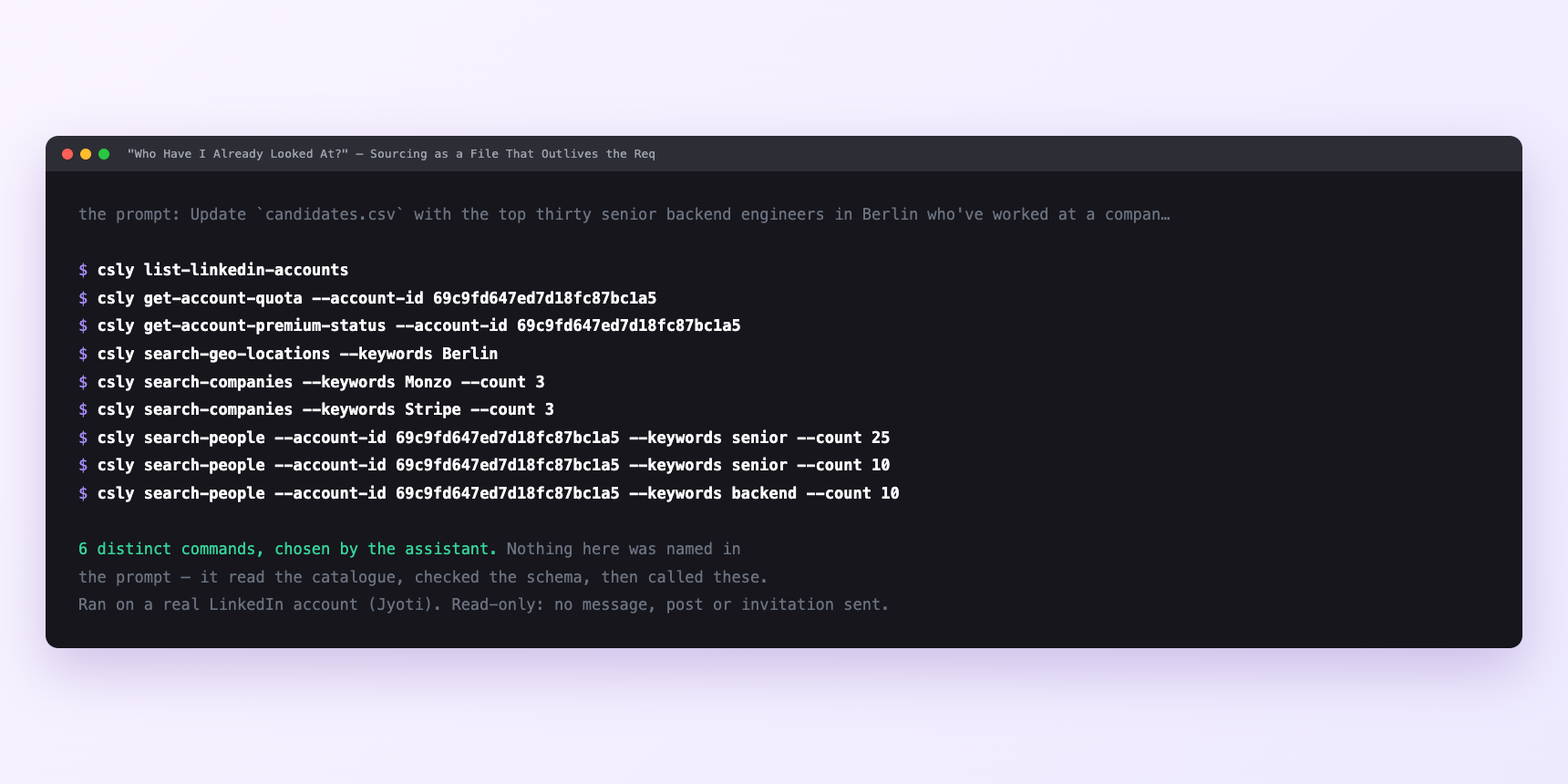
Not a mock-up. This is the actual run: the assistant was given the prompts above and nothing else, and these are the 6 distinct commands it chose from the catalogue. It ran read-only on a real LinkedIn account — nothing was sent, posted or invited.
Can I make it run on its own?
Yes. Add one more sentence and it keeps happening without you. This is the part a chat window cannot do — a saved job runs on the days you are busy.
“Save the file after every append, and email me the diff once a week.”
How many LinkedIn actions does this use?
LinkedIn limits how much any account can do in a day. These are the real numbers, and your assistant checks what is left before it starts.
- Profile views: 120 a day, reset at midnight UTC. A run should take about a third of the tightest budget, leaving room for your own browsing and anything else on the account. Thirty profile reads a run is comfortable; ninety in an afternoon is what you thought you needed and what stops you before the day ends.
- Searches through the tool: a thousand calls a day per search type, billed per page fetched. Generous enough that it rarely binds first — but the next paragraph is why that number is misleading.
- LinkedIn's commercial use limit is the one nobody enforces for you. Roughly a hundred people searches a month on a free account, about three hundred on Premium Career, effectively unlimited with Sales Navigator or Recruiter. LinkedIn does not publish the number, computes it partly from your behaviour, and nothing warns you first — searches simply stop returning what they should. There is more on working around the search limit if it is biting.
Watch it instead
4 minutes
Common questions
- What if the refresh finds no changes anywhere?
- Almost always the file is younger than sixty days for most rows, or you are refreshing at the same cadence every time. Ask what it actually attempted and set the age threshold lower for the next run.
- What if the search returns names already in the file?
- Broaden the filter. the sourcing sentence you wrote is describing people you have already screened. That is progress; it means the file works.
- What if searches quietly return far less than yesterday?
- LinkedIn's commercial use limit, not a bug. It resets on the 1st.
- What if the run stopped after twenty profile reads?
- Daily budget. Ask what it completed rather than what it planned, and pick up tomorrow.
- How many LinkedIn actions does build a candidate list use up?
- Profile views: 120 a day, reset at midnight UTC. A run should take about a third of the tightest budget, leaving room for your own browsing and anything else on the account. Thirty profile reads a run is comfortable; ninety in an afternoon is what you thought you needed and what stops you before the day ends.
How do I set this up?
Once, and it takes about four minutes. After this you only write sentences.
$ npm install -g @connectsafely/cli$ export CONNECTSAFELY_API_KEY=...$ csly list-linkedin-accounts$ export CONNECTSAFELY_ACCOUNT_ID=...$ csly skill installThe package is @connectsafely/cli on npm. You need Node 20 or newer.
Then start your chat with this line, so your assistant uses the CLI instead of trying to open LinkedIn itself and hitting a login page:
“Use the ConnectSafely CLI (csly) for anything that touches LinkedIn. Run csly commands to see what exists, and csly schema before calling one. Don't guess a command name.”
Other things you can do
Try this on your own LinkedIn account
From $10 a month, on the LinkedIn account you already use, with zero ban risk.
What the CLI actually is— 86 commands, same plan, no extra cost.