
Warm up passive candidates on LinkedIn, using one prompt
Last updated 2026-10-16 · Tested on a real LinkedIn account
Short answer
Warm up twenty passive candidates over a fortnight before you message them. You ask in plain English. Your AI assistant runs the LinkedIn CLI for you, so you never type a command yourself.
What do I actually type?
This one sentence. That is the whole thing.
“Read `warm-up.md`. Every couple of days, show me the recent posts from the twenty candidates in it, drafting a substantive reply only where there is something to add. Log every touch. On day fourteen, draft an outreach message to anyone I engaged with at least once, referencing the specific exchange. Do not send anything.”
How does it work, step by step?
Paste these one at a time. Each one is written in normal English — no command names, no flags.
We gave these exact prompts to a real AI assistant and wrote down every command it ran. It chose 4 commands: get-account-status, get-latest-posts, get-account-comments, get-account-reactions. Nobody told it which ones to use.
“Read `warm-up.md`. Every couple of days, show me the recent posts from the twenty candidates in it, drafting a substantive reply only where there is something to add. Log every touch. On day fourteen, draft an outreach message to anyone I engaged with at least once, referencing the specific exchange. Do not send anything.”
The log is a file you can open, sort, hand to a colleague or throw away. Nothing is stored in the model's memory, because there is no such thing to store into. Two touches from one name over a fortnight is what the play needs; four is attention-seeking; zero is what happens if the assistant forgets day nine.
your assistant picks this“Hi Priya — hope you're well! I've been really impressed by your background and I think you'd be an excellent fit for a Senior Staff opportunity we're partnering on with a hyper-growth AI-native fintech (~$200M ARR). Culture is world-class, comp is top of market. Are you open to a quick 15-min chat this week or next?”
A recruiter DM from a name she has seen twice in the fortnight:
your assistant picks this“The tracing rewrite you posted about at Stripe — did you land on OpenTelemetry in the end, or did you keep the internal collector? Reason for asking: a founder I know at Datadog is hitting the same choice and I offered to compare notes. If it's easier to say in a call, happy to set that up.”
Two things about the second one. It is under sixty words. And it could not have been written without reading her post, which is the whole point of the fortnight.
your assistant picks thisWhat it printed when we ran it
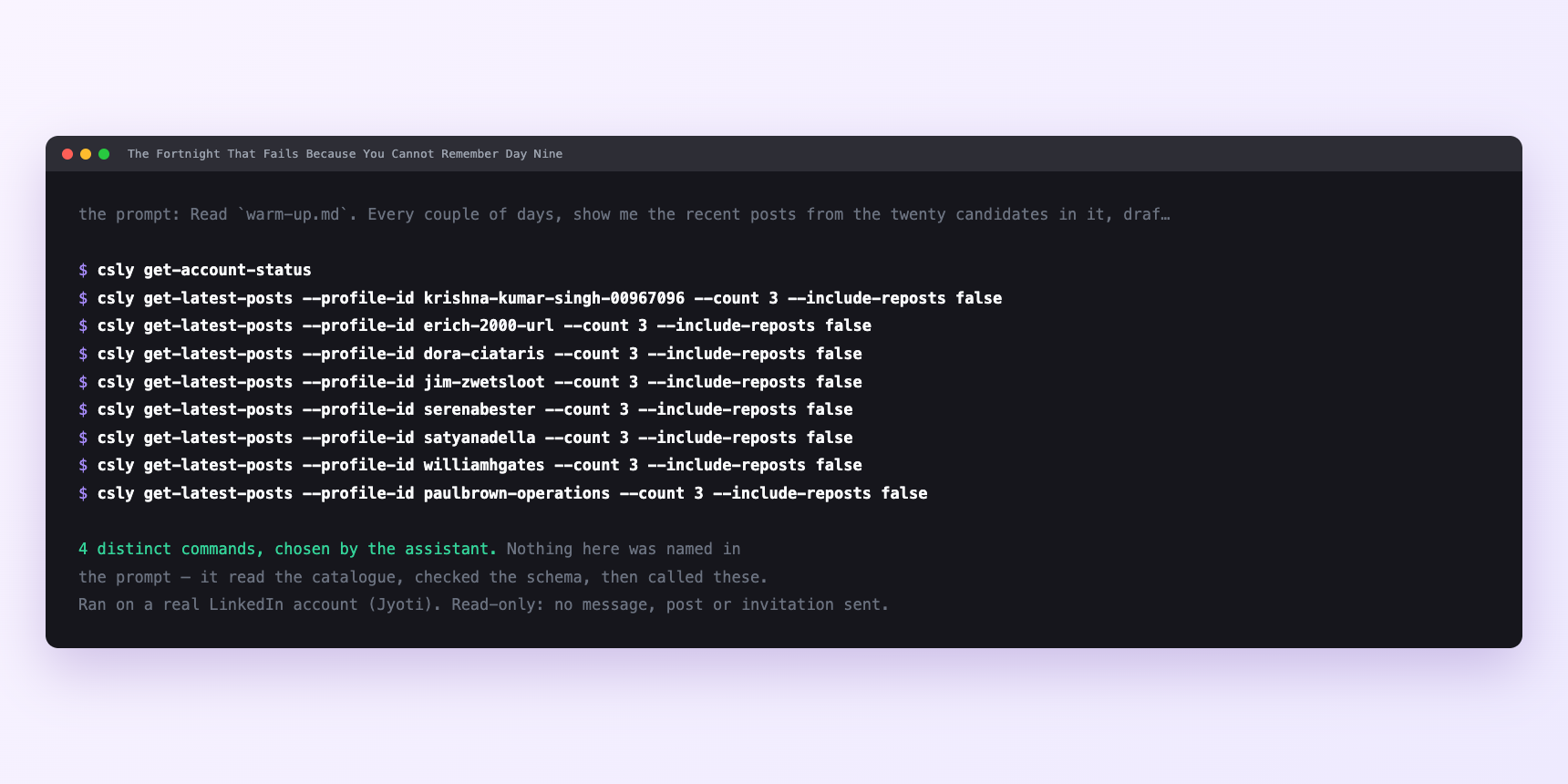
Not a mock-up. This is the actual run: the assistant was given the prompts above and nothing else, and these are the 4 distinct commands it chose from the catalogue. It ran read-only on a real LinkedIn account — nothing was sent, posted or invited.
How many LinkedIn actions does this use?
LinkedIn limits how much any account can do in a day. These are the real numbers, and your assistant checks what is left before it starts.
- Most workflows are shaped by a cap. This one is not, and pointing that out matters because the ceiling is far above anything sensible — which means the caps will not stop you doing the version that fails.
- A run is up to three comments plus, on the last day, five messages. Follows cap at 100 a day, so the twenty you post on day zero is a fifth of one budget, once. Comments cap at 100 a day, so three is three per cent. Reactions cap at 120 a day. Messages cap at 150 a day, so five at the end is three per cent again. Writes run at fifteen a minute, so three comments occupy twelve seconds of allowance. The comment cap alone is thirty times what the play can bear.
- The real limit is external and it belongs to the candidates: they have to have written something. Twenty senior engineers posting once or twice a month produce maybe ten to fifteen posts across a fortnight, and the ones you can genuinely add to might be half of those. Six or seven comments over ten working days is under one a day.
- So three comments a run is a ceiling you will rarely touch, not a target. On a pass when nobody has written anything worth answering, the correct number of comments is zero — and an assistant asked for three will not tell you that. Which is why the saved sentence says "only where there is something to add", and why the skill files tell it to draft rather than send.
Watch it instead
4 minutes
Common questions
- What if nobody posted anything on this pass?
- That is an answer, not an obstacle. Check it is not a fifteen-day window artefact, and move the genuinely silent ones to a deliberate profile visit instead.
- What if the log is out of sync with what happened?
- The assistant appended rows and something else in your workflow rewrote the file. Hand back the last known good copy; the log is the source of truth for what day fourteen picks up.
- What if comments went out but never appeared?
- LinkedIn sometimes accepts a comment and quietly does not create it. That is the soft limit talking, and it carries a two-hour hold on commenting. Stop rather than retrying. the retry is what walks you into the hard hold.
- What if a candidate replies to your comment on day six?
- There is a real exchange now, so waiting until day fourteen to look natural is overthinking it. Send the message that day.
- How many LinkedIn actions does warm up passive candidates use up?
- Most workflows are shaped by a cap. This one is not, and pointing that out matters because the ceiling is far above anything sensible — which means the caps will not stop you doing the version that fails.
How do I set this up?
Once, and it takes about four minutes. After this you only write sentences.
$ npm install -g @connectsafely/cli$ export CONNECTSAFELY_API_KEY=...$ csly list-linkedin-accounts$ export CONNECTSAFELY_ACCOUNT_ID=...$ csly skill installThe package is @connectsafely/cli on npm. You need Node 20 or newer.
Then start your chat with this line, so your assistant uses the CLI instead of trying to open LinkedIn itself and hitting a login page:
“Use the ConnectSafely CLI (csly) for anything that touches LinkedIn. Run csly commands to see what exists, and csly schema before calling one. Don't guess a command name.”
Other things you can do
Try this on your own LinkedIn account
From $10 a month, on the LinkedIn account you already use, with zero ban risk.
What the CLI actually is— 86 commands, same plan, no extra cost.