
Find buyers in LinkedIn groups on LinkedIn, using one prompt
Last updated 2026-10-16 · Tested on a real LinkedIn account
Short answer
Score the LinkedIn groups you are in by whether buyers are still talking in them. You ask in plain English. Your AI assistant runs the LinkedIn CLI for you, so you never type a command yourself.
What do I actually type?
This one sentence. That is the whole thing.
“Every morning, rescore the groups in `groups.txt` by activity. Score each on newest post date, ratio of comment threads to promo drops, and how many distinct people posted more than once this month. Put the ranked list in `groups-scored.md`. Don't read any profiles.”
How does it work, step by step?
Paste these one at a time. Each one is written in normal English — no command names, no flags.
We gave these exact prompts to a real AI assistant and wrote down every command it ran. It chose 5 commands: list-linkedin-accounts, get-account-quota, search-groups, get-group-details, get-group-members. Nobody told it which ones to use.
“What's my quota — how many group member reads and profile views do I have left today?”
First, always. It reports what is actually left on your account today, which beats any number in any article, including this one.
your assistant picks this“For each URL in `groups.txt`, fetch group details and read enough of the recent posts to score against the three signals. Write the ranked list to `groups-scored.md` with the delta from last week. Don't read any profiles.”
The one that runs in the background. Zero profile-view budget, one group-details call per URL. The diff against the previous run is the important part: a group whose score fell fifteen places in a fortnight is telling you something the current ranking hides.
your assistant picks this“For the top-ranked group I'm a member of, pull the member list, filter to operations leadership titles, and cross-check who I'm already connected to.”
The one that spends budget. The member-list read is one call against the 1,000-a-day group-read budget; the headline filter is free; relationship checks are cheap and notify nobody. Only after all of that do you consider spending any profile views.
your assistant picks this“For the new people, read forty profiles and draft a first message for each, referencing the shared group. Show me before sending anything.”
The last five words are the important ones, and they are also the default — the skills tell the assistant to draft rather than send. You approve from your phone in about ninety seconds.
your assistant picks thisWhat it printed when we ran it
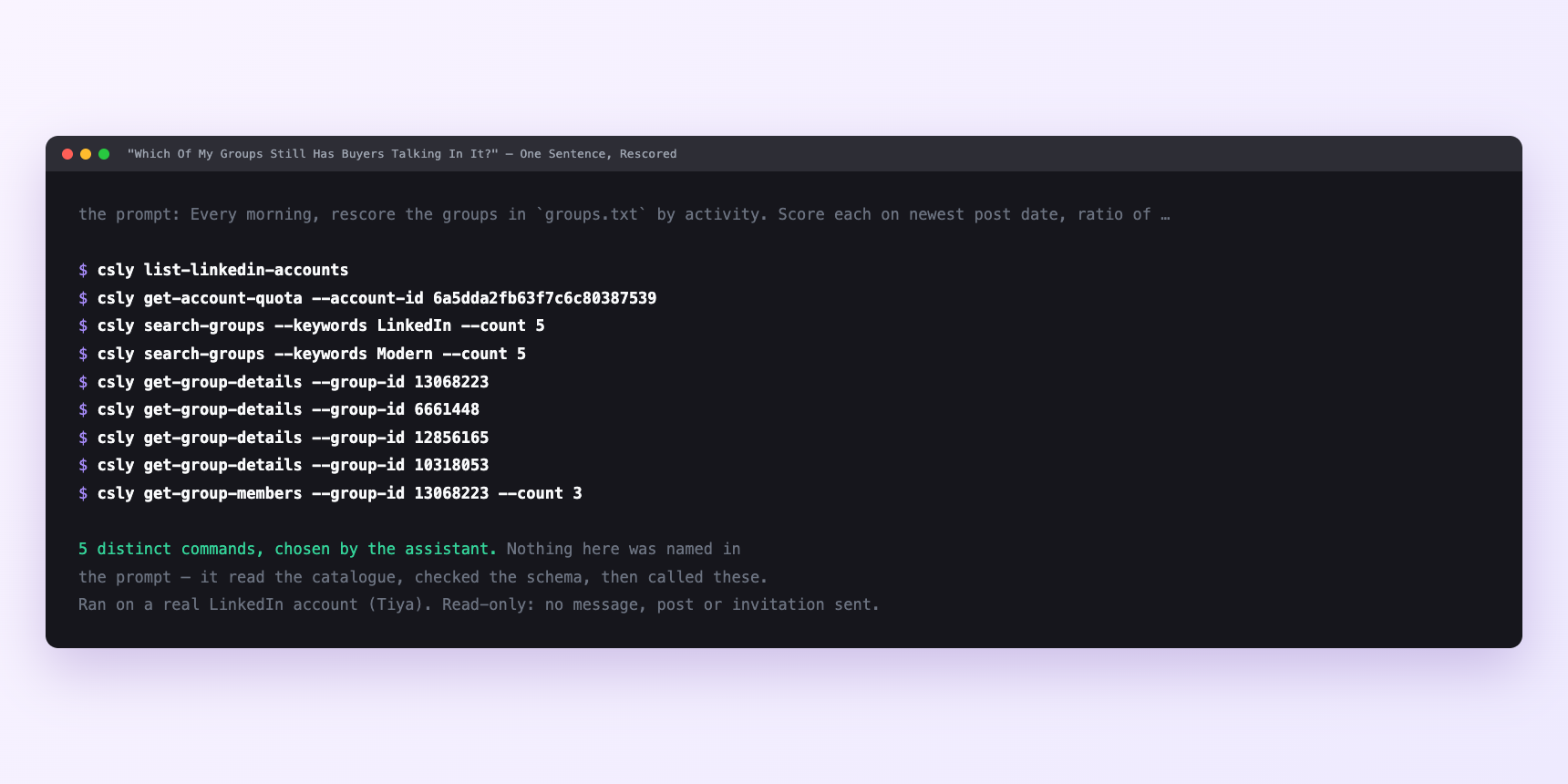
Not a mock-up. This is the actual run: the assistant was given the prompts above and nothing else, and these are the 5 distinct commands it chose from the catalogue. It ran read-only on a real LinkedIn account — nothing was sent, posted or invited.
Can I make it run on its own?
Yes. Add one more sentence and it keeps happening without you. This is the part a chat window cannot do — a saved job runs on the days you are busy.
“Run the rescore every Monday at 07:00 and leave `groups-scored.md` in the repo for me.”
How many LinkedIn actions does this use?
LinkedIn limits how much any account can do in a day. These are the real numbers, and your assistant checks what is left before it starts.
- Group member reads: 1,000 a day, reset at midnight UTC. Sits on its own budget, separate from profile views. Nine hundred members is one comfortable pull. Ask for a forty-thousand-member list in one instruction and you get a partial run, worse than no run because you cannot tell which part completed.
- Profile views: 120 a day, reset at midnight UTC. The tightest limit any part of the loop touches, and the reason the prospecting skill spends these only on the survivors of the headline filter. Forty a run is a third of the day's budget.
- Connection requests: 90 a week, reset Monday. The only weekly limit. Sixty is the working target so a busy week never pushes you into a twenty-four-hour hold — twelve a day in groups of three or four, at gaps that vary.
- Group-details and group search are cheap — content-reads velocity of thirty a minute. The rescore of twenty groups is a couple of minutes' pacing, which is why it fits in a scheduled job.
Watch it instead
4 minutes
Common questions
- What if the rescore returned nothing for a group?
- You are not a member yet, or the group is closed to the point where the details endpoint refuses. A pending request is not membership.
- What if the pull stopped halfway?
- The group is larger than a day of member-read budget. Ask what it actually completed, and continue tomorrow.
- What if everything failed at once?
- Ask it to check the account status. A LinkedIn session that needs reconnecting fails quietly mid-run.
- What if the list has no job titles?
- It has headlines. Most contain a title, and the ones reading "Helping teams win" tell you something too.
- How many LinkedIn actions does find buyers in linkedin groups use up?
- Group member reads: 1,000 a day, reset at midnight UTC. Sits on its own budget, separate from profile views. Nine hundred members is one comfortable pull. Ask for a forty-thousand-member list in one instruction and you get a partial run, worse than no run because you cannot tell which part completed.
How do I set this up?
Once, and it takes about four minutes. After this you only write sentences.
$ npm install -g @connectsafely/cli$ export CONNECTSAFELY_API_KEY=...$ csly list-linkedin-accounts$ export CONNECTSAFELY_ACCOUNT_ID=...$ csly skill installThe package is @connectsafely/cli on npm. You need Node 20 or newer.
Then start your chat with this line, so your assistant uses the CLI instead of trying to open LinkedIn itself and hitting a login page:
“Use the ConnectSafely CLI (csly) for anything that touches LinkedIn. Run csly commands to see what exists, and csly schema before calling one. Don't guess a command name.”
Other things you can do
Try this on your own LinkedIn account
From $10 a month, on the LinkedIn account you already use, with zero ban risk.
What the CLI actually is— 86 commands, same plan, no extra cost.