
Warm someone up first on LinkedIn, using one prompt
Last updated 2026-10-16 · Tested on a real LinkedIn account
Short answer
Warm someone up over a fortnight before you ask for anything. You ask in plain English. Your AI assistant runs the LinkedIn CLI for you, so you never type a command yourself.
What do I actually type?
This one sentence. That is the whole thing.
“Work my visit queue in `warmup.md`. Two or three profiles a tick, several ticks between now and evening, at gaps that vary. Never two from the same account back-to-back. Log who and when. Do not touch anyone already 1st-degree — pass those to the message queue.”
How does it work, step by step?
Paste these one at a time. Each one is written in normal English — no command names, no flags.
We gave these exact prompts to a real AI assistant and wrote down every command it ran. It chose 7 commands: list-linkedin-accounts, get-account-status, get-account-quota, check-relationship, conversation-exists, get-profile, get-inmail-credits. Nobody told it which ones to use.
“What's my quota — how many connection requests and messages do I have left this week?”
First, always. Profile visits are free, but the follow-up two days later is not, and it is the follow-up that decides how big a visit queue is safe to build. If eight of the current queue are 2nd-degree contacts and only twelve invitations remain this week, that changes the plan before the first visit lands.
your assistant picks this“Take `warmup.md`. Drop anyone already 1st-degree — they get a real message, not a visit. Then two or three visits a tick across the working day, gaps that vary, never the same account back-to-back, log who and when.”
The pre-filter is the cheapest call in the sequence and it has to come first. A visit from somebody you are already connected to reads as checking up on them, not as an introduction.
your assistant picks this“Two days on: who did I visit that I have not messaged yet? Draft an opener for each. Do not mention the profile visit.”
The last instruction is not optional. An agent that knows you visited somebody will reach for that fact as context, because on the surface it looks like personalisation. It is the one fact that has to stay out of the draft.
your assistant picks thisWhat it printed when we ran it
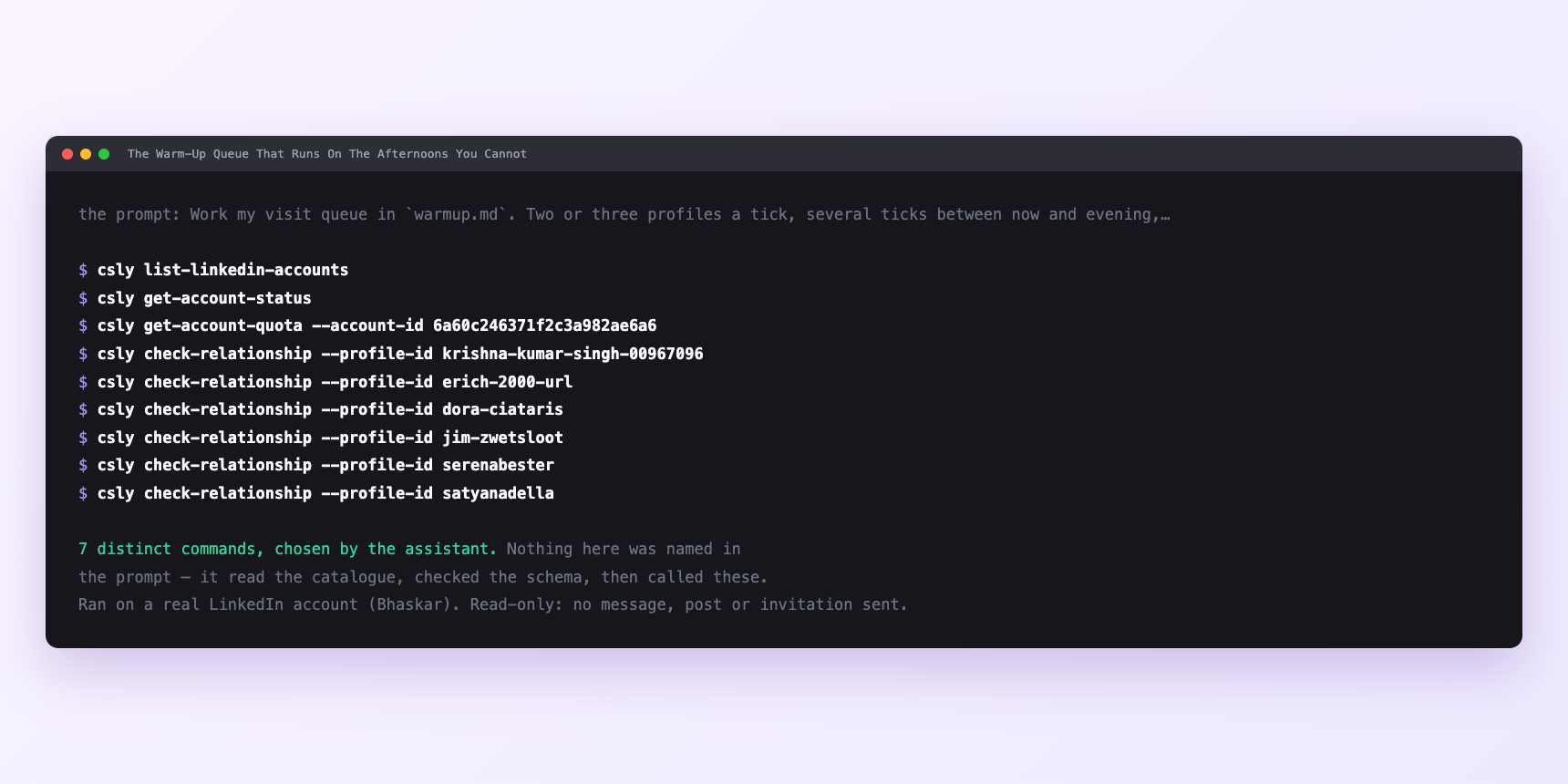
Not a mock-up. This is the actual run: the assistant was given the prompts above and nothing else, and these are the 7 distinct commands it chose from the catalogue. It ran read-only on a real LinkedIn account — nothing was sent, posted or invited.
Can I make it run on its own?
Yes. Add one more sentence and it keeps happening without you. This is the part a chat window cannot do — a saved job runs on the days you are busy.
“Every morning, work the visit queue. And every evening, draft follow-ups for whoever I visited forty-eight hours ago.”
How many LinkedIn actions does this use?
LinkedIn limits how much any account can do in a day. These are the real numbers, and your assistant checks what is left before it starts.
- Ten visits a day across five working days is fifty people a week. If every one is a second-degree contact who needs a connection request rather than a direct message, that is fifty invitations against a hard cap of ninety a week and a working target of sixty.
- So ten a day is not an arbitrary round number. It is the largest daily visit count whose follow-ups still fit under a weekly invitation budget you would want to keep. Push it to twenty-five a day and you have built a queue you cannot answer.
- The rest of the budgets never bind. Relationship checks run at 150 a day; pre-filtering ten names costs a fifteenth of the allowance. Messages sent run at 150 a day; ten follow-ups is the same fifteenth. Profile views cost nothing here — a visit and a read are different actions on different endpoints. The only real ceiling is the invitation budget downstream.
- Before anything larger than usual, ask for the account quota. It reports what is actually left today, which beats any number in this article.
Watch it instead
4 minutes
Common questions
- What if nothing at all after a fortnight?
- Check the browsing privacy setting. If your account browses privately or semi-privately, the target sees "someone in the software industry" or nothing at all, and the tactic does literally nothing. By far the most likely cause.
- What if the queue is empty even though you added names?
- They were all 1st-degree connections. The pre-filter moved them onto the message queue. correct behaviour and probably the higher-value use of the day.
- What if a run stopped part way?
- Ask what it actually did rather than what it planned to do. The log is the deliverable.
- What if you cannot tell whether a visit landed?
- There is no receipt. Your visitor list shows people who came to you, not confirmation of where you have been. Size the queue accordingly.
- How many LinkedIn actions does warm someone up first use up?
- Ten visits a day across five working days is fifty people a week. If every one is a second-degree contact who needs a connection request rather than a direct message, that is fifty invitations against a hard cap of ninety a week and a working target of sixty.
How do I set this up?
Once, and it takes about four minutes. After this you only write sentences.
$ npm install -g @connectsafely/cli$ export CONNECTSAFELY_API_KEY=...$ csly list-linkedin-accounts$ export CONNECTSAFELY_ACCOUNT_ID=...$ csly skill installThe package is @connectsafely/cli on npm. You need Node 20 or newer.
Then start your chat with this line, so your assistant uses the CLI instead of trying to open LinkedIn itself and hitting a login page:
“Use the ConnectSafely CLI (csly) for anything that touches LinkedIn. Run csly commands to see what exists, and csly schema before calling one. Don't guess a command name.”
Other things you can do
Try this on your own LinkedIn account
From $10 a month, on the LinkedIn account you already use, with zero ban risk.
What the CLI actually is— 86 commands, same plan, no extra cost.