
 Make
MakeScrape LinkedIn Group Members to Google Sheets: Make.com Scenario
Stop copying LinkedIn group member profiles one by one. This Make.com scenario automatically extracts premium members from Groups and saves them to Sheets.
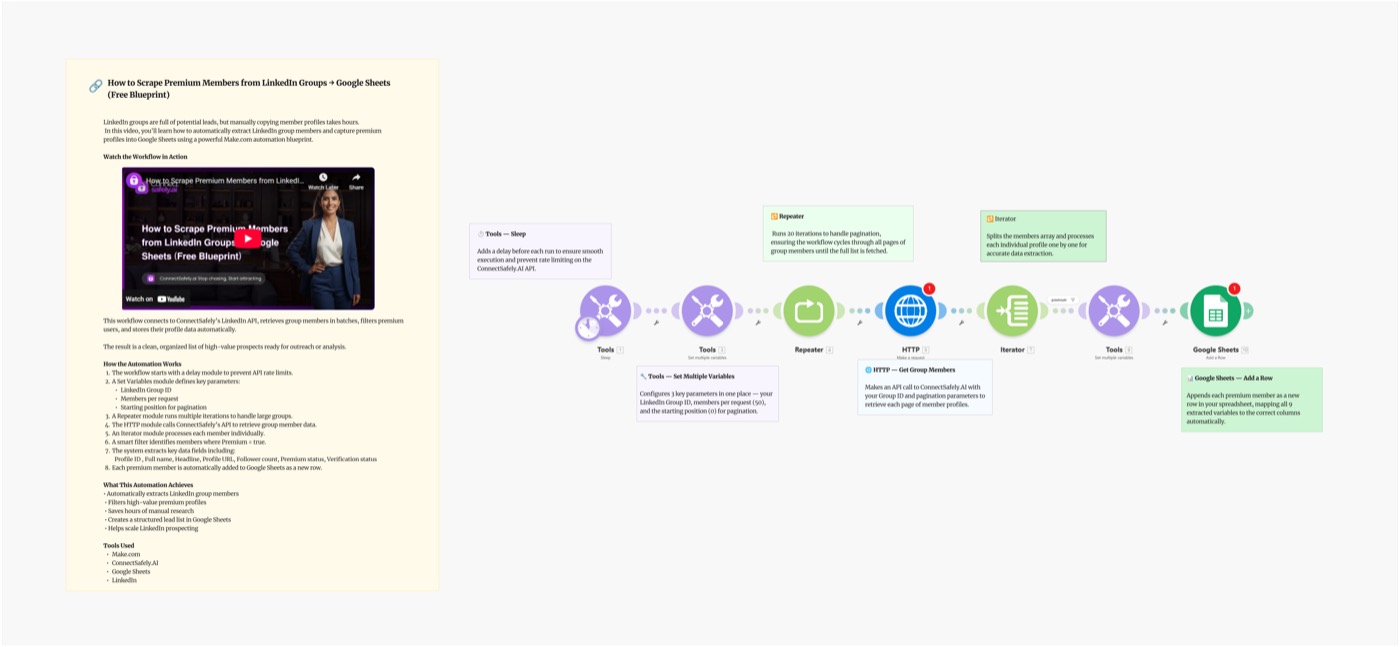
Stop manually copying LinkedIn group member profiles one by one. This Make.com scenario automates the entire extraction process — pulling only premium members from any LinkedIn Group and saving them directly to Google Sheets as a ready-to-use prospect list.
Video Tutorial
Why Target LinkedIn Group Premium Members?
Not all LinkedIn group members are equal. Premium members are:
- Higher intent — they pay for LinkedIn tools, signaling professional investment
- More active — premium users engage more frequently with content and outreach
- Better qualified — LinkedIn Premium is most common among sales, marketing, and leadership roles
- More responsive — InMail and DM response rates are higher among premium users
LinkedIn groups in your niche are goldmines of pre-qualified, niche-relevant prospects that most competitors overlook.
Scenario Overview
What You'll Build
A Make.com scenario that:
- Fetches group members from a target LinkedIn Group
- Filters for premium members only
- Extracts name, headline, company, LinkedIn URL for each
- Appends rows to Google Sheets with deduplication
- Ready for outreach immediately
Trigger → Fetch Group Members → Filter (Premium) → Iterator → Append to Sheets
Setting Up the Blueprint
Step 1: Prepare Your Google Sheet
Create a sheet with these columns:
| Column | Description |
|---|---|
| LinkedIn URL | Profile link |
| Name | Full name |
| Headline | Job title / description |
| Company | Current employer |
| Premium | Yes/No |
| Added Date | Filled by Make |
| Status | Pending (for outreach tracking) |
Step 2: Connect Your API Key
- Go to ConnectSafely.ai → Settings → API Key
- Add to Make's HTTP module:
Authorization: Bearer YOUR_API_KEY
Step 3: Configure the Modules
Module 1: Manual or Schedule Trigger
- Run manually when you want to extract a new group
- Or schedule weekly to catch new members
Module 2: ConnectSafely — Get Group Members
GET https://api.connectsafely.ai/v1/groups/members
Headers: Authorization: Bearer YOUR_API_KEY
Body: { "groupUrl": "YOUR_LINKEDIN_GROUP_URL" }
Returns list of members with profile data including premium status.
Module 3: Iterator
- Loop through each member
Module 4: Filter — Premium Members Only
- Condition:
member.isPremium = true - This is the core filter that qualifies your list
Module 5: Google Sheets — Search Existing Rows
- Check if LinkedIn URL already exists in sheet
- Prevents duplicate entries
Module 6: Router
- Route A: Already in sheet → Skip
- Route B: New member → Append row
Module 7: Google Sheets — Append Row
- Add all profile fields as a new row
- Set
Status = Pendingfor outreach tracking - Set
Added Date = {{now}}
Step 4: Find Target LinkedIn Groups
Best groups to target:
| Group Type | Why It Works |
|---|---|
| Industry-specific groups | Members share your niche |
| Role-specific groups (CMOs, VPs) | Self-selected by job function |
| Competitor customer groups | Pre-qualified by use case |
| Conference or event groups | High-intent professionals |
| Technology user groups (HubSpot, Salesforce, etc.) | Tool-qualified buyers |
Search LinkedIn Groups: linkedin.com/groups/search/
Using the List for Outreach
Once your sheet is populated with premium members:
Option 1: Direct connection requests → Use the AI-Powered Outreach Blueprint to send personalized connection requests
Option 2: LinkedIn follow campaign → Use the Auto-Follow from Sheets Blueprint
Option 3: Export to CRM → Push to HubSpot using the Commenters to HubSpot Blueprint (adaptable for sheet-based inputs)
Best Practices
Group Selection Strategy
- Join groups before running extraction — you must be a member
- Target groups with 1,000–50,000 members (sweet spot for quality + volume)
- Avoid spammy groups dominated by self-promotion posts
- Cross-reference: does this group's member profile match your ICP?
Rate Limits for Extraction
- Extract in batches of 200–500 members per run
- Add a 2–5 second delay between member fetches
- Spread large extractions (5,000+ members) across multiple days
List Hygiene
- Filter out profiles without a headline (often inactive accounts)
- Remove accounts with 0 connections (likely fake or abandoned)
- Prioritize recent joiners — more likely to be actively looking for connections
Common Issues & Fixes
| Issue | Solution |
|---|---|
| No members returned | Confirm you're a member of the group first |
| Private group access denied | You must have accepted membership before extracting |
| Duplicates in sheet | Check Search Rows module before Append |
| Premium filter catches too few | Some groups have low premium ratios — remove filter for all members |
Frequently Asked Questions
How do I extract LinkedIn group members into Google Sheets?
Join the target LinkedIn group, then use this Make.com scenario with ConnectSafely's API. The scenario fetches group members, filters for premium status, and appends each profile as a new row in your Google Sheet automatically.
Why focus on LinkedIn Premium members specifically?
Premium members pay for LinkedIn tools — they're demonstrably more professional and active on the platform. They have higher InMail response rates, accept connection requests more frequently, and are often in decision-making roles (Sales Navigator, Recruiter, and Business Premium are the most common).
How many members can I extract from a LinkedIn Group?
Extraction limits depend on group size and pace. For groups under 5,000 members, a single run works fine. For larger groups, spread extraction across multiple runs over several days to avoid hitting rate limits.
Related Workflows
- Build LinkedIn Lead Lists from Search - Extract from LinkedIn search results instead of groups
- Auto-Follow Profiles from Sheets - Follow every profile you extracted
- n8n: Group Members to Sheets - Same workflow built on n8n
Build your next prospect list in minutes, not days. Start your ConnectSafely free trial and get started today.
Prerequisites
- Make.com account
- ConnectSafely.ai account with API key
- LinkedIn account connected to ConnectSafely
- Membership in the target LinkedIn Group
- Google Sheets account
Required Integrations
Make.com ConnectSafely
 LinkedIn
 Google Sheets
Use Cases
- Extract premium members from LinkedIn Groups into a spreadsheet
- Build targeted prospect lists from niche LinkedIn communities
- Identify high-value members (LinkedIn Premium = higher-intent buyers)
- Populate outreach lists from groups in your industry or niche
- Research group composition before advertising or content targeting
Ready to get started?
Download this workflow template and customize it for your needs.
Related Templates
Build LinkedIn Lead Lists in Seconds with Google Sheets: Make.com Scenario
Stop manually searching LinkedIn and copying profiles into spreadsheets. This Make.com scenario automates it — search LinkedIn and save results to Sheets.
View TemplateAI-Powered LinkedIn Outreach: Make.com Scenario
Automate personalized LinkedIn outreach at scale with Make.com, Google Sheets, Gemini AI, and ConnectSafely.ai. Build a complete AI-powered lead gen scenario.
View TemplateLinkedIn Group Members to Sheets | n8n
Extract LinkedIn group members to Google Sheets with n8n. Filter for premium members and export prospect lists automatically.
View Template